
Appearance
Chapter 12: LSASS Protections
Introduction
Before we get into the "how-to" of credential extraction, we have to talk about the "bouncer" at the door. Microsoft hasn't just sat by while tools like Mimikatz became mainstream; they've developed an increasingly sophisticated set of defenses to protect the Local Security Authority Subsystem Service (LSASS). LSASS is the highest-value target on any Windows machine because it's where your hashes, tickets, and (sometimes) passwords live. If you don't understand these protections, you're going to burn your tools and your access the moment you try a dump.
In my experience, about half of the engagements I work on now have at least one of these protections enabled, and that number is only going up. What used to be a simple sekurlsa::logonpasswords command has become a multi-step reconnaissance problem: first you have to figure out what's protecting LSASS, then you have to decide whether to bypass it (if possible), or pivot to alternative credential sources entirely.
In this chapter, we're going to break down the three primary defensive layers: Auditing, Protected Process Light (PPL), and Credential Guard. We'll look at the hardware and software requirements for each, how to identify if they're active, and what the legitimate bypass techniques look like. For the defenders, we'll discuss deployment strategies that actually work to move the needle on security. The goal is to give you a complete mental map of the LSASS protection landscape so you can make informed tactical decisions, regardless of which side of the engagement you're on.
Technical Foundation
Understanding LSASS: The High-Value Target
LSASS (lsass.exe) is a core system process that handles everything related to local security policy, user authentication, and logon sessions. Because it needs to provide Single Sign-On (SSO) capabilities, it caches credentials in its memory space.
What's at stake?:
- NTLM Hashes: For every logged-on user, both interactive and network logons
- Kerberos Tickets: TGTs and service tickets for domain-joined systems
- LSA Secrets: Service account passwords, VPN credentials, and auto-logon passwords
- Plaintext Passwords: In certain (usually older or misconfigured) environments using WDigest
- DPAPI Master Keys: Cached keys for data protection operations
- Smart Card PINs: Cached for SSO with certificate-based authentication
The dilemma for Microsoft was clear: LSASS must hold these secrets to function, but if an Admin can read LSASS memory, they can steal those secrets. The protections we're about to discuss are their attempt to solve that problem.
The Protection Stack Architecture
Microsoft's approach has been defense-in-depth, with three distinct layers:
| Protection Layer | Enforcement Point | Bypass Difficulty | Deployment Rate |
|---|---|---|---|
| LSASS Auditing | Event Log System | Cannot bypass (detection only) | ~40% |
| Protected Process Light (PPL) | Kernel Object Manager | High (requires Ring 0) | ~60% |
| Credential Guard | Hypervisor/VBS | Very High (no practical bypass) | ~25% |
Each layer operates independently, and they can be combined for defense-in-depth. Understanding where in the stack each operates is critical for both attack planning and defensive deployment.
Windows Process Protection Model
Before diving into specifics, let's understand the broader Windows Protected Process model:
Process Protection Hierarchy:
├── Protected Process (PP)
│   └── Highest protection, anti-malware only
├── Protected Process Light (PPL)
│   ├── PPL-Windows (WinTcb)
│   ├── PPL-Antimalware
│   └── PPL-LSA (LSASS)
└── Normal Process
    └── No protection (traditional)
The kernel enforces these protections at the EPROCESS structure level:
c
// Protection level in EPROCESS structure
typedef struct _PS_PROTECTION {
    UCHAR Type : 3;           // Protected process type
    UCHAR Audit : 1;          // Audit flag
    UCHAR Signer : 4;         // Required signer level
} PS_PROTECTION;

// LSASS PPL values
// Type = 1 (PsProtectedTypeProtectedLight)
// Signer = 4 (PsProtectedSignerLsa)
When LSASS runs as PPL, the kernel's ObpCheckProcessAccessMask() function blocks access requests from lower-protected processes, regardless of the caller's privileges.
LSA Protected Process Light (PPL)
The Kernel Bouncer
Windows has a concept called a Protected Process. This is a security boundary enforced by the kernel that prevents non-protected processes from accessing the memory of a protected one. Protected Process Light (PPL) is a specific level of this defense.
When LSASS is running as a PPL (often referred to as RunAsPPL), even a local Administrator with SeDebugPrivilege cannot open a handle to the process with PROCESS_VM_READ rights.
Enabling and Configuring PPL
Registry-Based Configuration
cmd
:: Enable RunAsPPL via registry
reg add "HKLM\SYSTEM\CurrentControlSet\Control\Lsa" /v RunAsPPL /t REG_DWORD /d 1 /f

:: For Windows 11 22H2+, additional flag available
reg add "HKLM\SYSTEM\CurrentControlSet\Control\Lsa" /v RunAsPPL /t REG_DWORD /d 2 /f| RunAsPPL Value | Behavior |
|---|---|
| 0 | Disabled - no PPL protection |
| 1 | Enabled - PPL protection active |
| 2 | Enabled with UEFI lock (Windows 11 22H2+) |
Group Policy Configuration
Computer Configuration → Administrative Templates → System → Local Security Authority
→ "Configure LSASS to run as a protected process"

Options:
- Disabled
- Enabled with UEFI Lock (most secure)
- Enabled without UEFI Lock
UEFI Variable Lock
On modern systems with UEFI and Secure Boot, Windows also stores this configuration in a UEFI variable (Kernel_Lsa_Ppl_Config). This is critical because it means a simple registry change isn't enough to disable it; the protection will re-enable itself on reboot unless the UEFI variable is also cleared.
powershell
# Check for UEFI variable (requires elevated privileges)
[System.Runtime.InteropServices.Marshal]::GetLastWin32Error()
# Cannot directly query - protected by Secure Boot

# Detection via firmware interface
Get-WmiObject -Query "SELECT * FROM Win32_BIOS" | Select-Object SMBIOSBIOSVersion
The UEFI lock creates a significant barrier because:
- Registry changes are ineffective - the kernel reads the UEFI variable at boot
- Clearing the UEFI variable requires physical access or firmware-level exploitation
- Secure Boot prevents loading unsigned code that could modify the variable
Detecting PPL Status
Method 1: Process Explorer
Process Explorer → lsass.exe → Properties → Security tab
Look for: "Protected: PsProtectedSignerLsa-Light"
Method 2: PowerShell Query
powershell
# Check LSASS protection status
$lsass = Get-Process lsass
$protection = (Get-Process lsass).ProtectedProcess
Write-Host "LSASS Protected: $protection"

# More detailed check via WMI
Get-WmiObject Win32_Process -Filter "Name='lsass.exe'" |
    Select-Object Name, ProcessId, @{N='Protected';E={
        $handle = [Kernel32.Methods]::OpenProcess(0x1000, $false, $_.ProcessId)
        if ($handle -eq [IntPtr]::Zero) { "Yes (Access Denied)" } else { "No" }
    }}
Method 3: Registry Check
cmd
reg query "HKLM\SYSTEM\CurrentControlSet\Control\Lsa" /v RunAsPPL

:: Expected output when enabled:
:: RunAsPPL    REG_DWORD    0x1
Method 4: Mimikatz Detection
mimikatz # privilege::debug
mimikatz # sekurlsa::logonpasswords

:: If PPL is active, you'll see:
ERROR kuhl_m_sekurlsa_acquireLSA ; Handle on memory (0x00000005)
PPL Bypass Techniques
To get around PPL, you generally have to move from User Mode (Ring 3) to Kernel Mode (Ring 0).
The Driver Method (mimidrv.sys)
Mimikatz includes a kernel driver (mimidrv.sys) that can reach into the kernel's process structures and flip the bits to remove the protection.
:: Load the driver (requires Administrator + test signing or valid signature)
mimikatz # !+
mimikatz # !processprotect /process:lsass.exe /remove

:: Now standard commands work
mimikatz # sekurlsa::logonpasswords| Requirement | Details |
|---|---|
| Privileges | Administrator + driver load capability |
| Signatures | Test signing mode OR signed driver |
| Detection | Sysmon Event ID 6, ETW driver events |
| HVCI Impact | Blocked if HVCI enabled |
BYOVD (Bring Your Own Vulnerable Driver)
Many attackers use "Bring Your Own Vulnerable Driver" attacks, where they load a legitimate, signed driver that has a known vulnerability, then exploit that driver to disable PPL.
Commonly abused drivers:
| Driver | Vendor | Vulnerability | CVE |
|---|---|---|---|
| DBUtil_2_3.sys | Dell | Arbitrary memory R/W | CVE-2021-21551 |
| RTCore64.sys | MSI | Arbitrary memory R/W | CVE-2019-16098 |
| gdrv.sys | Gigabyte | Arbitrary memory R/W | CVE-2018-19320 |
| AsrDrv103.sys | ASRock | Arbitrary memory R/W | N/A |
Attack flow:
1. Load signed vulnerable driver
2. Exploit driver to gain kernel read/write
3. Locate LSASS EPROCESS structure
4. Modify PS_PROTECTION to remove PPL
5. Dump LSASS with standard tools
The Minidump Workaround
Sometimes, you can use a legitimate system tool like comsvcs.dll via rundll32.exe to create a memory dump of LSASS. If the bouncer doesn't recognize the tool as a threat, it might let the dump happen, which you can then analyze offline.
cmd
:: This technique is often blocked by PPL but worth testing
rundll32.exe C:\Windows\System32\comsvcs.dll, MiniDump <lsass_pid> C:\temp\lsass.dmp full

:: Alternative: Task Manager "Create dump file" (often blocked)Important: Modern PPL implementations typically block these techniques. However, some edge cases exist where specific dump methods succeed.
Windows Credential Guard
The Isolated Vault
Credential Guard is the most robust defense in the stack. It uses hardware-based virtualization (Virtualization-Based Security or VBS) to create a "Secure Kernel" that is completely isolated from the normal operating system.
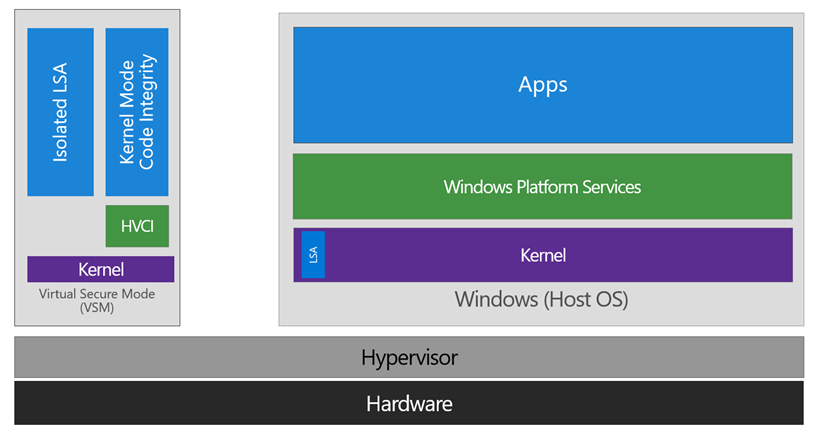
The diagram above illustrates the fundamental architecture: the left side shows Virtual Secure Mode (VSM) containing the Isolated LSA and HVCI components, completely separated from the right side where the normal Windows Host OS runs. The Hypervisor sits beneath both, enforced by hardware.
How Credential Guard Works
In a traditional setup, all secrets live in the lsass.exe process. With Credential Guard, the actual secrets are moved into a process called LsaIso.exe (LSA Isolated), which runs inside the virtualized Secure Kernel. The standard lsass.exe becomes a mere proxy—it handles the requests but never actually touches the raw hashes or tickets.
When you see LsaIso.exe in Task Manager (as shown above), you know Credential Guard is active. Notice:
- LsaIso.exe (PID 968) - "Credential Guard" - the isolated vault process
- lsass.exe (PID 980) - "Local Security Authority Process" - now just a proxy
Hardware and Software Requirements
| Requirement | Minimum Specification |
|---|---|
| CPU | Intel VT-x or AMD-V with SLAT |
| Firmware | UEFI 2.3.1 with Secure Boot |
| Windows Edition | Enterprise, Education, or Server |
| TPM | TPM 2.0 recommended |
| Hypervisor | Windows Hypervisor enabled |
Enabling Credential Guard
Via Group Policy
Computer Configuration → Administrative Templates → System → Device Guard
→ "Turn On Virtualization Based Security"

Select:
- Enable Virtualization Based Security: Enabled
- Platform Security Level: Secure Boot and DMA Protection
- Credential Guard Configuration: Enabled with UEFI lock
Via Registry
cmd
:: Enable VBS
reg add "HKLM\SYSTEM\CurrentControlSet\Control\DeviceGuard" /v EnableVirtualizationBasedSecurity /t REG_DWORD /d 1 /f

:: Enable Credential Guard
reg add "HKLM\SYSTEM\CurrentControlSet\Control\LSA" /v LsaCfgFlags /t REG_DWORD /d 1 /f

:: Reboot required
shutdown /r /t 0
Verifying Credential Guard Status
Method 1: System Information
cmd
msinfo32.exe

Look for:
- Virtualization-based security: Running
- Virtualization-based security services running: Credential Guard
Method 2: PowerShell
powershell
# Check Device Guard status
Get-CimInstance -ClassName Win32_DeviceGuard -Namespace root\Microsoft\Windows\DeviceGuard

# Look for:
# VirtualizationBasedSecurityStatus = 2 (Running)
# SecurityServicesRunning includes 1 (Credential Guard)
Method 3: Process Check
powershell
# If LsaIso.exe exists, Credential Guard is active
Get-Process -Name LsaIso -ErrorAction SilentlyContinue
if ($?) { Write-Host "Credential Guard is ACTIVE" -ForegroundColor Red }
The "Hard Truth" About Credential Guard
There is no practical, software-only bypass for Credential Guard from an Admin context. Because it's enforced by the hypervisor and hardware, even kernel-mode code in the normal OS cannot reach into the isolated vault.
Why it's "unbreakable" (for now):
- Hardware Isolation: The secrets exist in a separate virtual machine
- Hypervisor Enforcement: The hypervisor prevents the normal OS from accessing VSM memory
- Sealed Memory: Even DMA attacks are blocked with IOMMU/VT-d
- Code Integrity: HVCI prevents unsigned code in the secure kernel
Alternative Attack Strategies
Your Move as a Practitioner: If I land on a box with Credential Guard, I pivot my strategy. I stop trying to dump LSASS and start looking for:
| Alternative Target | What You Get | Technique |
|---|---|---|
| Service Tickets | Kerberos TGS | Still in proxy LSASS |
| Cached Credentials | DCC2 hashes | SECURITY hive |
| RDP Credentials | Plaintext | DPAPI/mstsc.exe |
| Browser Saved Passwords | Various | Chrome/Edge DPAPI |
| KeePass/1Password | Master key | Process memory |
| SAM Database | Local hashes | Offline extraction |
| Network Attacks | Kerberos tickets | Kerberoasting, AS-REP |
LSASS Auditing
The Silent Alarm
Auditing doesn't stop the attack, but it ensures you're caught. Microsoft added a default System Access Control List (SACL) to lsass.exe that can log every attempt to read its memory.
Enabling LSASS Auditing
Via auditpol:
cmd
:: Enable Kernel Object auditing
auditpol /set /subcategory:"Kernel Object" /success:enable /failure:enable

:: Verify configuration
auditpol /get /subcategory:"Kernel Object"
Via Group Policy:
Computer Configuration → Windows Settings → Security Settings →
Advanced Audit Policy Configuration → Object Access →
"Audit Kernel Object" → Success, Failure
The Detection Artifacts
Event ID 4663 - Kernel Object Access
Every time Mimikatz (or any other tool) tries to access LSASS, Windows generates Event ID 4663.
xml
<Event>
  <System>
    <EventID>4663</EventID>
    <Channel>Security</Channel>
  </System>
  <EventData>
    <Data Name="SubjectUserSid">S-1-5-21-...</Data>
    <Data Name="SubjectUserName">attacker</Data>
    <Data Name="ObjectType">Process</Data>
    <Data Name="ObjectName">\Device\HarddiskVolume2\Windows\System32\lsass.exe</Data>
    <Data Name="AccessMask">0x10</Data>
    <Data Name="ProcessName">C:\temp\mimikatz.exe</Data>
  </EventData>
</Event>| Field | Detection Value |
|---|---|
| ObjectName | Contains lsass.exe |
| AccessMask | 0x10 (PROCESS_VM_READ) |
| ProcessName | Unknown/suspicious process |
Event ID 4656 - Handle Request
Generated when a process requests a handle to LSASS:
Access Mask values to monitor:
0x0010 = PROCESS_VM_READ
0x0020 = PROCESS_VM_WRITE
0x0400 = PROCESS_QUERY_INFORMATION
0x1000 = PROCESS_QUERY_LIMITED_INFORMATION
Building an Effective Whitelist
yaml
# Example SIEM whitelist for LSASS access
Legitimate_LSASS_Access:
  - ProcessName: "C:\Windows\System32\csrss.exe"
  - ProcessName: "C:\Windows\System32\services.exe"
  - ProcessName: "C:\Windows\System32\svchost.exe"
  - ProcessName: "C:\Program Files\Windows Defender\MsMpEng.exe"
  - ProcessName: "C:\Program Files\CrowdStrike\CSFalconService.exe"
  # Add your specific EDR/AV paths

Alert_On:
  - Any ProcessName not in whitelist
  - ProcessName in user profile directories
  - ProcessName with suspicious characteristics
Detection and Indicators of Compromise
Primary Detection Events
| Event ID | Source | Indicator |
|---|---|---|
| 4663 | Security | LSASS memory read attempt |
| 4656 | Security | Handle requested to LSASS |
| 4688 | Security | Suspicious process creation |
| 6 | Sysmon | Driver loaded (potential BYOVD) |
| 7 | Sysmon | DLL loaded into LSASS |
| 10 | Sysmon | Process access (includes LSASS) |
| 4657 | Security | Registry value modified (RunAsPPL) |
Registry Modification Detection
Any change to the RunAsPPL registry key or the virtualization settings should be a high-priority alert:
Monitor these registry paths:
- HKLM\SYSTEM\CurrentControlSet\Control\Lsa\RunAsPPL
- HKLM\SYSTEM\CurrentControlSet\Control\DeviceGuard\EnableVirtualizationBasedSecurity
- HKLM\SYSTEM\CurrentControlSet\Control\DeviceGuard\RequirePlatformSecurityFeatures
- HKLM\SYSTEM\CurrentControlSet\Control\LSA\LsaCfgFlags
Driver Loading Detection
Since bypassing PPL usually requires a driver, monitor for Sysmon Event ID 6 (Driver Loaded):
xml
<Sysmon Event ID="6">
  <RuleName>Suspicious Driver Load</RuleName>
  <UtcTime>2024-01-15 14:30:00</UtcTime>
  <ImageLoaded>C:\Users\attacker\AppData\Local\Temp\evil.sys</ImageLoaded>
  <Signed>false</Signed>
  <Signature>N/A</Signature>
</Sysmon>
Detection criteria:
- Unsigned drivers
- Known-vulnerable driver hashes (maintain a blocklist)
- Drivers loaded from user directories
- Drivers loaded shortly before LSASS access attempts
SIGMA Detection Rules
yaml
title: LSASS Memory Access via Suspicious Process
status: experimental
logsource:
    category: process_access
    product: windows
detection:
    selection:
        TargetImage|endswith: '\lsass.exe'
        GrantedAccess:
            - '0x1010'  # PROCESS_QUERY_LIMITED_INFORMATION + PROCESS_VM_READ
            - '0x1038'  # Common Mimikatz access mask
            - '0x1fffff' # Full access
    filter:
        SourceImage|startswith:
            - 'C:\Windows\System32\'
            - 'C:\Program Files\Windows Defender\'
    condition: selection and not filter
level: high
Defensive Strategies
Strategy 1: Enable Protected Process Light
Deploy PPL with UEFI lock on all systems where possible:
powershell
# Deployment script
$systems = Get-ADComputer -Filter * -SearchBase "OU=Workstations,DC=corp,DC=local"

foreach ($system in $systems) {
    Invoke-Command -ComputerName $system.Name -ScriptBlock {
        Set-ItemProperty -Path "HKLM:\SYSTEM\CurrentControlSet\Control\Lsa" -Name "RunAsPPL" -Value 2
        Write-Host "PPL enabled on $env:COMPUTERNAME"
    }
}
Strategy 2: Deploy Credential Guard
Prioritize Credential Guard on high-value systems:
- Domain Controllers (consider carefully - may impact compatibility)
- PAW (Privileged Access Workstations)
- Tier 0 administrative systems
- Systems with access to sensitive data
Strategy 3: Enable Comprehensive Auditing
cmd
:: Enable all relevant audit categories
auditpol /set /subcategory:"Kernel Object" /success:enable /failure:enable
auditpol /set /subcategory:"Process Creation" /success:enable /failure:enable
auditpol /set /subcategory:"Logon" /success:enable /failure:enable
Strategy 4: Deploy Hypervisor-Protected Code Integrity (HVCI)
HVCI prevents unsigned drivers from loading, blocking both mimidrv.sys and most BYOVD attacks:
Group Policy:
Computer Configuration → Administrative Templates → System → Device Guard
→ "Turn On Virtualization Based Security"
→ Virtualization Based Protection of Code Integrity: Enabled with UEFI lock
Strategy 5: Maintain Driver Blocklist
Use Microsoft's recommended driver blocklist or Windows Defender Application Control (WDAC):
xml
<!-- WDAC policy to block vulnerable drivers -->
<FileRules>
    <Deny ID="ID_DENY_DBUTIL" FriendlyName="Dell DBUtil"
          Hash="SHA256:87E38E7AEAAAA..." />
    <Deny ID="ID_DENY_RTCORE" FriendlyName="MSI RTCore"
          Hash="SHA256:01AA278B07B58..." />
</FileRules>
Strategy 6: Implement Attack Surface Reduction
powershell
# Enable ASR rule to block credential stealing from LSASS
Add-MpPreference -AttackSurfaceReductionRules_Ids 9e6c4e1f-7d60-472f-ba1a-a39ef669e4b2 -AttackSurfaceReductionRules_Actions Enabled
Strategy 7: Network Segmentation for Tier 0
Implement the tiered administration model to limit exposure of high-privilege credentials:
Tier 0: Domain Controllers, PKI, Credential Guard everywhere
Tier 1: Member servers, isolated VLANs, PPL minimum
Tier 2: Workstations, full monitoring, standard protections
Protection Comparison Matrix
| Feature | Auditing | PPL | Credential Guard |
|---|---|---|---|
| Prevents credential theft | No | Partial | Yes |
| Detects credential theft | Yes | No | N/A |
| Requires reboot | No | Yes | Yes |
| Hardware requirements | None | None | VT-x, UEFI, TPM |
| OS requirements | Vista+ | 8.1+ | Enterprise/Education |
| Bypass difficulty | N/A | High | Very High |
| Compatibility impact | None | Low | Medium |
| Management overhead | Low | Low | Medium |
What Gets Protected by Each Layer
| Credential Type | Auditing | PPL | Credential Guard |
|---|---|---|---|
| NTLM hashes | Detected | Protected | Isolated |
| Kerberos TGT | Detected | Protected | Isolated |
| Kerberos TGS | Detected | Protected | Not isolated |
| Plaintext passwords | Detected | Protected | Isolated |
| LSA Secrets | Detected | Protected | Partially isolated |
| DPAPI keys | Detected | Protected | Not isolated |
| Cached credentials | Detected | Protected | Not isolated |
Operational Considerations
For Red Teams
- Always enumerate first: Before attempting any credential access, determine what protections are in place
- Have a backup plan: If Credential Guard is active, immediately pivot to alternative credential sources
- Consider the noise: BYOVD attacks are increasingly detected; weigh the risk vs. reward
- Test in similar environments: Lab environments should match target protection levels
- Document protection status: Include protection enumeration in your engagement notes
For Blue Teams
- Layer your defenses: Don't rely on a single protection mechanism
- Monitor for bypass attempts: Detection is still valuable even if PPL blocks the attack
- Test your protections: Regularly verify that protections are active and functioning
- Plan for compatibility: Some applications may not work with Credential Guard; test before wide deployment
- Keep firmware updated: UEFI vulnerabilities could undermine UEFI-locked protections
Compatibility Considerations
| Application/Feature | PPL Impact | Credential Guard Impact |
|---|---|---|
| Legacy AV/EDR | May require updates | Usually compatible |
| Smart card authentication | Compatible | Compatible |
| Windows Hello | Compatible | Compatible |
| NTLMv1 | Compatible | Broken |
| Unconstrained delegation | Compatible | Broken |
| MS-CHAPv2 | Compatible | Broken |
| NTLM after Kerberos timeout | Compatible | May fail |
Practical Lab Exercises
Exercise 1: Test the Bouncer
Enable RunAsPPL in your lab registry, reboot, and try to run credential extraction:
cmd
:: Step 1: Enable PPL
reg add "HKLM\SYSTEM\CurrentControlSet\Control\Lsa" /v RunAsPPL /t REG_DWORD /d 1 /f

:: Step 2: Reboot
shutdown /r /t 0

:: Step 3: After reboot, attempt Mimikatz
mimikatz # privilege::debug
mimikatz # sekurlsa::logonpasswords

:: Expected result:
ERROR kuhl_m_sekurlsa_acquireLSA ; Handle on memory (0x00000005)
Exercise 2: Identify the Vault
Verify Credential Guard status:
cmd
:: Method 1: System Information
msinfo32.exe
:: Look for "Virtualization-based security" = "Running"

:: Method 2: Check for LsaIso process
tasklist /fi "imagename eq lsaiso.exe"

:: Method 3: PowerShell
Get-Process -Name LsaIso -ErrorAction SilentlyContinue
Exercise 3: Audit the Access
Configure auditing and capture credential theft attempts:
cmd
:: Step 1: Enable Kernel Object auditing
auditpol /set /subcategory:"Kernel Object" /success:enable /failure:enable

:: Step 2: Run Mimikatz (disable PPL first for this test)
mimikatz # privilege::debug
mimikatz # sekurlsa::logonpasswords

:: Step 3: Find the event
wevtutil qe Security /q:"*[System[(EventID=4663)]]" /c:10 /f:text
:: Look for ProcessName and AccessMask fields
Exercise 4: Protection Enumeration Script
Create a comprehensive protection status check:
powershell
function Get-LSASSProtections {
    $result = @{}

    # Check PPL
    $ppl = Get-ItemProperty -Path "HKLM:\SYSTEM\CurrentControlSet\Control\Lsa" -Name "RunAsPPL" -ErrorAction SilentlyContinue
    $result["PPL"] = if ($ppl.RunAsPPL -ge 1) { "Enabled (Value: $($ppl.RunAsPPL))" } else { "Disabled" }

    # Check Credential Guard
    $lsaiso = Get-Process -Name LsaIso -ErrorAction SilentlyContinue
    $result["CredentialGuard"] = if ($lsaiso) { "Active (PID: $($lsaiso.Id))" } else { "Not Running" }

    # Check Kernel Object auditing
    $audit = auditpol /get /subcategory:"Kernel Object" 2>$null
    $result["Auditing"] = if ($audit -match "Success and Failure") { "Enabled" } else { "Partial or Disabled" }

    # Check HVCI
    $dg = Get-CimInstance -ClassName Win32_DeviceGuard -Namespace root\Microsoft\Windows\DeviceGuard -ErrorAction SilentlyContinue
    $result["HVCI"] = if ($dg.SecurityServicesRunning -contains 2) { "Active" } else { "Not Running" }

    return $result
}

Get-LSASSProtections | Format-Table -AutoSize
Exercise 5: BYOVD Detection Lab
Set up detection for vulnerable driver loading:
powershell
# Configure Sysmon to detect driver loads
# sysmon-config.xml excerpt:
@"
<Sysmon schemaversion="4.90">
  <EventFiltering>
    <DriverLoad onmatch="include">
      <Signed condition="is">false</Signed>
    </DriverLoad>
    <DriverLoad onmatch="include">
      <!-- Known vulnerable drivers by hash -->
      <Hashes condition="contains">87E38E7AEAAAA</Hashes>
    </DriverLoad>
  </EventFiltering>
</Sysmon>
"@

# Monitor for Event ID 6
Get-WinEvent -FilterHashtable @{LogName='Microsoft-Windows-Sysmon/Operational';ID=6} -MaxEvents 10
Exercise 6: Credential Guard Deployment
Deploy Credential Guard in a test environment:
powershell
# Step 1: Check hardware compatibility
systeminfo | findstr /i "Hyper-V"

# Step 2: Enable via registry
reg add "HKLM\SYSTEM\CurrentControlSet\Control\DeviceGuard" /v EnableVirtualizationBasedSecurity /t REG_DWORD /d 1 /f
reg add "HKLM\SYSTEM\CurrentControlSet\Control\DeviceGuard" /v RequirePlatformSecurityFeatures /t REG_DWORD /d 1 /f
reg add "HKLM\SYSTEM\CurrentControlSet\Control\LSA" /v LsaCfgFlags /t REG_DWORD /d 1 /f

# Step 3: Reboot and verify
# After reboot, run Exercise 2 to confirm activation
Summary
LSASS protections represent a fundamental shift in the Windows security model. Understanding this protection stack is essential for both attackers who need to adapt their techniques and defenders who need to deploy these controls effectively.
Key Takeaways:
- Auditing ensures there's a record of the attempt—it won't stop an attack, but it ensures detection is possible
- PPL raises the bar significantly by requiring kernel-mode access to bypass, but determined attackers with driver capabilities can still succeed
- Credential Guard uses hardware isolation to make traditional memory dumping impossible—this is currently the gold standard for credential protection
- Defense in depth is critical—deploy all three layers where possible
- Know your target: As an operator, your first job is to identify which protections are in play and adjust your tradecraft accordingly
- Pivot when necessary: When Credential Guard is active, focus on alternative credential sources rather than trying to bypass it
The cat-and-mouse game continues, but these protections have significantly raised the cost and complexity of credential theft. Organizations that deploy them comprehensively make themselves much harder targets.
Next: Chapter 13: Kernel DriverPrevious: Chapter 11: Terminal Service